Try MyFreeCams Yourself
TRY IT NOWBest Cam Sites Right Now — Our Picks







MyFreeCams has been running since 2002 and it looks it, in both senses. The green chrome and dense text belong to an older internet, and so does the underlying idea: a community first and a marketplace second. This MyFreeCams review covers the interface nobody else builds any more, the token economy behind it, the ranking system that shapes what you see, and what you can actually do as a guest. It is adult throughout and restricted to over 18s.
What MyFreeCams is
A freemium cam platform running on tokens, with free public rooms, paid private and group shows on top, and a member layer that is unusually elaborate. Everything happens on one page. Open a room and the grid does not go away; it slides under the player and stays there.
The site is girls only. There are no guys, couples or trans tabs anywhere, which is a straightforward positioning choice and the first thing that separates it from every other large network in this reference.
What you get as a guest
A guest here is a real account state rather than a euphemism for locked out. You arrive with an auto-assigned handle, something like Guest45847, printed in the sidebar. Everything below is open to you without becoming a member at all:
- The full model list, every panel and every sidebar section
- Live video in public chat rooms, with the chat stream and the user list visible
- Room topics in full, which on this site is where the pricing lives
- The whole tag and topic vocabulary, which you can read in full
- Every webcam thumbnail and room count in the model list
- The separate profiles directory
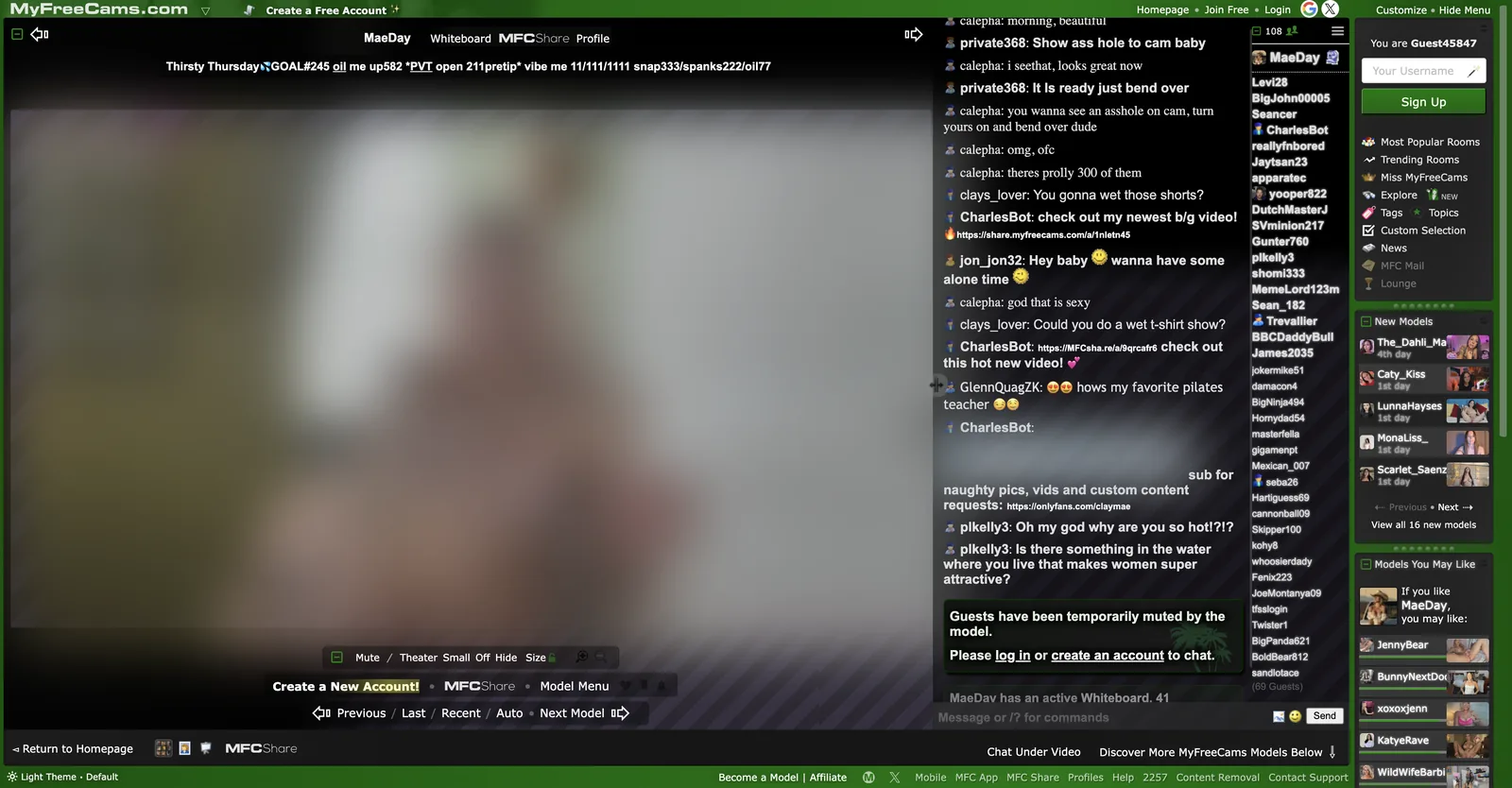
What you cannot do is talk, and here the site is more honest than most: individual models choose. The room I sat in displayed a notice reading that guests had been temporarily muted by the model, followed by a prompt to log in or create an account. That is a per-room decision rather than a platform wall, so some rooms will take a guest message and some will not.
Where the pricing actually is
This is the part that confuses people arriving from a modern cam site. MyFreeCams publishes almost nothing in a pricing panel. There is no rate band filter, no per-minute figure on a tile, and no tip menu widget.
Instead, the price list is the room topic. There is no tokens per minute figure anywhere you can find by browsing. The room I opened carried a topic line that packed in a goal number, a countdown figure, a private-show entry price, a pre-tip amount, three separate vibration tiers, and prices for a social media unlock, a spank and an oil show, all in a single line of text with no spaces to spare.
Once you know to read it, that line tells you everything. Until you know, it looks like noise. It is the single steepest piece of learning curve on the site, and it is entirely cultural rather than technical: nothing stops MFC putting those numbers in a panel, the community simply never needed it to.
On the actual rate for a private, the site itself is silent on the public pages. Review sites covering MyFreeCams report private shows typically running around 20 tokens per minute, with a spread from about 10 up to 100 tokens per minute depending on the performer. That is third-party reporting rather than an operator figure, so treat it as an anchor and read the room topic for the number that applies.
The model list is the product
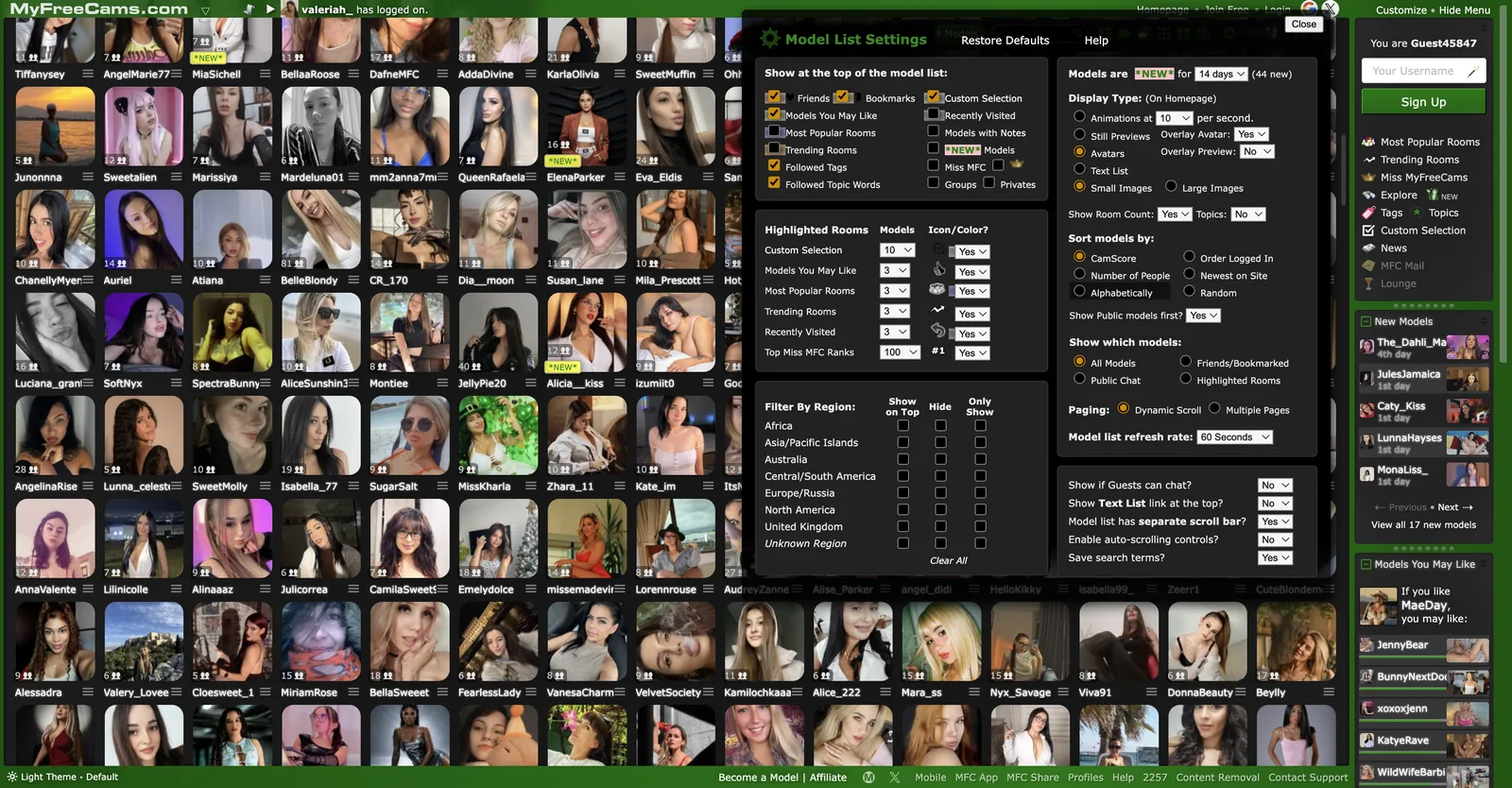
Every other site in this reference gives you filters. MyFreeCams gives you a control panel, and it is genuinely the most configurable browsing interface here. A Model List Settings dialog covers:
What appears at the top
Thirteen separate toggles decide which groups pin above the general list: friends, bookmarks, models you may like, most popular rooms, trending rooms, followed tags, followed topic words, custom selection, recently visited, models with notes, new models, Miss MFC, groups and privates. Each pinned group then gets its own count, from 1 up to 250, and its own colour or icon marker.
How the tiles look
Display type is a real choice rather than a density toggle. You can run animations at a chosen frames-per-second, still previews, avatars, or a plain text list, in small or large images, with overlay avatars and overlay previews as separate switches.
That avatar mode is worth knowing about. It replaces live thumbnails with the performer’s chosen profile photo, which turns the grid into something closer to a directory. If the wall-of-live-video presentation is not what you want, this one setting changes the whole character of the site.
Sorting and region
Sort options run to CamScore, order logged in, number of people, newest on site, alphabetically and random. CamScore is the house ranking and the default, so the grid you see first is a merit order rather than a popularity order.
Regions get their own three-way control, which no other site here offers. Africa, Asia and Pacific Islands, Australia, Central and South America, Europe and Russia, North America, the United Kingdom and an unknown region each have a Show On Top, Hide and Only Show option. You can push one region to the front, remove another entirely, or restrict the whole grid to one.
The rest of the panel covers paging by dynamic scroll or multiple pages, a refresh rate down to sixty seconds, whether public models come first, whether guests can chat, and whether search terms are saved.
Tags, topics and the vocabulary problem
The Tags and Topics panel is enormous. It runs to several hundred entries, split into single-word tags and multi-word topic phrases, and the phrase half is where it gets unusual: entries such as sugar baby, girl next door, role playing, cam to cam and true private sit alongside the ordinary body and act vocabulary.
The interactive toy vocabulary is well represented in there, with Lovense, lush, ohmibod, domi and interactive toy all present as separate entries, alongside cam2cam under both the c2c abbreviation and the full phrase. The room I watched had vibration tiers written into its topic line, so toy control is clearly a mainstream part of how rooms here make money rather than a niche feature.
You can follow a tag or a topic word and have matching rooms pinned to the top of your list, which turns the vocabulary into a live filter rather than a browse page. That is a better idea than a static category tree and almost nobody else does it.
The cost is that the list is unmanageable at first glance and carries no counts, so you cannot tell whether following something will surface fifty rooms or none.
Miss MyFreeCams and the ranking layer
Sitting over everything is a competitive structure the site treats as core rather than as a promotion. Miss MyFreeCams is a ranked list running to hundreds of positions, with a link to the full table, and performers carry their rank number directly on the grid tile. A Trending Rooms panel shows the top five by viewers and tokens with a refresh control on it, and New Models are listed by how many days they have been on the site.
The effect is that MFC tells you where a performer sits in a hierarchy before you enter her room, which is information no other site here surfaces. Whether that is useful or slightly grim depends on your view of leaderboards, but it is honest about how the economics work.
The community layer
This is where the age of the site shows in a good way. The sidebar carries an MFC Mail inbox, a Lounge, a News section, an Explore tab and a Custom Selection builder. Rooms carry a Whiteboard tab alongside the profile, and MFC Share is a separate content-sales product with its own tab in every room.
Profiles live on their own subdomain entirely.
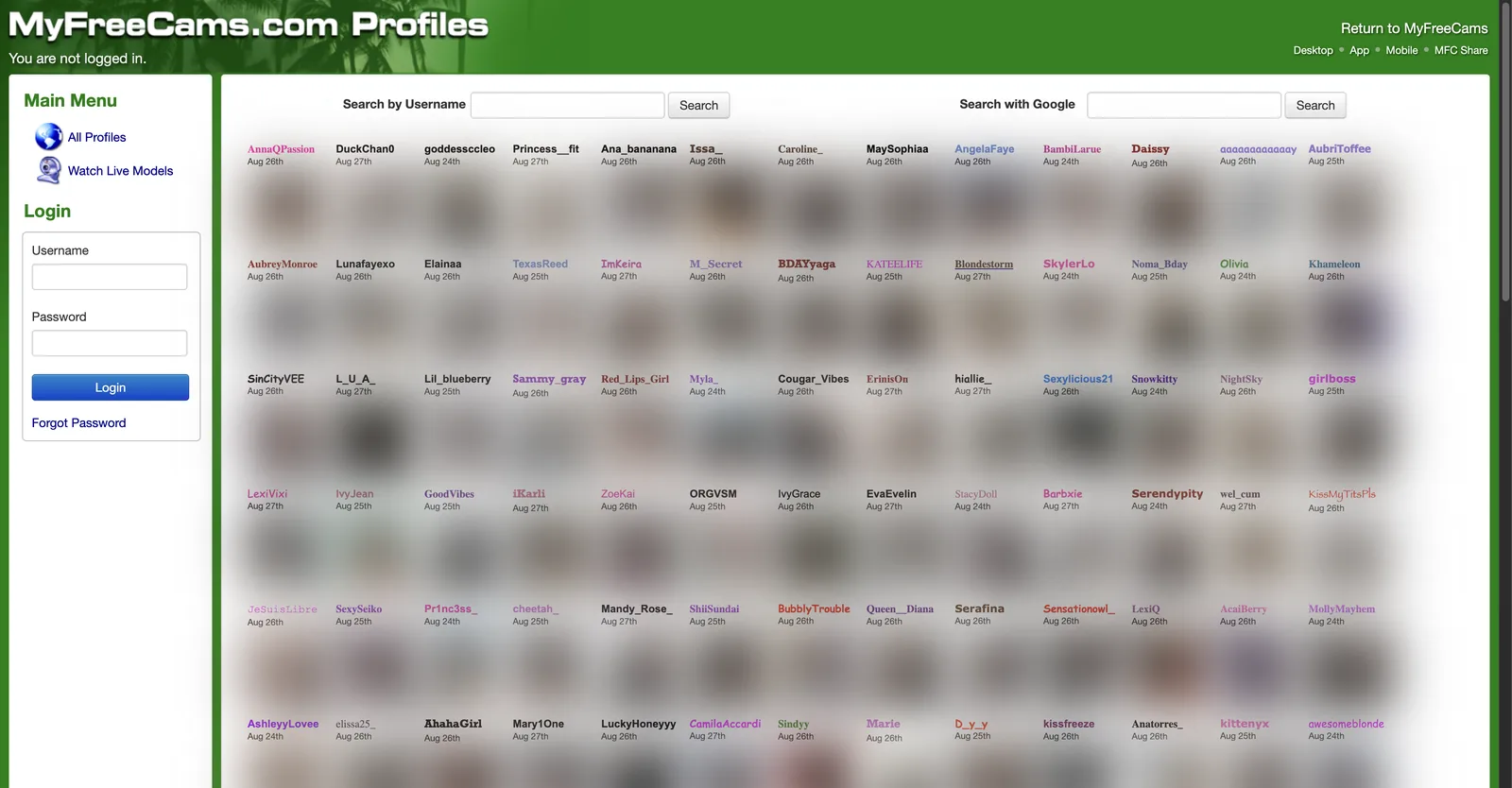
That directory is searchable by username, carries a second search box that hands off to Google, and lists every profile with the date it was last updated. Dates were clustered within a few days of each other across the page, which tells you the profile layer is actively maintained rather than abandoned.
MFC Mail deserves a note of its own. Private messages between members and models run through an inbox on the site rather than through a chat overlay, which is a small architectural decision with a large cultural effect: conversations persist, and the relationship between a member and a model is expected to continue between sessions. That is the community half of the site showing through the marketplace half.
The Lounge and News sections point the same way. A cam site with a members’ lounge is telling you it expects regulars who talk to each other, not just to the performers.
Bots are part of the furniture too. The room I watched had one posting content links into the chat on the performer’s behalf, which is a normal MFC pattern and worth knowing before you assume a link came from a person.
What is missing
- A published token price. No package table, no per-token rate, nothing on the public side.
- Any rate filter. With prices living in room topics, there is no way to sort or filter by cost.
- Live counts on tags. Several hundred tags, none of them numbered.
- Gender variety. Girls only, by design.
- A modern interface. Said plainly: this looks like 2009 and it is not an accident, but it is a barrier.
- Any model-side numbers. There is a Become a Model route and an affiliate programme, and no commission split or payout schedule published anywhere public.
- Named payment methods. Nothing on the open pages says whether cards, PayPal or anything else is accepted.
The footer does carry the expected paperwork, with a 2257 statement, a content removal route, a help section and contact support, plus separate model and affiliate routes and an MFC app.
How it compares
Against Stripchat and Chaturbate, MFC is smaller, plainer and much more configurable. Those two give you counted filters and rates on tiles; MFC gives you a settings dialog and expects you to build your own view. Chaturbate is the closest relative in culture, since both grew from the same free-public-room, tip-driven model.
Against CamSoda and BongaCams, both of which let you filter by what a private show costs before opening a room, MFC simply has no equivalent. If price shopping is how you browse, this is the wrong site.
Against LiveJasmin and Streamate the comparison barely applies, since those are polished per-minute platforms and this is a community with a token jar. Camster is the interesting contrast: a similar community feel with leaderboards and contests, but it publishes its credit-to-dollar rate, which MFC never does. Cams.com, Jerkmate and XloveCam all sit closer to the polished end and none of them carries anything like this settings dialog.
One more comparison worth making is on who the site is for. Most large networks in this reference are optimised for a first-time visitor: big tiles, counted filters, rates on the grid, a signup nudge every few seconds. MFC is optimised for the two hundredth visit. The settings dialog, the followed tags, the notes on models, the bookmarks and the mail inbox are all features that only pay off after you have been coming back for a while. That is a defensible design and it is also why the site reads as impenetrable on day one.
Who it is for
Regulars. That is the honest answer and it is not a criticism. MyFreeCams is built for somebody who follows particular performers, follows particular tags, has opinions about CamScore, reads room topics fluently and has their model list configured the way they like it. For that person the settings dialog is a genuine advantage and nothing else in this reference comes close on customisation.
It is a poor first cam site. Prices hide in topic lines, the tag list has no counts, the interface assumes knowledge it never teaches, and there is no gender variety at all. A newcomer who wants to see what a private show costs before committing will have a much easier time on a site that puts the number on the tile.
Two practical notes if you do go. Switch the display type to avatars if the live grid is too much, and read the room topic before you tip, because on this site that line is the price list.