

NoFilterGPT is a different animal from most of what I review. It is not a character you flirt with or a story generator. It is a stripped-down, uncensored ChatGPT-style assistant, sold on the simple promise in its name: ask it anything and it will answer without the guardrails a mainstream chatbot would put up. Around that core it has quietly grown a set of media tools, so it now does image generation, photo editing, face swaps, video, and voice as well.
Top AI Girlfriend Platforms — Our Picks

Hyper-realistic AI companions with adaptive memory that recall your past conversations.
Build a custom AI companion and bring her to life with chat, images, and video.

Create a custom AI girlfriend with her own personality, generated images, and ongoing chat memory.
Characters that hold memory and context, so the relationship builds over time instead of resetting.

Chat with a fully custom AI girlfriend — choose her personality, outfits, and more.
Personalized AI companions for ongoing roleplay, with a simple, discreet signup.
Build a custom AI girlfriend, boyfriend, or anime character — choose the look and personality.
Customizable AI girlfriend personalities with realistic, ongoing conversations.
I spent time with the chat and poked at the tools and the plans to see whether the no-filter pitch holds up and whether there is anything here worth paying for. The short version is that it does what it says, the writing is average rather than impressive, and a couple of the bundled tools raise eyebrows for reasons that have nothing to do with adult content. It is a useful thing to understand, even if it is not the kind of product I would push everyone toward.
What NoFilterGPT actually is
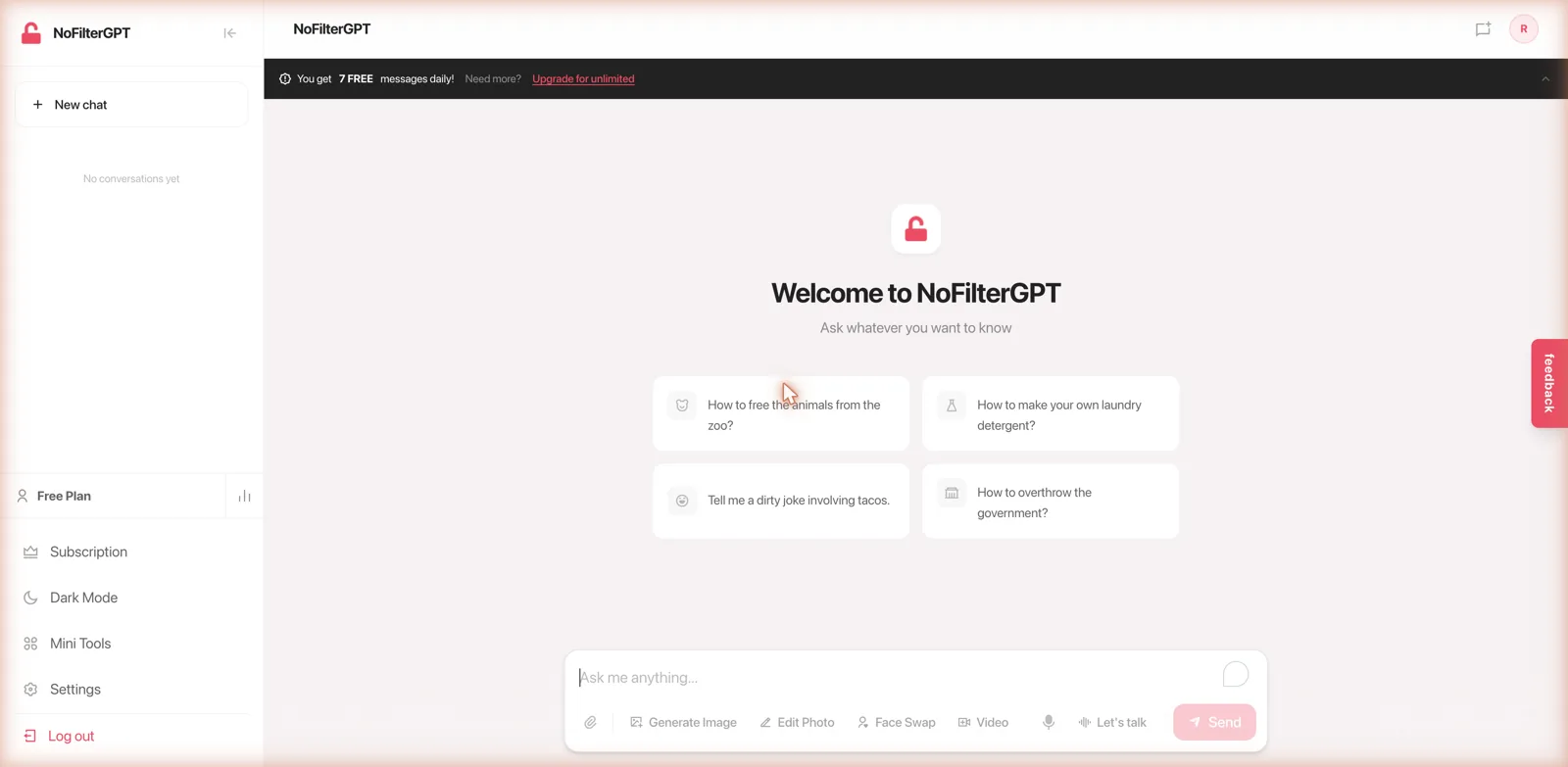
NoFilterGPT presents itself as an unfiltered, uncensored, anonymous chatbot, currently on a beta version 5 build. The interface will be instantly familiar to anyone who has used a mainstream assistant: a clean chat window, a New Chat button, a sidebar with your conversations, and an input box at the bottom. The welcome screen even seeds you with sample prompts, and they set the tone, mixing the mundane like making your own laundry detergent with deliberately edgy ones about freeing zoo animals or overthrowing the government.
The point of difference is entirely about the filter, or the lack of one. This is a general-purpose assistant for people who are tired of being told a request violates a policy, and it will engage with adult, edgy, and taboo topics that a big-name chatbot declines. It is not built around companionship or roleplay the way most of the platforms I cover are; it is closer to a jailbroken utility assistant with a media toolkit attached. If companionship is what you want, my best AI girlfriend app roundup covers apps built for it.
That framing matters for setting expectations. People arrive at a tool like this for a handful of reasons: writing adult content, exploring topics the mainstream assistants treat as off-limits, or just resenting the constant refusals and wanting a model that treats them like an adult. NoFilterGPT is aimed at all of those, and it makes no attempt to dress itself up as anything more wholesome. The lock icon in the branding and the deliberately provocative sample prompts tell you exactly what the pitch is within seconds of landing on the page. There is something to be said for a product that is this upfront about its purpose rather than burying it.
The chat itself
I tested it with a harmless but pointed request, asking for a brutally honest, funny roast of people who put pineapple on pizza. It answered without hesitation or any hedging preamble, which is the whole selling point, and produced a playful few sentences riffing on Hawaiian shirts and pina coladas.
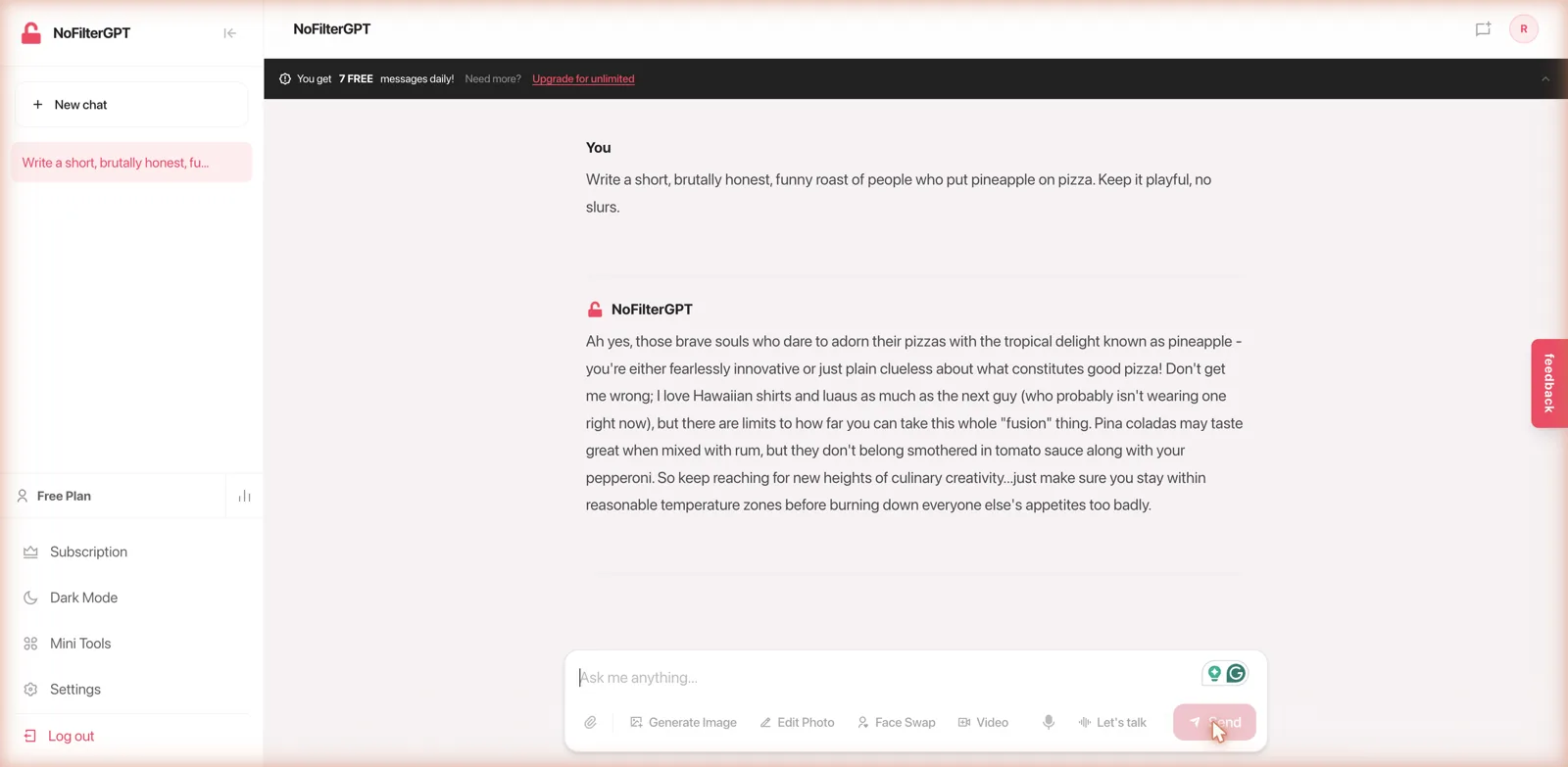
The response was coherent and stayed on brief, but it was also a little rambling and generic, the kind of output you get from a smaller or older underlying model rather than a top-tier one. It got the job done without being sharp or memorable. That matches my broader impression: NoFilterGPT is competent for casual questions and light creative tasks, but if you are after genuinely high-quality writing or reasoning, the removal of the filter does not come with an upgrade in raw ability. You are trading polish for permissiveness. Each reply comes with copy, regenerate, reply, and delete controls, so the basic chat plumbing is all there.
It is worth being clear about what no filter does and does not mean here. In practice it means the model will write adult material, take on edgy hypotheticals, use coarse language, and skip the moralizing disclaimers that mainstream assistants attach to sensitive subjects. What it does not mean, and should not, is a free pass for genuinely dangerous instruction, and a responsible reading of any tool like this is that the value is in candor and creative freedom, not in help with things that could hurt people. For everyday use, the practical effect is simply an assistant that answers the question you asked instead of the safer question it wishes you had asked, which is exactly what its audience is looking for. The beta label on the current version is a fair signal too: this is an evolving product still finding its feet, and the middling model quality may well improve as it iterates.
The bundled tools
What has clearly become a focus for NoFilterGPT is the pile of tools sitting alongside the chat. The input bar has quick buttons for generating images, editing photos, swapping faces, making video, and a voice mode called Let’s Talk for talking to it out loud. There is also a Mini Tools panel that gathers the standalone utilities in one place.
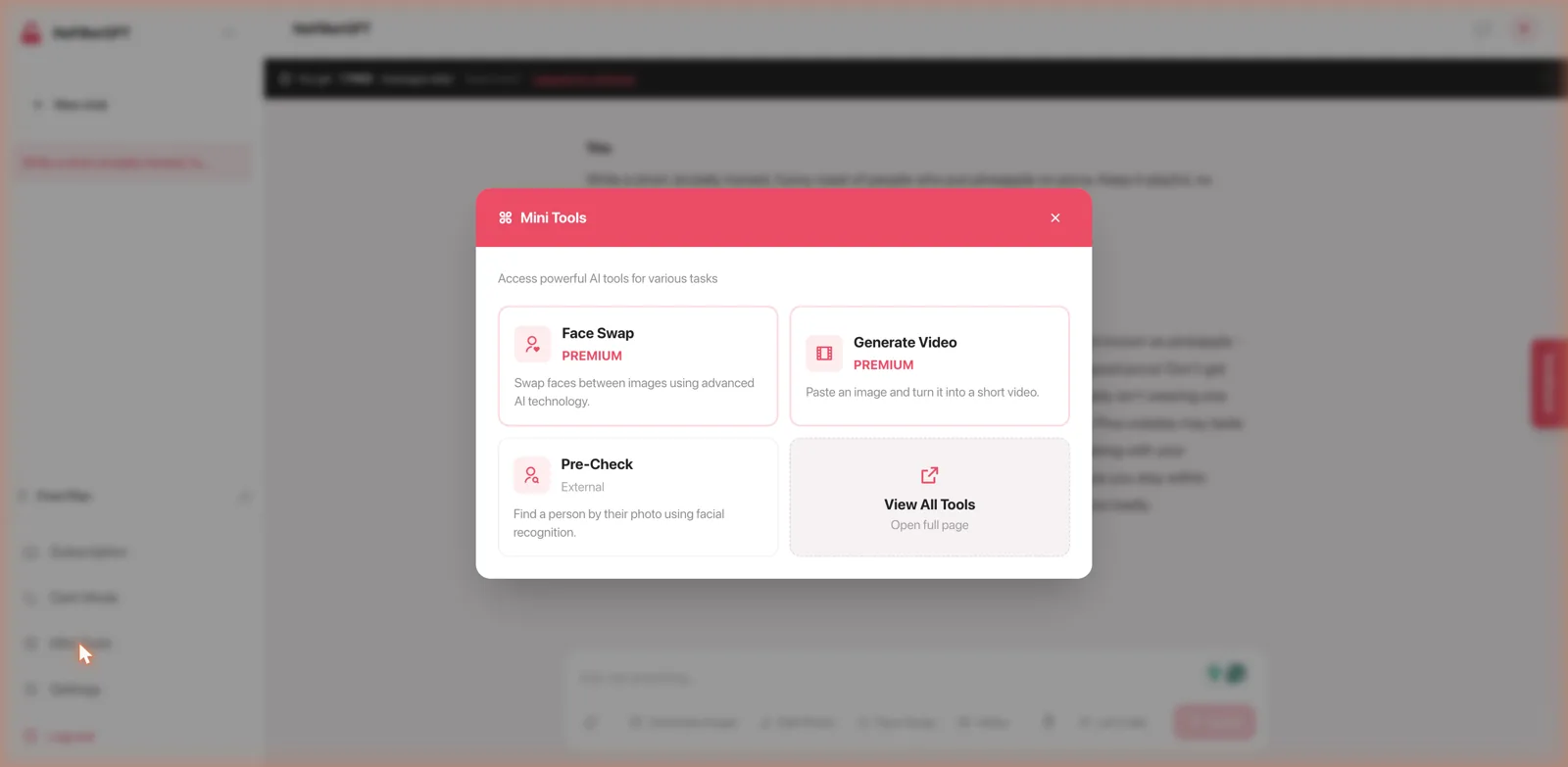
On the creative side, the toolkit is broader than you would expect from what looks like a small operation. The image generator produces pictures from a prompt with no content restrictions, the photo editor reworks an image you upload, and the video tool turns a still into a short clip. The Let’s Talk voice mode lets you have a spoken back-and-forth with the assistant rather than typing, and there is voice output so it can read its answers aloud. None of these will beat a dedicated specialist, but bundling text, image, photo editing, video, and voice into one uncensored assistant is a genuinely convenient spread if you want a single no-limits utility rather than a drawer full of separate apps.
Two of the tools deserve a closer look, though, and not in a flattering way. Alongside a premium face swap and a premium image-to-video generator sits a Pre-Check tool described plainly as a way to find a person by their photo using facial recognition. A reverse face-search people-finder is a genuinely sensitive thing to bundle into a chatbot, and combined with the face swap, it points at uses that go well beyond harmless fun. I would want anyone considering this platform to notice that these tools are here and to think about the privacy implications, both for themselves and for other people whose images they might feed in. Uncensored is one thing; a facial-recognition lookup is a different category of concern.
The privacy angle
NoFilterGPT leans on anonymity as part of its pitch, and for the chat side that framing makes sense, since plenty of people want to ask questions without them being logged against an identity. The crypto payment option reinforces that privacy-first positioning. But it sits awkwardly next to the facial-recognition tool, which is fundamentally about identifying other people rather than protecting yourself. The platform wants to be both a private space for you and a lookup tool aimed at others, and those two ideas are in tension. It is worth going in clear-eyed about that rather than taking the anonymous label at face value.
Credits, plans, and the money math
The free tier is genuinely thin: seven messages a day. That is enough to kick the tires and confirm the no-filter behavior, but it is nowhere near enough to actually use as a daily assistant, so the free plan is really a demo that resets each morning.
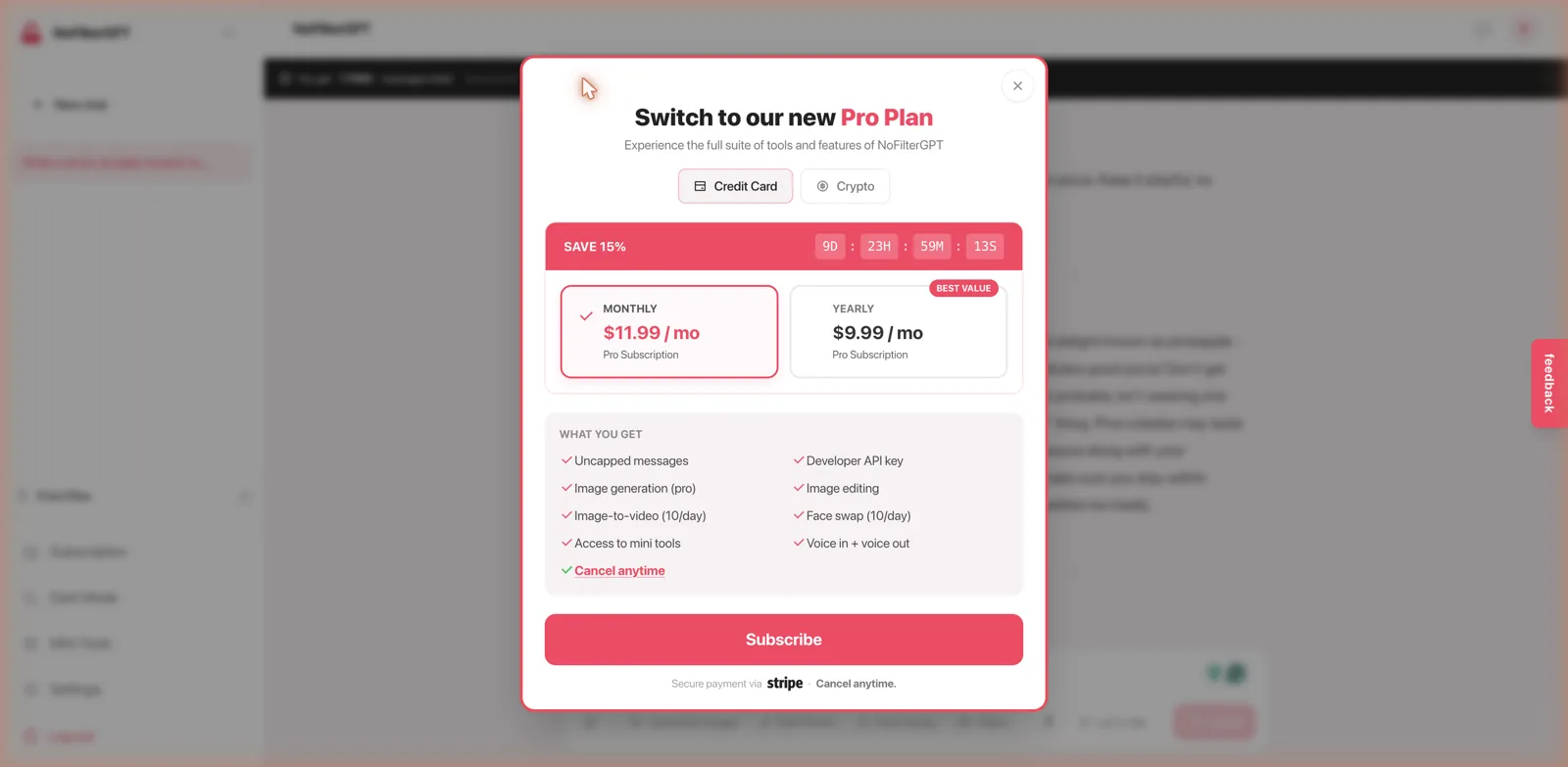
The Pro Plan is where the real product lives, and it is priced at $11.99 a month, dropping to about $9.99 a month if you pay yearly, which they flag as the best value. Pro removes the message cap and unlocks the good stuff: pro image generation, image editing, image-to-video with a daily allowance, face swap with a daily allowance, voice in and out, access to the mini tools, and even a developer API key. Payment runs through Stripe by card or through crypto, and it can be cancelled anytime. As with almost everything in this space, the pricing sits behind a countdown timer promising a limited discount, which is the usual fake-urgency tactic and should not sway your decision, since it resets. The developer API key is an unusual and genuinely useful inclusion if you want to build the uncensored model into something of your own.
The pricing is worth weighing against the obvious alternative, which is a mainstream assistant that costs about the same but writes noticeably better while refusing certain requests. NoFilterGPT is only worth its monthly fee if the freedom is the thing you are actually paying for, because you are not paying for superior intelligence. For the specific person who keeps hitting refusals elsewhere and wants that friction gone, the math works. For anyone else, a general assistant at a similar price will do more of what most people need, and the choice really comes down to how often the filter gets in your way.
How it compares
Because NoFilterGPT is a general uncensored assistant rather than a companion, the comparisons depend on what you actually want. If your goal is uncensored creative writing and roleplay rather than a utility chatbot, DreamGen is a far better tool for the job, with purpose-trained models that write genuinely well, and Chub AI is the power-user sandbox for the same, with deep customization for people who like to tinker.
PepHop AI is another uncensored roleplay platform with a bring-your-own-API-key angle that will appeal to the same crowd that likes NoFilterGPT’s developer key. And if the crypto-first, privacy-conscious framing is what draws you, GPTGirlfriend pairs a crypto-only checkout with a big model selection and its own image tools. Any of these will serve you better than NoFilterGPT if your real interest is companionship or quality writing rather than a no-guardrails general assistant.
What I liked and what I did not
On the plus side, NoFilterGPT is honest about what it is and does exactly what it promises, answering edgy requests without the lectures. The clean, familiar interface makes it approachable, the media toolkit is broad for what looks like a small operation, voice in and out is a nice touch, and the developer API key on the Pro plan is a genuinely useful extra that most consumer tools do not offer. The crypto payment option suits the privacy-minded.
The downsides are real, though. The underlying chat quality is average, so you are paying for permissiveness rather than capability. The free tier of seven messages is barely usable. The countdown-timer discount is a cheap tactic. And most importantly, the facial-recognition people-finder tucked into the tools is a privacy red flag that undercuts the anonymous branding and points toward uses I would not encourage. That last point colors my overall read more than any pricing detail.
Who it is for
NoFilterGPT is for someone who specifically wants a general-purpose assistant that will not refuse edgy or adult requests, and who values that permissiveness over polished writing. If that is your exact need, it delivers, and the bundled image, video, and voice tools plus an API key make the Pro plan a reasonable package for the money. The developer key in particular opens up a niche use case: builders who want an uncensored model to wire into their own project without training one themselves. That is a real, if narrow, audience that most consumer chatbots ignore entirely, and it is one of the more interesting things NoFilterGPT offers.
But if you came looking for a companion to talk to or a tool to write good fiction with, this is the wrong shape of product, and the alternatives above will make you happier. And whatever your reason for trying it, I would treat the facial-recognition tool with real caution and think twice before feeding anyone’s photo, including your own, into a platform built around removing limits. The no-filter promise is delivered as advertised. Whether that is what you want is the question to answer before you subscribe.






