Most AI image generators hand you a blank text box and expect you to know how to write a good prompt. Nonolo.ai, which brands itself simply as Nolo, throws that idea out. Instead of typing anything, you build your picture by tapping a stack of presets: pick a style, pick a person, pick an ethnicity, an age, an expression, a body type, and hit generate. It is the most beginner-friendly approach to AI image generation I have used in a while, and it comes with a couple of genuinely strange twists I did not see coming. I put it through its paces, and here is the rundown.
Top AI Girlfriend Platforms — Our Picks

Hyper-realistic AI companions with adaptive memory that recall your past conversations.


Create a custom AI girlfriend with her own personality, generated images, and ongoing chat memory.
Build a custom AI companion and bring her to life with chat, images, and video.
Characters that hold memory and context, so the relationship builds over time instead of resetting.

Chat with a fully custom AI girlfriend — choose her personality, outfits, and more.

Personalized AI companions for ongoing roleplay, with a simple, discreet signup.

Build a custom AI girlfriend, boyfriend, or anime character — choose the look and personality.

Customizable AI girlfriend personalities with realistic, ongoing conversations.
The short version: Nolo is a tag-driven adult image generator built for people who do not want to learn prompt engineering. It is dead simple, it is uncensored, and its pricing includes some of the weirdest options I have ever seen on one of these sites.
If you want the same no-prompt-engineering simplicity but with video and chat in the same account, Pornify and its character library are the broader version of this idea.
Point and click instead of prompt and pray
The moment you land on the Create page, you can see the whole philosophy. There is no prompt box anywhere. Instead the screen is split into a settings rail on the left and a giant menu of visual presets on the right.
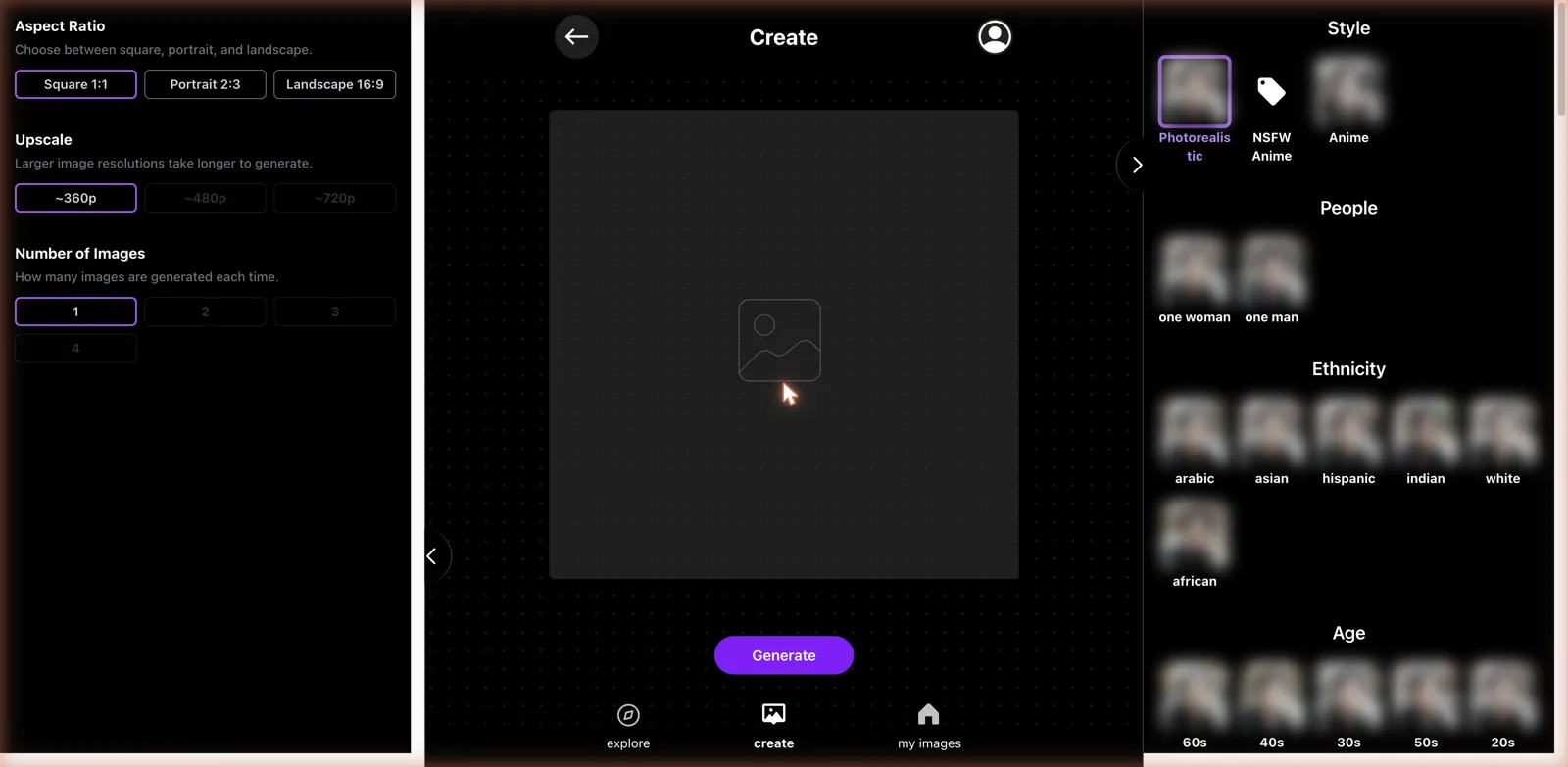
On the left you choose your basics: an aspect ratio of square, portrait, or landscape, an upscale resolution from roughly 360p up to 720p, and how many images to generate at once, from one to four. On the right you build the actual subject by tapping options. Style comes first, with Photorealistic, Anime, and an explicitly labeled NSFW Anime. Then People, where you pick one woman or one man. Then Ethnicity across six choices, and Age brackets that run from 18-plus all the way up to the 90s. Keep scrolling and you hit Face expression, Body type, and more. It is a build-a-character menu, not a writing exercise. If you want AI girlfriend chat too, my main ranking covers apps that pair it with images.
I cannot overstate how much this lowers the barrier to entry. If you have ever watched someone bounce off a tool like Dopamine Girl because they did not know the magic words to type, Nolo is the answer to that frustration. You do not need to know that you should specify lighting or camera lenses or art styles. You just tap what you want and the app assembles the prompt behind the scenes. The tradeoff, of course, is control, and I will get to that.
Uncensored by design
Let me be upfront, because the presets make it obvious within seconds. Nolo is an adult generator. Alongside the tame expression options like happy and serious sit explicit ones, and there is a whole NSFW Anime style sitting right next to the safe-for-work ones. The community explore feed, which is the first thing you see if you browse rather than create, is wall-to-wall adult content. There is no pretending this is a general-purpose art tool that happens to allow spice. Adult imagery is the main event.
That puts it squarely in the same category as generators like SpicyGen and PornJourney, where the whole point is making explicit pictures without a filter slapping your hand. If that is what you came for, Nolo delivers it with far less fuss than most, precisely because the tag system means you do not have to figure out how to phrase anything. If you were hoping for a tamer creative tool, this is not the one, and the explore feed will tell you that immediately.
Worth saying plainly on the responsible side: the app does gate age at 18-plus as the youngest bracket, which is the right call, and the presets keep everything anchored to adult subjects. As with any uncensored generator, the responsibility for what you make with it lands on you, and this is very much an adults-only tool that you should treat as one. I mention it because the sheer ease of the tag system can make it feel like a toy, and it is not; it is a capable adult content engine with a friendly face.
The generation experience, and the free-tier wall
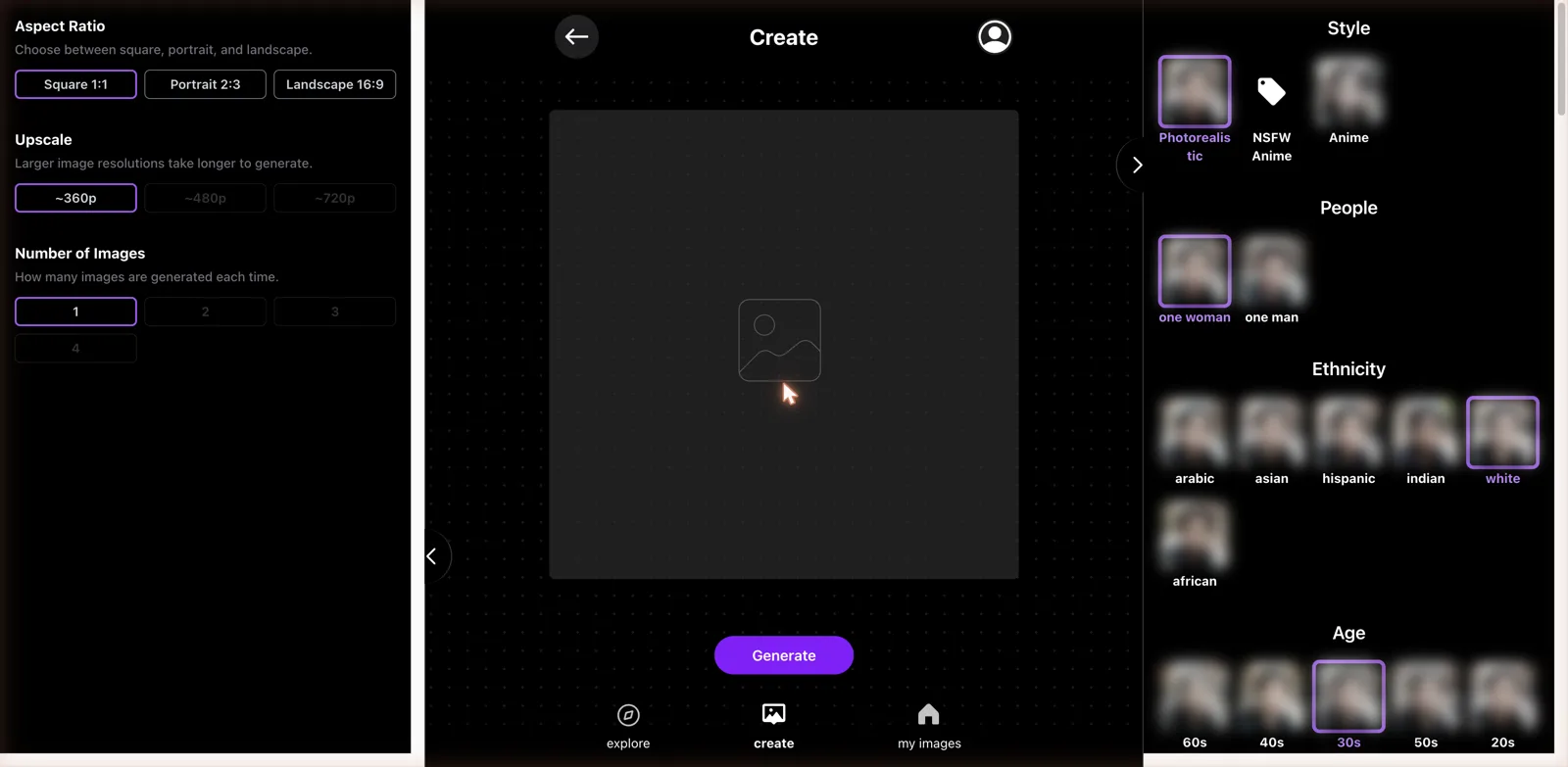
I built a deliberately tame test, a photorealistic portrait of one woman in her thirties, and hit Generate to see what would happen on a free account. What happened is the thing you will run into fast: a paywall. Free generations come through blurred, and to actually see and download your images you need to pick a plan.
That is standard for the category, and it is the same funnel you see on Seduced and most adult generators. The free tier is really a demo that lets you learn the interface and queue up an image before asking for your card. I will say the tag system makes that demo more useful than usual, because you can fully understand what the product does and how you would use it before paying, even if the result stays blurred.
A note on the output settings worth flagging: the resolution caps at around 720p even on the upscale option, and higher resolutions are gated behind the pricier plan. So if you want crisp, large images rather than small web-sized ones, budget for the upgrade. The one-to-four images per batch is a nice touch for quickly seeing variations without regenerating one at a time.
The app also keeps a My Images area in the bottom navigation, which is where your creations collect once you are on a paid plan and can actually save them. It is a simple personal library rather than anything elaborate, but it means your generations are not one-and-done; you can come back to them, which matters if you are the type to build up a collection. The three-tab layout of Explore, Create, and My Images keeps the whole app easy to move around, and I never found myself hunting for where something lived. Simplicity is the through-line of the entire product, for better and for worse.
Getting decent results out of it
Because the app writes the prompt for you, the way to get good output is to be thoughtful about which tags you stack together rather than how you phrase things. In my testing the combinations that read as coherent were the ones where the choices did not fight each other. Pick a style, a person, an age that matches, an expression that fits the mood, and a body type, and the generator has a clear picture to work toward. Where I would expect trouble is piling on contradictory tags, since the system has to reconcile whatever you tap, and there is no free-text field to smooth over the gaps or add nuance.
The batch feature helps here. Generating up to four images at once lets you see a spread of interpretations of the same tag combination, which is the closest thing Nolo offers to iterating. On a prompt-based tool you would tweak your wording and regenerate. Here you lean on the batch and on swapping individual tags to nudge the result. It is a different rhythm, more like adjusting sliders than rewriting a sentence, and once you accept that, it is a fast way to land on something you like without any of the trial-and-error frustration that prompt writing can involve.
The strangest pricing page I have seen
This is where Nolo goes somewhere no other generator I have reviewed has gone. When the paywall appeared, it was not just the usual two or three digital tiers.
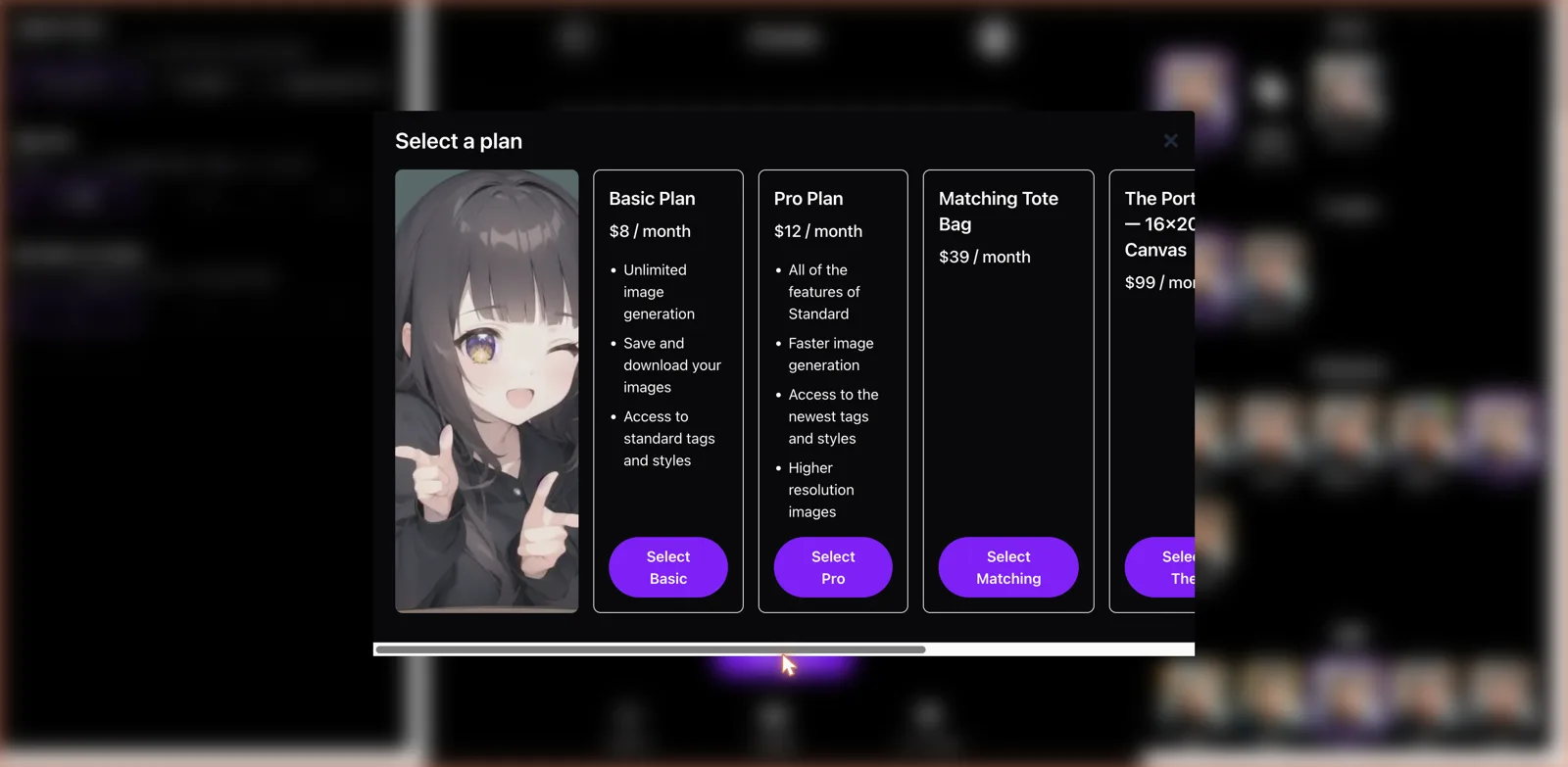
The digital plans are normal enough. Basic runs $8 a month and gets you unlimited image generation, the ability to save and download your images, and access to the standard tags and styles. Pro is $12 a month and adds faster generation, access to the newest tags and styles, and higher resolution images. So far, so typical.
Then it gets weird. Sitting right alongside the software plans were physical merchandise tiers. There was a Matching Tote Bag option at $39 a month, and a tier called The Portrait, a 16 by 20 canvas, at $99 a month. Yes, you read that correctly: subscription plans that mail you physical products based on your AI creations. I have honestly never seen an adult image generator try to sell you a printed canvas of your work, let alone a tote bag, as a monthly subscription. It is bizarre, and I genuinely cannot tell if it is a clever way to monetize superfans who want their creations in the real world or a strange misfire. Either way, it is unlike anything else in this space, and it made me do a double take.
Where the tag system helps and where it hurts
The preset approach is a real strength for newcomers, but it is worth being clear-eyed about the ceiling. Because you are choosing from a fixed menu, you are limited to what Nolo has decided to offer. If your idea does not map onto the available tags, you are stuck. There is no way to type a specific scenario, an unusual outfit, a particular setting, or a creative concept that the menu does not already include. Power users who like to sculpt an image with a long, detailed prompt will feel boxed in almost immediately.
Compare that to a flexible prompt-based generator like GetImg AI, where the whole appeal is that you can describe anything you can imagine. Nolo trades that open-ended power for approachability. For someone who just wants a good-looking image of a certain type of person with a certain vibe, the tags get you there in three taps. For someone with a specific vision, the walls close in fast. Neither approach is wrong, they are aimed at different people, and Nolo has clearly picked the beginner.
What I liked and what I did not
On the plus side, the tag-based builder is the friendliest on-ramp to AI image generation I have tested, and it genuinely removes the intimidation factor. The interface is clean and fast, the batch generation and aspect ratio options are handy, and the whole thing is uncensored without making you fight it. For a total beginner who wants adult images and does not want to learn prompting, it is close to ideal.
On the downside, the fixed-menu approach caps your creativity hard, and there is no escape hatch to a free-text prompt for when you want something specific. The free tier blurs everything, the resolution is modest unless you pay up, and the whole thing is a fairly aggressive funnel toward a subscription. And the physical merchandise tiers, while novel, feel like an odd fit that most users will scroll right past on their way to the eight-dollar plan.
Who Nonolo.ai is for
Nolo is for the beginner who wants to make adult AI images and has zero interest in learning how to write prompts. If you have tried other generators and felt lost staring at an empty text box, the tap-to-build system here will feel like a relief, and at eight dollars a month the entry price is reasonable. It is approachable, uncensored, and quick, which is exactly what a chunk of this audience wants.
If you are an experienced creator who wants fine control, specific scenarios, or the ability to describe something unusual, you will hit Nolo’s ceiling within minutes and be far happier on a prompt-driven platform. And if you want a tamer, non-explicit tool, this is not remotely it. But taken for what it is, a simple, preset-driven, uncensored image generator for people who do not want to think too hard, Nolo does the job, quirks and all. Just prepare yourself for that pricing page, because the tote bag is real.