MyLovely AI opens with a promise you have heard a hundred times: meet your dream AI girlfriend, always in the perfect mood, built exactly the way you want. What sets these apps apart is never the pitch, it is what happens once you actually start talking. So I made an account, chatted with one of its characters, walked through the creation tools, and read the pricing to see whether MyLovely earns its 500,000-user badge. It is an adults-only app, and as you will see, it leans into that hard, so treat this as your 18-plus warning up front.
Top AI Girlfriend Platforms — Our Picks

Hyper-realistic AI companions with adaptive memory that recall your past conversations.
Build a custom AI companion and bring her to life with chat, images, and video.

Create a custom AI girlfriend with her own personality, generated images, and ongoing chat memory.


Characters that hold memory and context, so the relationship builds over time instead of resetting.

Chat with a fully custom AI girlfriend — choose her personality, outfits, and more.

Personalized AI companions for ongoing roleplay, with a simple, discreet signup.

Build a custom AI girlfriend, boyfriend, or anime character — choose the look and personality.

Customizable AI girlfriend personalities with realistic, ongoing conversations.
Here is my hands-on take on what MyLovely AI does, how spicy its chat runs, and who should sign up.

What MyLovely AI actually is
MyLovely AI is a browser-based AI girlfriend platform that combines character chat with image and video generation. The top nav lays out the whole thing: Create, Characters, Chats, Gallery, and Premium. Characters is the roster you talk to, Create is the maker for custom companions and media, Gallery is the shared image feed, and Premium is the paywall. It is a girlfriend-first app with a generation studio attached, rather than a generator with chat bolted on. For how it compares with other AI girlfriend platforms, see my main ranking.
The character library splits into MyLovely Characters and Your Characters, with filters like Milf, Asian, Blonde, Busty, and Dominant. The premade characters come with short backstory hooks and some carry a Roleplay 2.0 badge, which the site uses to flag its upgraded chat model. The art style is realistic and the previews are frankly on the racy side, so this is not an app trying to look wholesome. It knows what it is.
Signing up was quick and dropped me into an account that already had a small token balance to play with, alongside a notification bell and the usual account menu. The site pushes its Roleplay 2.0 upgrade hard, with a popup boasting sharper answers, stronger character consistency, and smoother roleplay. Marketing claims like that are cheap, so I took them with a grain of salt and let the actual chat do the talking. Each character also has its own profile page with a biography, a heart to favorite them, and buttons to either start a chat or jump straight into creating images of them, so the path from browsing to talking to generating is short.
The chat runs hot, fast
I opened Rachel Star, a character whose bio paints her as a fantasy writer who unwinds at the shooting range. To test the tone, I kept my opening deliberately tame and just asked what got her into shooting. The reply did not stay tame for even one message. She answered in character, then immediately steered into explicit territory unprompted, describing the physical rush of pulling the trigger in graphic terms.
That tells you the most important thing about MyLovely: the chat is uncensored and it escalates quickly, even when you do not push it there. For a lot of people that is exactly the point, and the writing itself was competent, staying in Rachel’s voice while it did it. But if you are looking for slow-burn romance or a companion who reads the room before turning things up, know that the default setting here is the deep end. There is no easing in. If you prefer a build-up, an app like SecretCrush AI gives you more of a runway before things heat up.
The chat interface itself is clean and well organized. You get starter prompts like say hello, ask for a selfie, and tell me a secret, plus quick-reply buttons along the bottom for things like send me a photo or tell me a story. Voice and video call icons sit up top, and a collapsible side panel holds the character’s portrait, bio, and personality attributes. There is a light gamification layer too, with achievement popups like First Heartbeat for sending your opening message, which is a small nudge to keep you engaged.
Those quick-reply buttons deserve a note, because they double as a menu of what the app can do. Send me a photo pulls an image into the chat, the voice and video icons point to spoken and visual calls, and the personality attributes in the side panel (Rachel’s listed her as a rebel whose hobbies were webcam and weapons) show the character is running on a defined profile rather than a blank slate. It is the kind of setup that makes the companion feel consistent from one session to the next, which is the whole point of a personality attribute system. Whether the memory holds up over long stretches is something only weeks of use would prove, but the scaffolding for a persistent companion is clearly there, and the Roleplay 2.0 tag suggests the site is actively iterating on it.
Creating a character and generating media
The Create menu is a proper Creation Hub with three tools: Create Character to build a companion, Generate Images for text-to-image art, and Generate Videos. The character builder is a guided five-step flow covering Identity, Appearance, Physique, Personality, and Finalize, so it walks you through a persona rather than dumping every option on one screen.
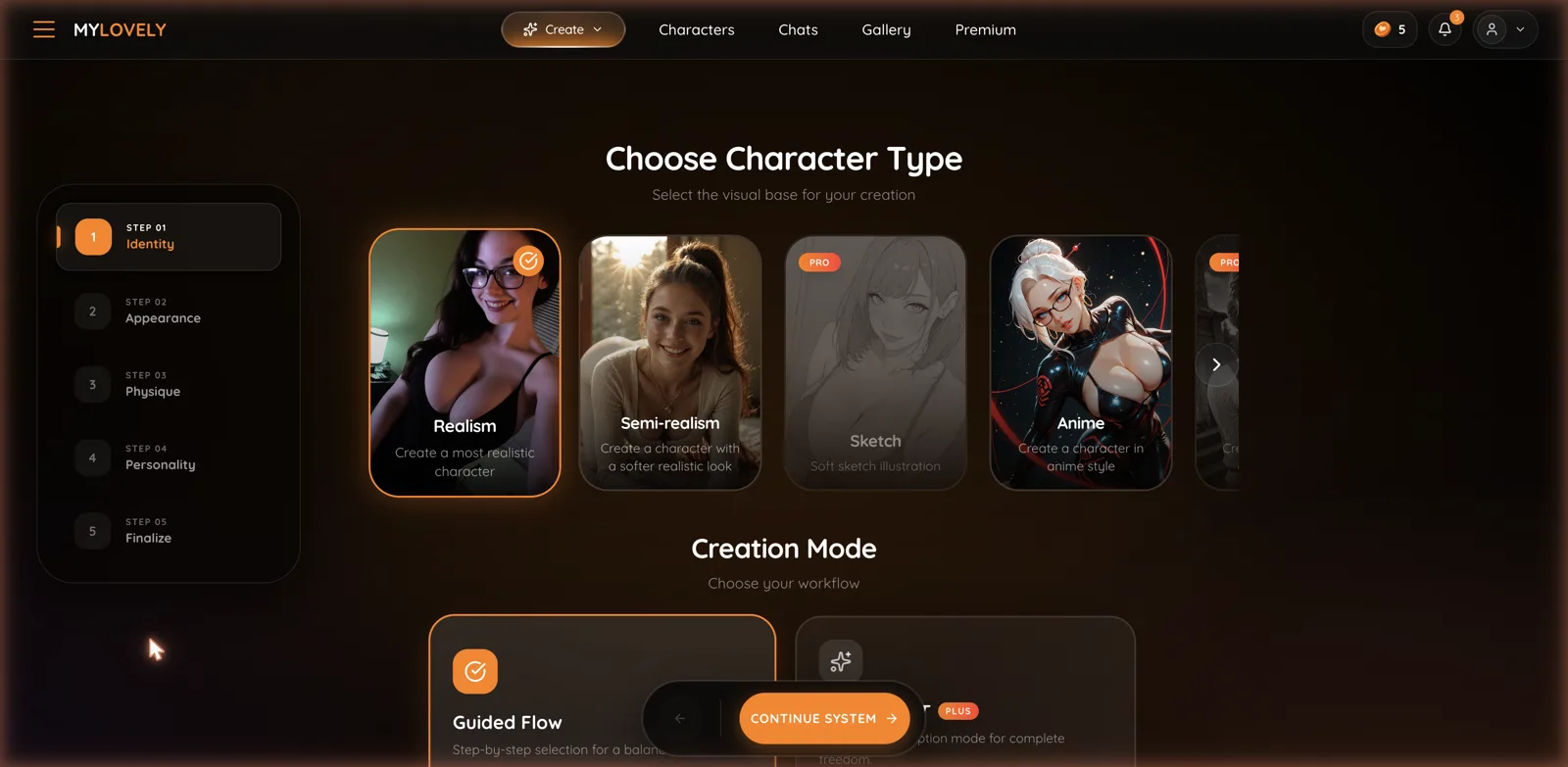
Step one alone shows the depth: you pick a visual base from Realism, Semi-realism, Sketch, or Anime, with some styles marked Pro, and then choose a creation mode between a Guided Flow and a freer Plus mode for complete control. It is a solid builder, on par with the better ones in this category, and the guided path is a friendly on-ramp for anyone who does not want to fiddle with sliders. Image and video generation live in the same hub, so once you have a companion you like you can make pictures and clips of her without leaving the site. That all-in-one setup is the same idea behind image-focused sisters like CreateMilf, just wrapped around a girlfriend app.
The five-step split is smart because it maps to how people actually think about a character. You settle who she is, then what she looks like, then her build, then her personality, and only then finalize. Breaking it up like that keeps each decision small instead of confronting you with a wall of options, and the Pro and Plus flags make it clear which parts want a paid plan. The Guided versus freeform choice is the right fork to offer: newcomers get hand-holding, and people who know exactly what they want can skip the rails. I did not spend tokens generating a full custom character, but the flow itself is one of the more thoughtfully organized builders I have clicked through.
The Gallery and the social layer
The Gallery tab is a shared feed of images made on the platform, and each character profile also has its own Feed and a locked Private Gallery. It is a lighter version of the community angle some competitors lean on, giving you a place to see what the generator can do and to share your own results. It is not the centerpiece the way a shared feed is on some sites, but it does mean the image tool has somewhere to show off, and it gives you a sense of the output quality before you spend your own tokens. If the social, share-your-creations side is what draws you, it is a nice-to-have here rather than the main event.
What MyLovely AI costs
MyLovely uses a subscription model with a token allowance on top, and it runs frequent discounts, so expect a countdown banner shouting about 70 percent off when you land on the pricing page. Ignoring the theatrics, there are three real options.
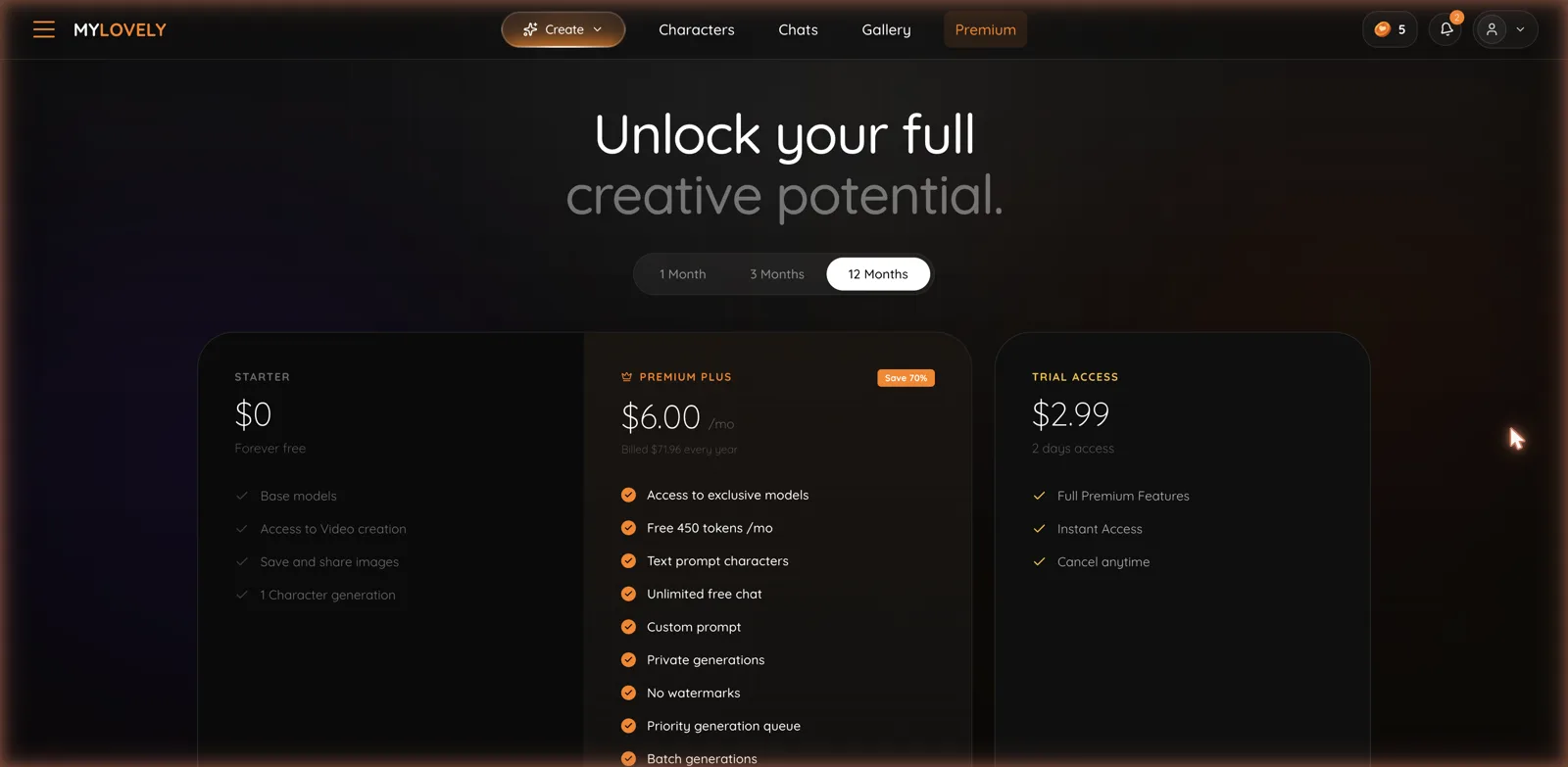
Starter is free forever and gives you base models, access to video creation, the ability to save and share images, and one character generation. Premium Plus is the main paid tier at $6.00 a month billed annually at $71.96, and it unlocks the exclusive models, 450 free tokens a month, text-prompt characters, unlimited free chat, custom prompts, private generations, no watermarks, a priority generation queue, and batch generations. There is also a Trial Access option at $2.99 for two days, which gives full premium features with the ability to cancel anytime.
The pricing is reasonable by category standards, and the annual Premium Plus rate is genuinely cheap at six dollars a month. The thing to watch is the token allowance: unlimited chat is included, but the 450 monthly tokens feed the image and video generation, so heavy generators will burn through them and want more. The free tier is usable for testing the chat and dabbling with one character, which is enough to judge whether the aggressive tone works for you before you pay. If you want to compare how other girlfriend apps split free chat from paid media, my virtual girlfriends guide breaks it down.
How it stacks up
MyLovely’s strengths are a clean interface, a capable five-step character builder, image and video generation under one roof, and cheap annual pricing. The chat writing held character well in my test, and the free tier plus a two-day trial make it low-risk to try. For someone who wants an uncensored girlfriend app that does not make them wait, it delivers exactly that.
The flip side is that same lack of restraint. The chat jumping straight to explicit content from a tame prompt is a feature for some and a turn-off for others, and there is not much middle ground on display. The racy character previews and filters like Milf and the youthful-styled tags also make the browsing experience feel more like a content catalog than a dating sim, which is worth knowing going in. If you would rather a companion that leans romantic before it leans explicit, AiGirlfriends.ai and Secret Desires AI are worth putting side by side with it.
Who MyLovely AI is for
MyLovely AI is a strong pick if you want an uncensored AI girlfriend that gets straight to the point, paired with a real character builder and built-in image and video generation, all at a low annual price. The interface is tidy, the tools are capable, and the free tier and cheap trial let you test the vibe before committing.
It is a weaker pick if you want a slow, romantic build-up or a companion with a gentler default, since the chat here starts hot and stays there. My advice: use the free tier to send a few messages and see if that immediate intensity is what you are after, because it is the defining trait of the whole app. If it is, the Premium Plus annual plan is a cheap way in, just keep an eye on your monthly tokens if you plan to generate a lot of images. It is 18-plus, it makes no secret of that, and for the audience it is built for, it does the job well.