OpenArt is not an AI girlfriend app, and I want to say that up front so nobody wastes their money expecting one. It is a serious, polished AI creator studio for images and video, the kind of tool marketers and content creators use to make music videos and ads. So why cover it here? Because a lot of people come to this corner of the internet wanting to build a consistent virtual woman, a recurring AI persona they can generate over and over, and OpenArt is one of the best tools around for exactly that, as long as you keep it clean. I spent time putting it through its paces from that angle, testing the image quality, poking at the character tools, and checking where the walls are. The short version is that OpenArt is a fantastic engine for making a believable virtual person as clean, polished content, and a poor fit for anyone who wants chat or explicit material. Here is what it does, what it does not, and whether it fits what you are actually after.
Top AI Girlfriend Platforms — Our Picks

Hyper-realistic AI companions with adaptive memory that recall your past conversations.
Build a custom AI companion and bring her to life with chat, images, and video.

Create a custom AI girlfriend with her own personality, generated images, and ongoing chat memory.
Characters that hold memory and context, so the relationship builds over time instead of resetting.

Chat with a fully custom AI girlfriend — choose her personality, outfits, and more.
Personalized AI companions for ongoing roleplay, with a simple, discreet signup.

Build a custom AI girlfriend, boyfriend, or anime character — choose the look and personality.
Customizable AI girlfriend personalities with realistic, ongoing conversations.
What OpenArt actually is
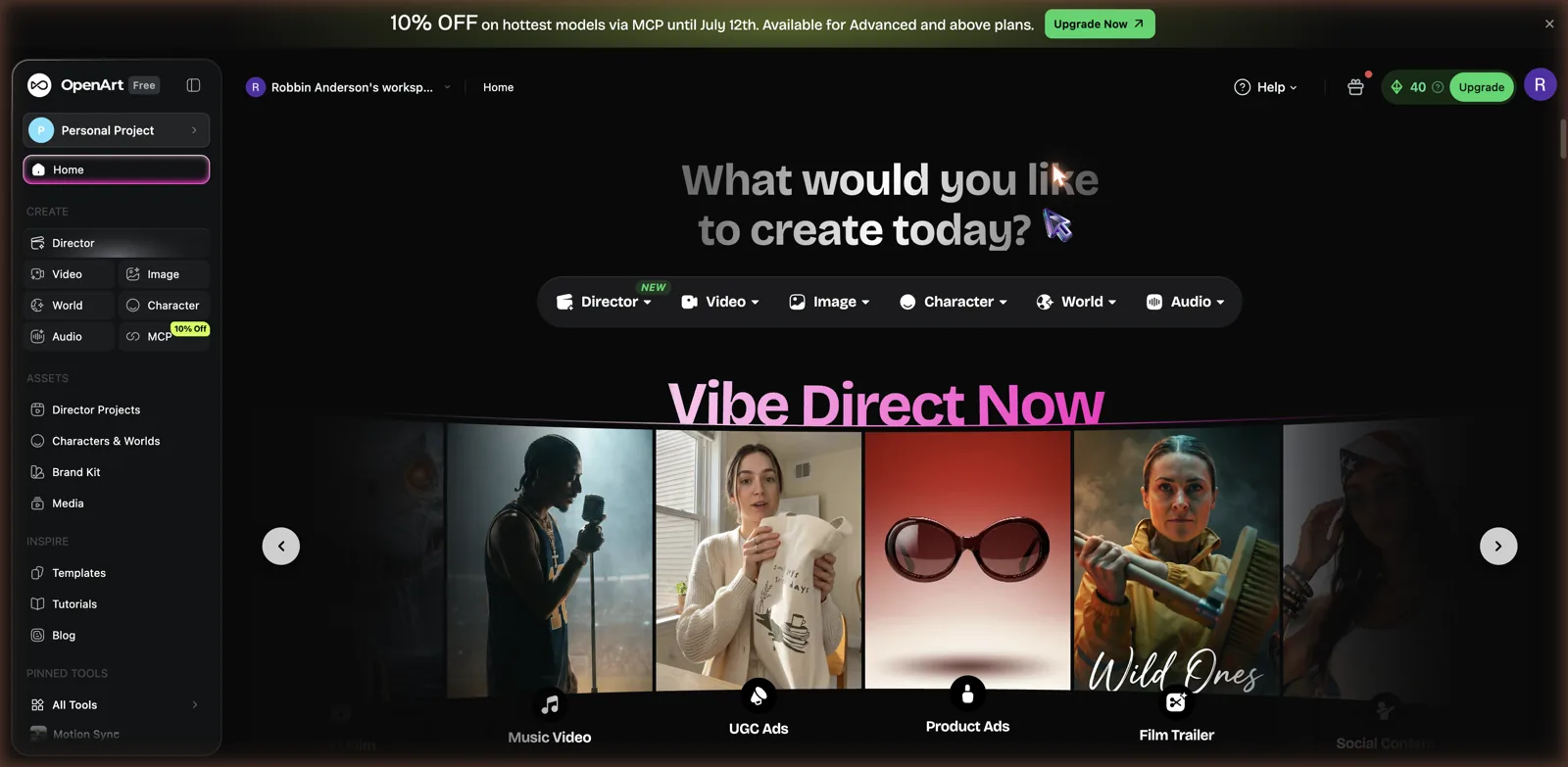
OpenArt bills itself as an AI Creator Studio for Video and Images, and the home screen makes the ambition obvious. The create menu runs across Director, Video, Image, Character, World, and Audio, with example projects for music videos, UGC ads, product ads, and film trailers. This is prosumer territory, a Swiss Army knife for anyone making visual content, and it is clearly built for creators and small businesses rather than someone looking to chat with a companion at midnight.
The engine behind it is strong. OpenArt gives you access to more than a hundred premium image, video, and audio models rather than a single house engine, so you are pulling from the best available tools depending on the job. That alone puts it in a different class from the closed, one-model setups on most adult sites. If you have used a general image platform like GetImg AI or a video-focused one like BasedLabs, OpenArt is playing in the same space but with a wider toolbox and a slicker workflow. The workspace is organized like a real editing app, with project folders, a brand kit, a media library, and templates to start from, which tells you who the intended user is. This is someone producing a steady stream of content, not a one-off curiosity.
The image quality is the real draw
I tested the image generator with a simple, tame prompt, a smiling woman with wavy brown hair in a cozy cafe, shot photorealistic. The default model was GPT Image 2, and the result was excellent, a natural, believable portrait with soft light and convincing detail that looked more like a real photo than a generation.
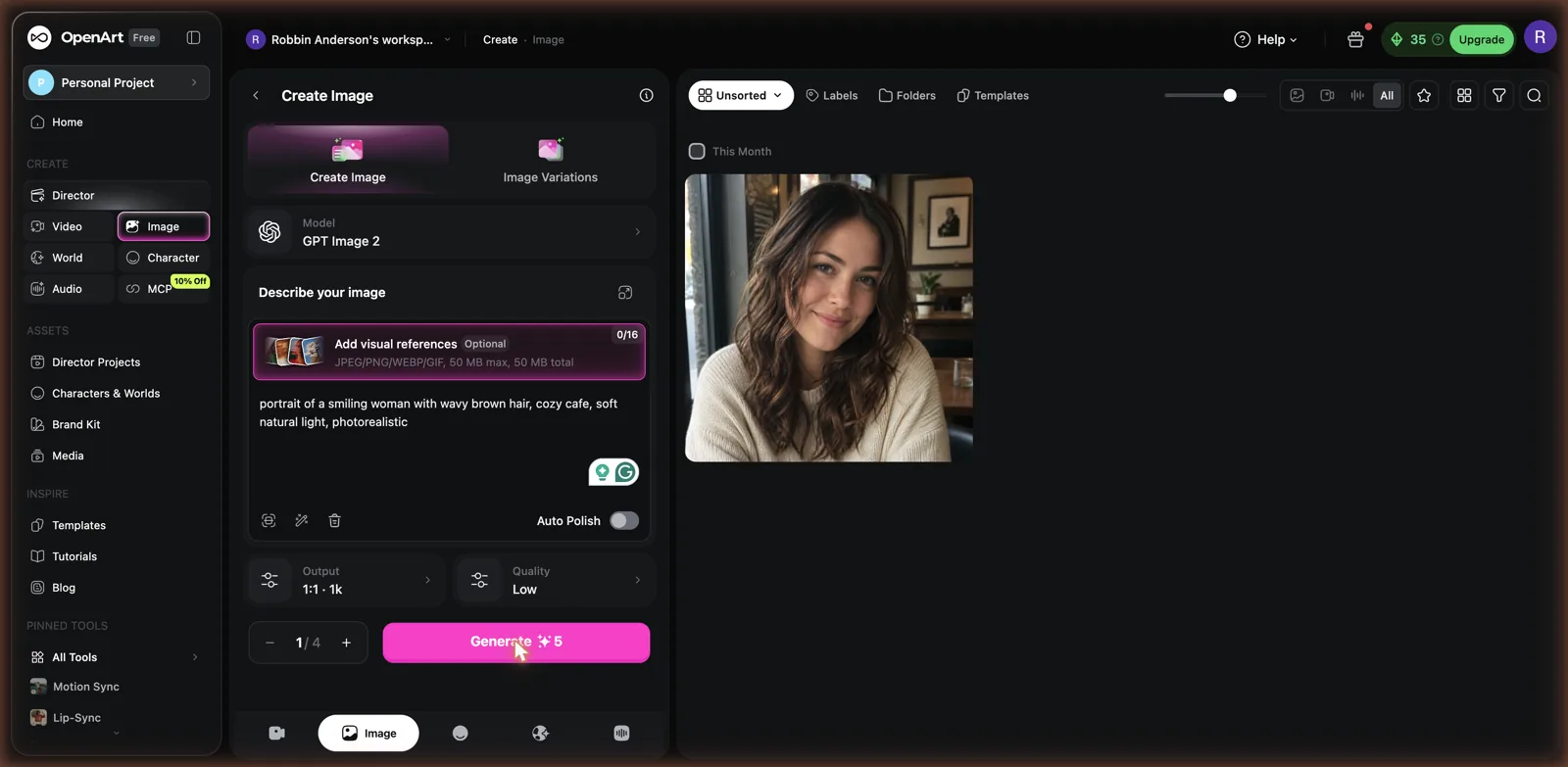
That quality is the whole reason to consider OpenArt for building a persona. If your goal is a virtual woman who looks like an actual person rather than a plastic doll, this is the kind of output you want. The interface is clean too, with a model picker, an Auto Polish toggle that cleans up your prompt, the ability to add up to sixteen visual references, and controls for aspect ratio and quality. Each generation costs a handful of credits, and the free plan gives you a small stack to try it, which is enough to see the quality for yourself before committing. If you want a persona you can chat with, the AI GF apps I ranked do that out of the box.
The model choice matters more than it first appears. Because OpenArt is not tied to one engine, you can switch between models tuned for photorealism, for stylized art, or for specific looks, and pick whichever suits the persona you are building. A realistic influencer type wants a very different model than an anime character, and having both under one roof means you are not hopping between three different sites to get the aesthetic you want. You can also feed in reference images so a new generation matches an existing look, which is how you keep a face and a style locked in across a whole set. For anyone who has fought with a single-model generator that only does one thing well, this flexibility is a real quality-of-life upgrade.
Consistent characters, the feature that matters here
The Character tool is where OpenArt becomes interesting for anyone chasing a recurring AI persona. It lets you make a reusable character you can bring into future images and videos, which is the technical heart of the whole virtual girlfriend or virtual influencer idea. You get three ways in: start from an image you upload, describe your character in words, or build one from scratch with sliders for look, gender, ethnicity, and age range.
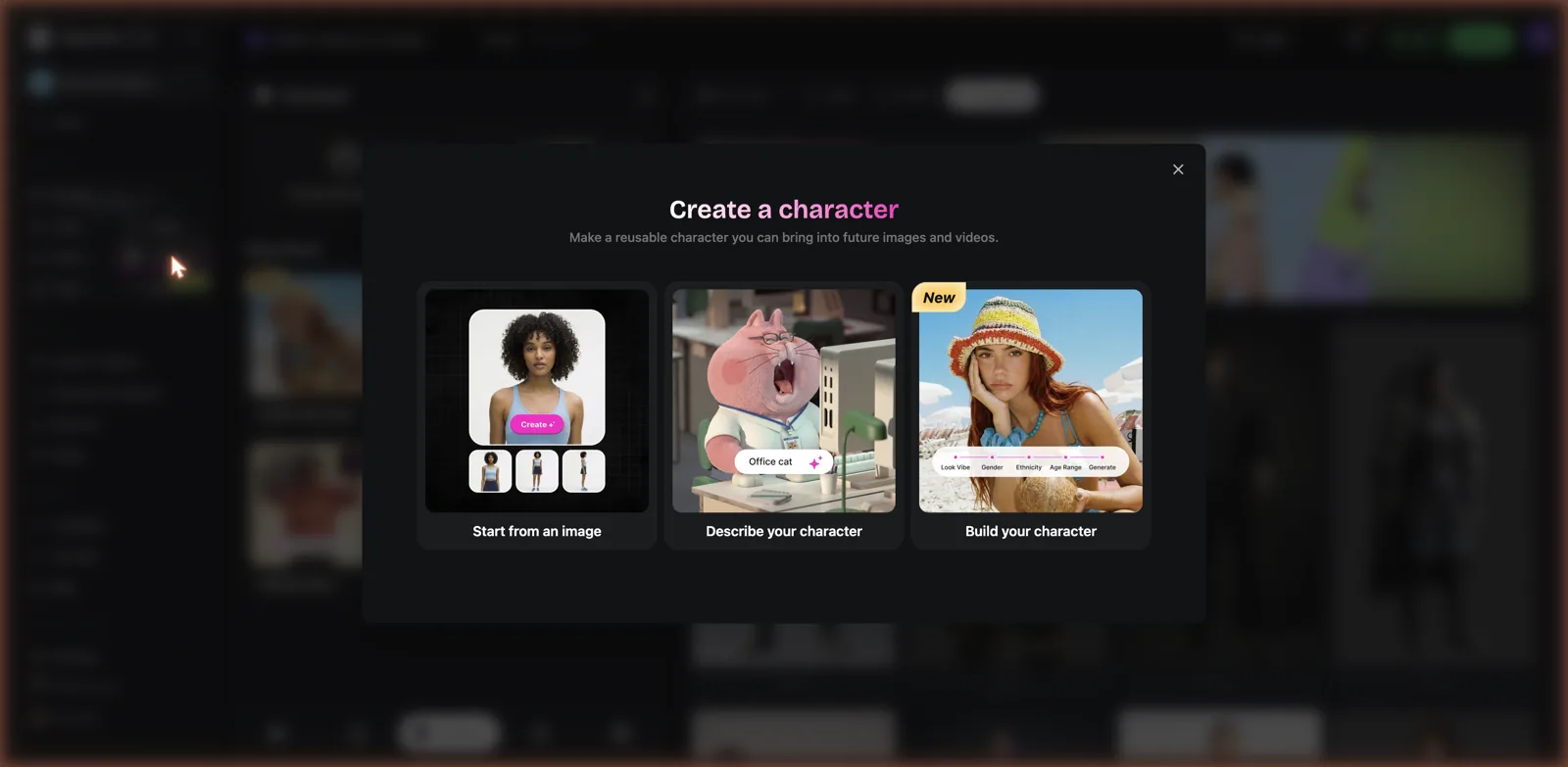
Once your character exists, the point is consistency. You can drop that same face and body into new scenes, outfits, and poses without her turning into a different person each time, which is the exact problem that makes casual image generators frustrating for this use. It is the same idea that drives dedicated AI influencer tools like APOB AI, except OpenArt bolts it onto a much broader studio with video and world-building attached. For building a believable, repeatable persona as clean content, this is a seriously capable setup.
Video, worlds, and the rest of the studio
OpenArt keeps going well past still images. The Director feature is an AI video director that turns a prompt or a song into a finished video, and there are dedicated Video, World, and Audio tools alongside it. You can build worlds for your characters to inhabit, train personalized models, generate one-click stories, and run multiple generations in parallel. There is even lip-sync and motion-sync for animating characters to audio.
For the persona use case, the video side is a big deal. Being able to take your consistent character and put her into short clips, not just static portraits, is what separates a flat picture set from something that feels alive. This is the ambitious end of what AI creation tools can do right now, and OpenArt packs a lot of it into one workspace. The tradeoff is that all this power comes with a learning curve, since this is a real creative suite, not a one-button toy.
The personalized models feature is worth flagging for the dedicated persona builder. Rather than describing your character every time, you can train a model on your character so the platform learns her specific look and reproduces it reliably. Paired with the World tool, which builds consistent settings for her to appear in, you can construct a whole coherent universe around a single persona, the same face, the same style, the same world, across dozens of images and clips. That is the difference between a scattershot pile of pretty pictures and something that reads as one believable character with a life of her own. It takes effort to set up, but the payoff is consistency that casual tools simply cannot match.
The part you need to hear: OpenArt is not for NSFW
Here is the honest catch, and it is the most important thing in this review. OpenArt is a mainstream, safe-for-work platform. It has content policies and filters, and it is not built for explicit or pornographic material. If your plan is to generate nude images or hardcore content of your persona, this is the wrong tool, and trying to push it there will get you nowhere. The polished, professional nature of OpenArt is exactly why it stays clean.
So the honest framing is this. OpenArt is superb for creating a consistent, realistic, clothed persona, a virtual girlfriend as a wholesome character, a virtual influencer, or story content you would be comfortable posting in public. It is not a replacement for an adult platform. If explicit output is the whole point for you, you want a dedicated uncensored image generator like SpicyGen or the galleries on aiAllure instead, and you should not pay for OpenArt expecting it to bend. Knowing which side of that line you are on will save you a lot of frustration.
I actually think the clean approach is a feature for the right person, not just a limitation. A safe-for-work persona is the one you can publish on public social platforms, use in a project, or build an audience around without it getting banned or hidden. Virtual influencers are a real and growing thing, and almost all of them are worksafe by necessity, because that is what the platforms they live on will allow. If your ambition is to build a character with reach rather than a private fantasy, OpenArt being clean is exactly why it works. It is only a downside if explicit content was the goal from the start, and in that case you were always shopping in the wrong aisle.
What it costs
OpenArt runs on credits, and the free plan starts you with a small allowance, forty credits when I looked, with each image costing around five. That is enough to test the waters but not to build a real body of work, so serious use means a subscription.
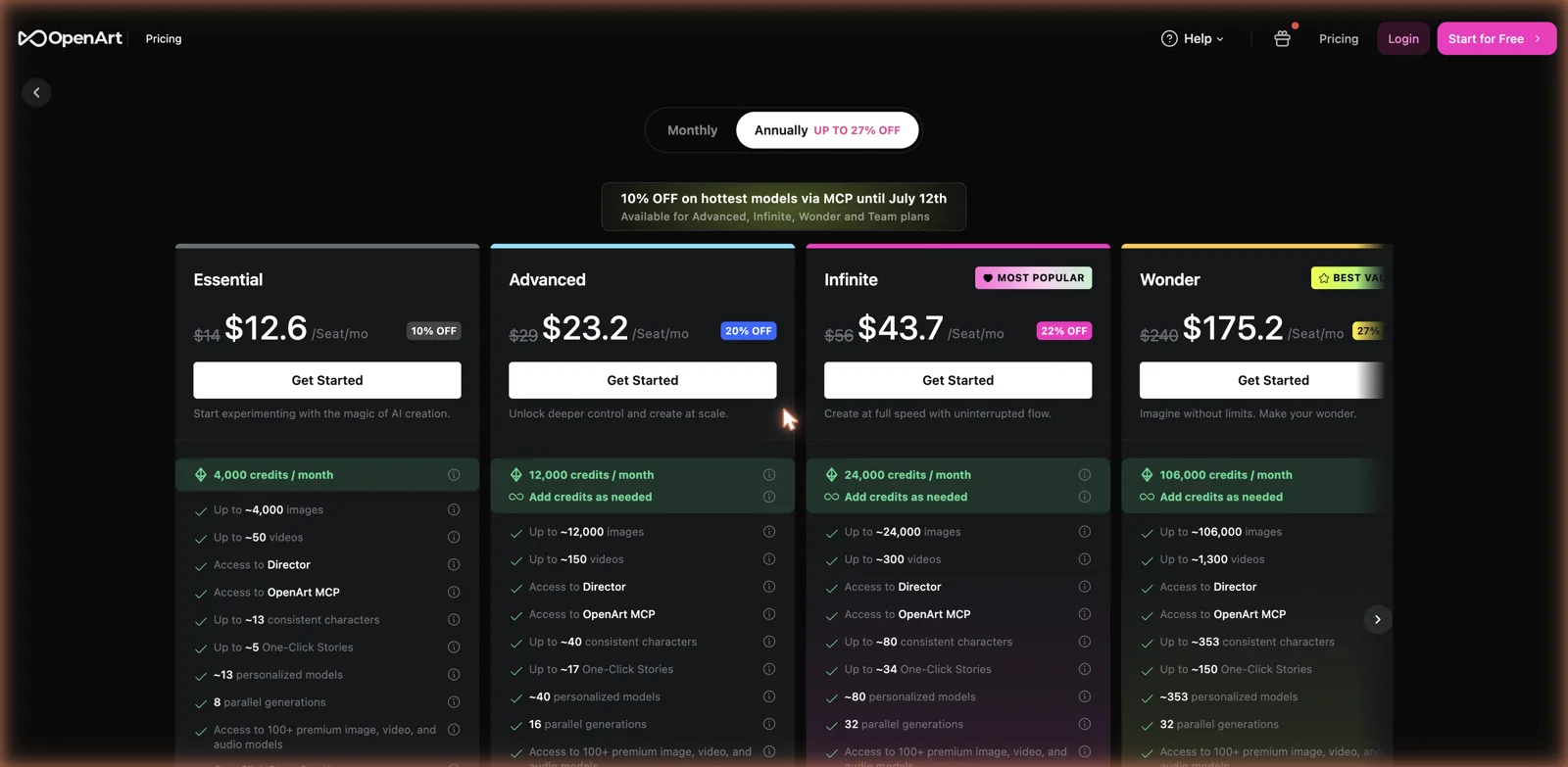
The paid tiers are priced for creators. On annual billing, Essential lands around twelve to fourteen dollars a month for roughly four thousand credits, about four thousand images or fifty videos, plus access to the full model library and around thirteen consistent characters. Advanced sits near twenty three dollars a month with twelve thousand credits and more consistent characters, Infinite is the popular pick around forty four dollars a month with twenty four thousand credits, and the top Wonder tier runs well over a hundred and fifty dollars a month for creators who need volume. You can also buy extra credits as you go. It is not cheap compared with a flat monthly companion app, but you are paying for a professional-grade studio and premium models, not a chat subscription.
One thing to plan around is how credits get eaten. Video costs far more than a still image, so if your persona project leans heavily on clips, you will burn through an allowance much faster than the raw image counts suggest. The higher tiers exist for exactly that reason, and heavy video creators will feel the pinch on the cheaper plans. For someone mostly making images with the occasional short clip, the middle tiers are plenty. It pays to think about your actual mix of stills and video before picking a plan, because the sticker price and the real cost of your workflow can be quite different.
Who OpenArt is for
OpenArt is for the creator, not the companion seeker. If you want to build a consistent, photorealistic virtual persona and generate polished images and videos of her for social media, storytelling, or a virtual influencer project, it is one of the strongest tools available and the image quality is hard to beat. If you want someone to talk to, this is the wrong category entirely, and a dedicated companion chat app will serve you far better, since OpenArt has no chat, no personality engine, and no relationship features at all. It is a camera and a studio, not a partner. And if you want explicit content, OpenArt will not do it, full stop, so point yourself at an uncensored platform instead.
The bottom line is that OpenArt is excellent at what it is, a powerful, clean AI studio for making a believable character come to life as visual content. Go in understanding that boundary, use the Character tool to keep your persona consistent, and lean on that deep model library, and you have a tool that punches well above the usual AI art site. Just do not expect it to be your girlfriend, or to get naked. Those are not what it is here for.