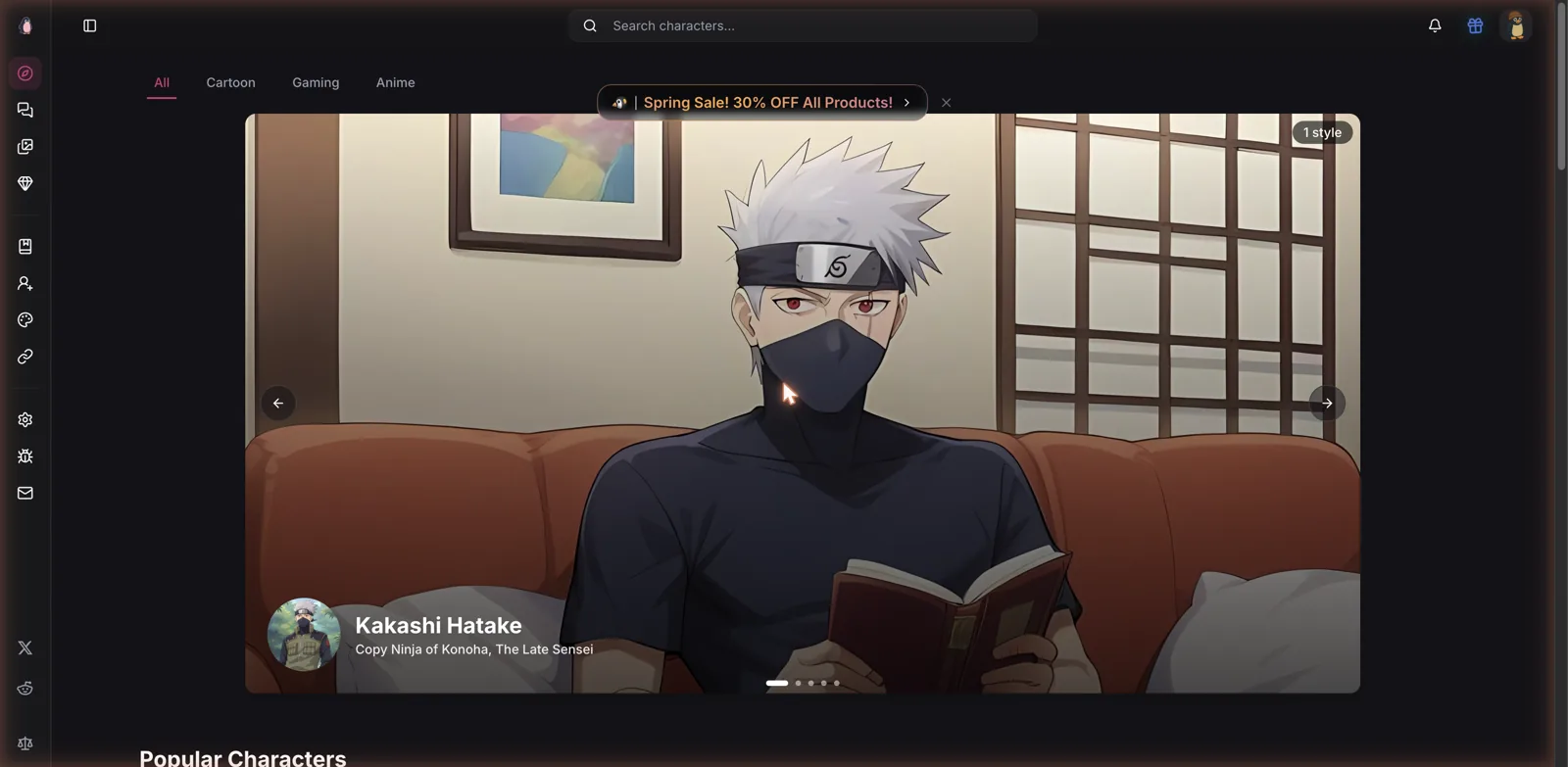
If you have ever wanted to roleplay with your favorite anime character and then get a custom picture of them mid-scene, Pinku is built almost entirely around that fantasy. It calls itself a place to roleplay and generate images of AI characters, and the roster tells you immediately who it is for. The first face I saw was Kakashi from Naruto, and scrolling down turned up Nami, Hinata, Marin Kitagawa, Bulma, and a long list of other fandom favorites. This is a platform for anime and pop-culture fans first, and everything about it is shaped around that crowd.
Top AI Girlfriend Platforms — Our Picks

Hyper-realistic AI companions with adaptive memory that recall your past conversations.

Build a custom AI companion and bring her to life with chat, images, and video.

Create a custom AI girlfriend with her own personality, generated images, and ongoing chat memory.

Characters that hold memory and context, so the relationship builds over time instead of resetting.

Chat with a fully custom AI girlfriend — choose her personality, outfits, and more.

Personalized AI companions for ongoing roleplay, with a simple, discreet signup.

Build a custom AI girlfriend, boyfriend, or anime character — choose the look and personality.

Customizable AI girlfriend personalities with realistic, ongoing conversations.
What makes Pinku more interesting than a plain chatbot is how tightly it fuses conversation with image generation. You are not just talking to a character, you are talking to one you can ask for pictures at any moment, in poses and outfits you describe. I spent time in the chat, the image tools, and the pricing to work out how well that combination actually holds together. For the best AI girlfriend apps overall, including several that pair chat with pictures, see my main ranking.
A fandom-first character library
The home page is organized around the fandoms, with tabs for Cartoon, Gaming, and Anime, and rows like Popular Characters and Latest Character Styles. The characters are community creations, each credited to the user who made it, which makes Pinku a user-generated platform at heart. That is both its strength and its wild card. The strength is enormous breadth, since fans keep adding the specific characters they love. The wild card is consistency, because a community library always ranges from lovingly detailed to barely fleshed out.
This puts Pinku in the same family as the big roleplay libraries I have covered, where the catalog is the product. If you have browsed the fan-made rosters on Joyland AI or the deep anime shelves of Yodayo, Pinku will feel familiar, just with a sharper focus on pairing each character with a rich set of visual styles for image generation.
That styles system is the standout detail. Each character comes with a whole set of looks, sometimes a dozen or more, sometimes over twenty, so a single character can be rendered in many outfits and aesthetics. It is a smart way to organize an image-heavy platform, because it means the pictures you generate stay on-model for the character rather than drifting into someone unrecognizable.
This matters more than it might sound. One of the most common frustrations with AI image tools is that you get a great picture once and then can never reproduce that exact face again. By tying each character to a defined roster of styles, Pinku sidesteps a lot of that. You are picking from established, curated looks rather than gambling on a fresh prompt every time, so the character you fell for in the chat is the character you get in the image. For a platform whose entire pitch is recognizable fandom faces, that reliability is arguably the single most important thing it could get right, and it does.
Finding your way around
The interface is clean and modern, with a slim icon rail down the left edge for jumping between exploring characters, your chats, your generated images, premium, and settings. A search bar sits up top so you can hunt for a specific character by name, which matters when the library is this large and fandom-driven. It never felt cluttered, and the dark theme with pink accents fits the anime aesthetic the whole site is going for.
Discovery is handled well. Beyond the fandom tabs, the home page surfaces trending characters and freshly added styles, so there is always something new to try even if you did not arrive with a specific character in mind. The Latest Character Styles row is a nice touch, spotlighting new looks for existing characters, which keeps regulars coming back to re-shoot a favorite in a fresh outfit. It is the kind of light, browsable structure that rewards the casual scroller as much as the person on a mission.
Chat and image generation, fused
The core loop is where Pinku earns its niche. You chat with a character in a normal roleplay thread, and whenever you want a picture, you request one right inside the conversation. When I opened Marin Kitagawa, a cosplayer character, the app actually ran a short tutorial teaching the prompt structure, showing me that an image request looks like typing a message such as send me a picture followed by comma-separated tags like an outfit, a pose, an expression, and a setting.
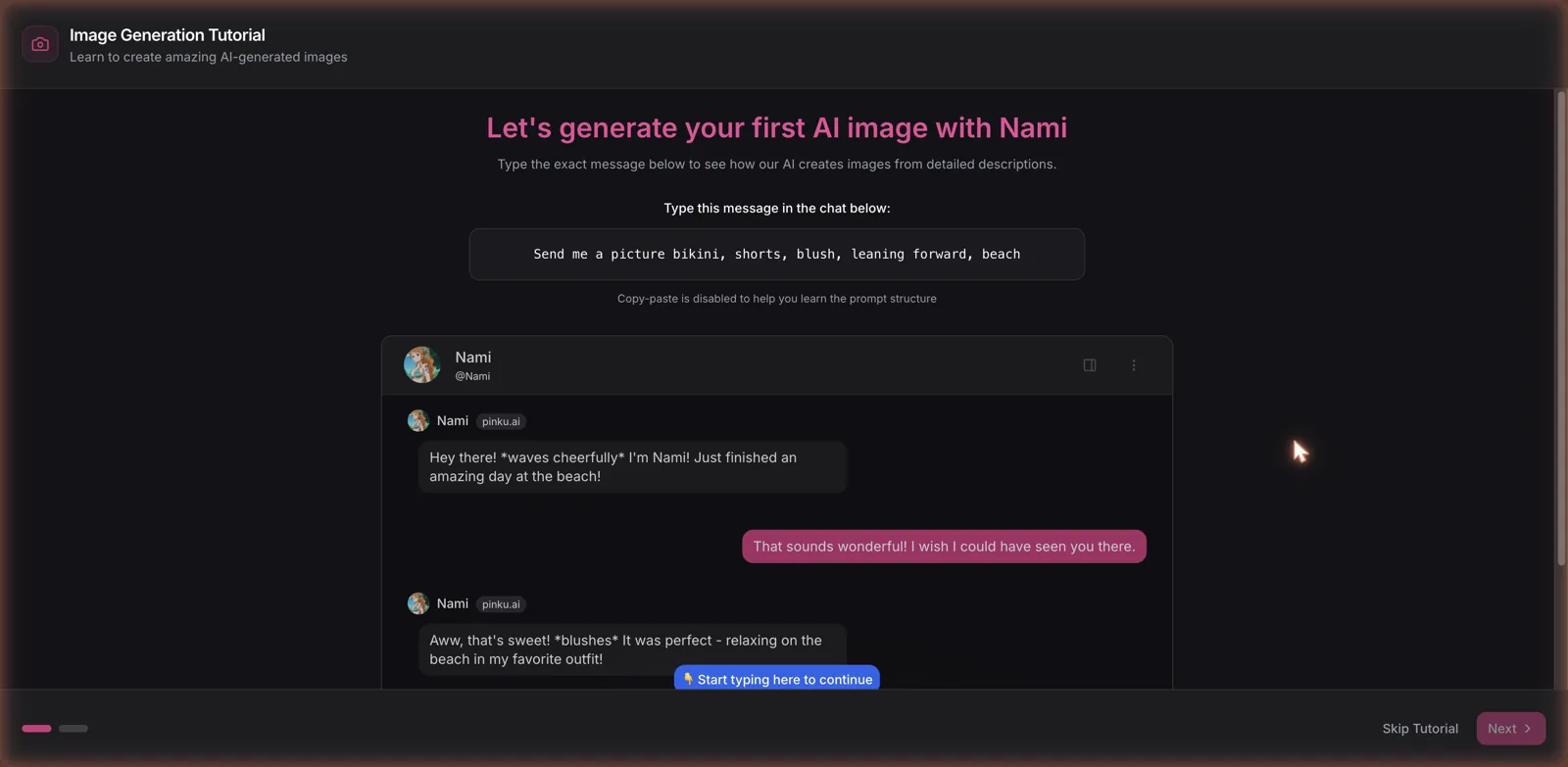
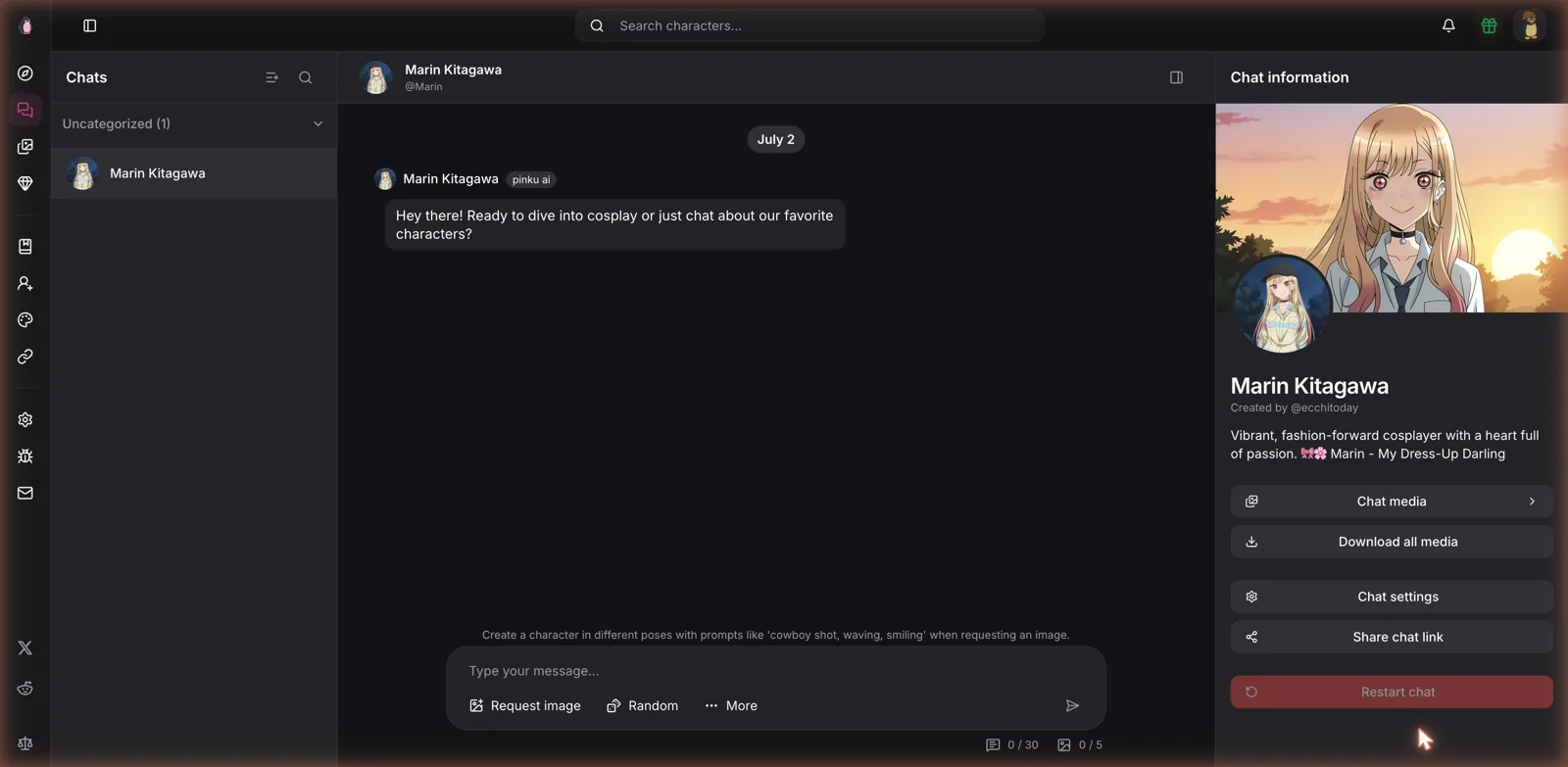
I like that they teach this rather than assuming you know it. The tutorial even disables copy-paste so you actually learn the pattern by typing it. Once you understand the structure, requesting an image is fast, and the chat box has Request image and Random buttons plus a hint suggesting poses like cowboy shot, waving, or smiling. It turns image generation from a separate chore into a natural part of the conversation, which is genuinely one of the better implementations of this idea I have seen.
The chat itself is solid. I asked Marin what got her into cosplay, and she answered in character, talking about making her first costume for a school festival, staying on theme without wandering off. It is not the deepest roleplay engine on the market, but for the anime fan who mostly wants a recognizable character to banter and pose with, it does the job well. The right-hand panel keeps the character bio, chat media, settings, and a share link handy, so the whole experience is well organized.
Styles, poses, and video
Because the styles do a lot of the heavy lifting, your generated images benefit from being anchored to a defined look rather than a from-scratch prompt every time. Combined with the pose and expression tags you add in the request, you get a decent amount of control over what comes out, without needing to write a paragraph-long prompt. For an anime-focused tool, leaning on curated styles is the right call, since consistency of a beloved character matters more here than raw prompt freedom.
Pinku also does video, at least in beta. The plans advertise converting images to videos and quote video allowances alongside the image ones, so you can animate a still you generated. AI video is the hardest thing to get right anywhere, and a beta label is appropriate, so I would keep expectations modest. But it is notable that a character roleplay app is reaching into animation at all, and it hints at where Pinku wants to go.
How adult does it get
Worth setting expectations here, because the vibe swings depending on how you use it. Plenty of Pinku is perfectly tame. My cosplay chat with Marin stayed wholesome, and a lot of the appeal is simply talking to and posing a beloved character in ordinary outfits and scenes. But this is an adult-capable platform, and the image request system with its outfit and pose tags clearly extends into spicier territory for those who want it. The character bios and community creations lean suggestive in places, and the whole thing is plainly built to accommodate an 18-plus audience alongside the wholesome fandom crowd.
That dual nature is actually one of Pinku’s quieter strengths. You can keep it as innocent as chatting with a character about their hobbies, or push it toward adult content, and the same tools serve both. It does not force the explicit angle the way some adult-first apps do, which makes it more comfortable for someone who mainly wants fandom roleplay with the option there rather than the demand. Just go in understanding that the platform spans that full range, and that the community-made characters reflect it.
Free limits and pricing
Pinku runs on a freemium model with daily caps. The chat showed small counters, a message allowance and a separate image allowance, that make it clear the free tier gives you a taste, something like a few dozen messages and a handful of images a day, before nudging you toward a plan. That is a reasonable free offering, enough to properly evaluate the thing before paying.
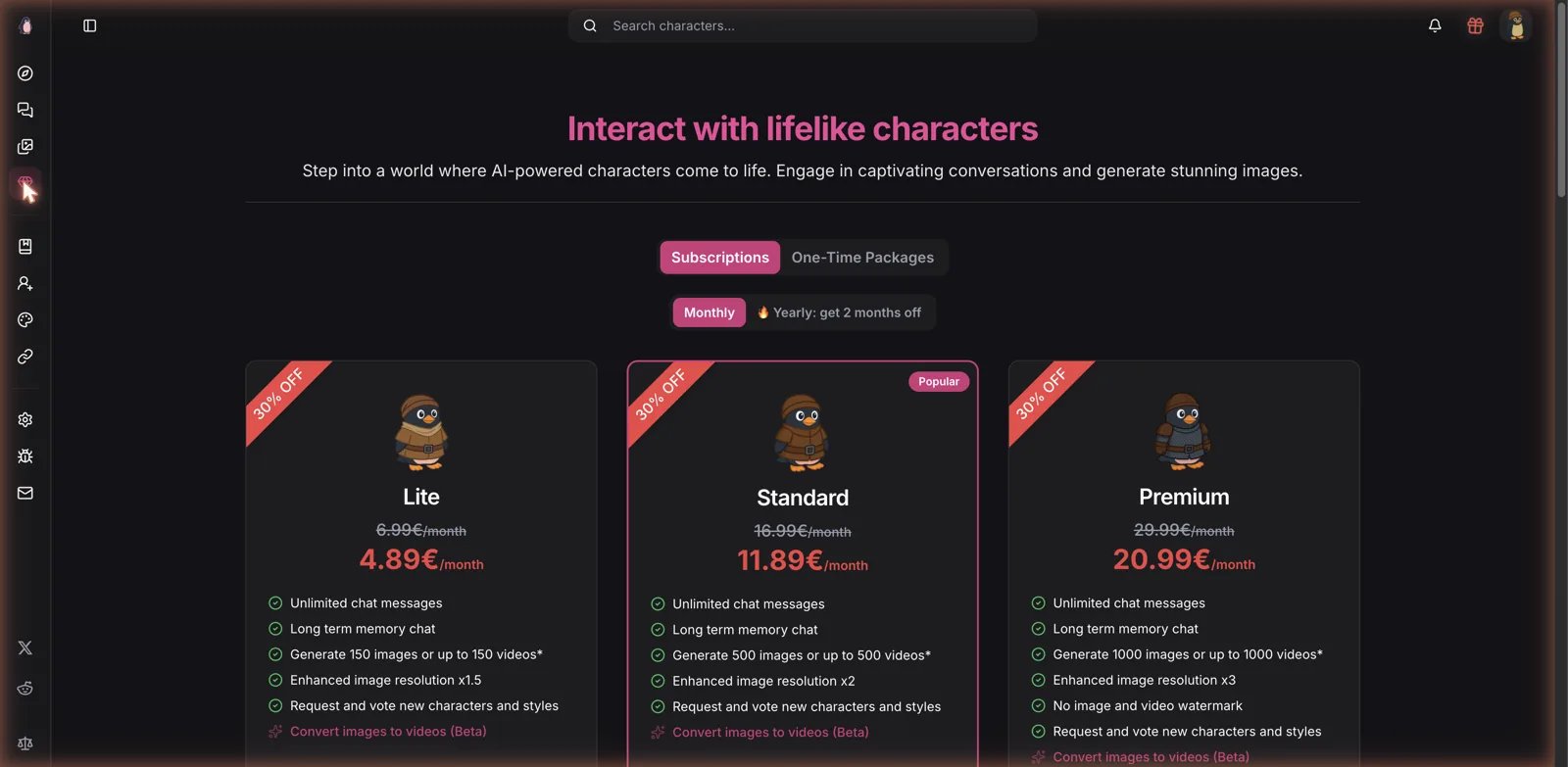
The paid side is subscription-based, priced in euros, with three tiers and a standing sale knocking a chunk off. When I looked, Lite ran about 4.89 euros a month, Standard about 11.89, and Premium about 20.99, with a yearly option that throws in two free months and a separate menu of one-time packages. All tiers give unlimited chat and long-term memory, then scale up the good stuff: image and video quotas climb from 150 up to 1000, image resolution improves from one and a half times up to three times, and only the top tier removes the watermark. It is a clear ladder where you are mainly paying for more and higher-quality generations. Compared with the token-metered economies on some rivals, a flat monthly with unlimited chat is easy to understand, and it lands in the same reasonable range as anime platforms like Sakura AI.
The copyright question
I would be dodging the obvious if I did not mention it: most of Pinku’s headline characters are recognizable, trademarked figures from anime, games, and comics, uploaded by fans. This is the same legally gray zone that every big user-generated roleplay platform lives in, the same one I flagged when writing about community libraries like Chub AI. For you as a user it mostly means a huge, familiar cast to play with. It is worth being aware, though, that fan-uploaded likenesses of protected characters are a shaky foundation, and rosters like this can shift when rights holders come knocking. Enjoy it for what it is, but do not be shocked if specific characters appear or vanish over time.
What works and what does not
What works is the fusion and the focus. Pinku knows its audience is anime and pop-culture fans, and it serves them a massive character library, a clever styles system that keeps images on-model, and an in-chat image request flow that it actually teaches you to use. The freemium limits are fair, the subscription ladder is easy to read, unlimited chat on every tier is welcome, and the move into beta video shows ambition. For the specific fantasy of chatting with and posing a favorite character, it is well made.
What does not work as well is the usual UGC unevenness, since community characters vary in depth, and the roleplay engine, while perfectly good, is not the deepest around if pure conversation is your thing. The reliance on trademarked characters is a long-term question mark. And the image and video quality, while helped by the styles, is quota-limited, so heavy generators will feel the caps or pay up to the higher tiers.
Who should use it
Pinku is an easy recommendation for anime and pop-culture fans who want to both talk to and generate images of specific characters, all in one place, without learning a complicated prompt language. The styles system and the taught-in-chat image requests make it approachable, the free tier is generous enough to test properly, and the pricing is sane. If your main love is a particular anime cast, this is close to purpose-built for you.
If you want deep, original character roleplay, hard privacy guarantees, or a library free of copyright questions, you will be better served elsewhere. But as a fan-focused mashup of roleplay and image generation, Pinku carves out a clear identity and executes it with more polish than most, and the in-conversation image flow alone makes it worth a look.