If you have read my Delur.ai review, brace yourself, because Spicier AI is going to feel like deja vu. Same layout, same character roster, same tools, same pricing down to the penny. Spicier AI is another front for the same Lovescape-network engine, an unfiltered adult generator that does images, video, lip-synced talking clips, and character chat. I ran through its tools to confirm what is actually here and where, if anywhere, it differs from its twin. It is an adults-only platform, so treat this as your 18-plus warning up front.
Top AI Girlfriend Platforms — Our Picks

Hyper-realistic AI companions with adaptive memory that recall your past conversations.

Build a custom AI companion and bring her to life with chat, images, and video.

Create a custom AI girlfriend with her own personality, generated images, and ongoing chat memory.


Characters that hold memory and context, so the relationship builds over time instead of resetting.

Chat with a fully custom AI girlfriend — choose her personality, outfits, and more.

Personalized AI companions for ongoing roleplay, with a simple, discreet signup.

Build a custom AI girlfriend, boyfriend, or anime character — choose the look and personality.

Customizable AI girlfriend personalities with realistic, ongoing conversations.
Here is my hands-on take on what Spicier AI does, how its credit system works, and whether there is any reason to pick it over its identical sibling.
What Spicier AI actually is
Spicier AI is a browser-based adult content generator built around four tools that share one account and one wallet: image generation, video generation, a talking-video lip-sync tool, and character chat. The landing page drops you into a grid of categories and a roster of named AI characters, exactly like its network siblings. The tags run the full range, from Milf, Anime, and Asian to Indian milf, AI latina milf, Gilf, FUTA, and Ebony, so whatever you are after, there is a tab for it.
The tell that this is a network clone is everywhere. The character roster, Martina, Sakura, Victoria, Paula, and the rest, is the same lineup you see on Delur, the interface is pixel-for-pixel the same, and even the starting credit balance and the Premium discount badge match. So Spicier AI is not a distinct product so much as another branded door into the same generation engine. That is not a criticism on its own, but it is the single most useful thing to know before you sign up. For distinct products, see AI partner apps compared on price and features.
Why does a company run multiple identical sites under different names? Mostly reach. Each domain can rank in search for its own keywords, catch its own audience, and funnel everyone into the same backend, which is a smart growth play even if it is a little confusing for a reviewer trying to keep them straight. For you as a user, the practical upshot is that picking between Spicier AI and its twins is not really a product decision, it is a coin flip. Whichever one you signed up for first is the one to stick with, because your credits and saved work live on that account and do not automatically transfer if you make a second one somewhere else in the family. So the one real piece of advice here is to not accidentally spread yourself across three logins when one would do.
The image generator is the core
The image tool is the most polished part, and it is well designed. You pick Girl or Guy, drop a custom prompt into a box with a 1,295-character budget, and then fill in optional slots for Character, Pose, Background, and Outfit. Style defaults to Realistic. You set how many images to make in a batch, and an Advanced settings panel is tucked away for people who want to fiddle.
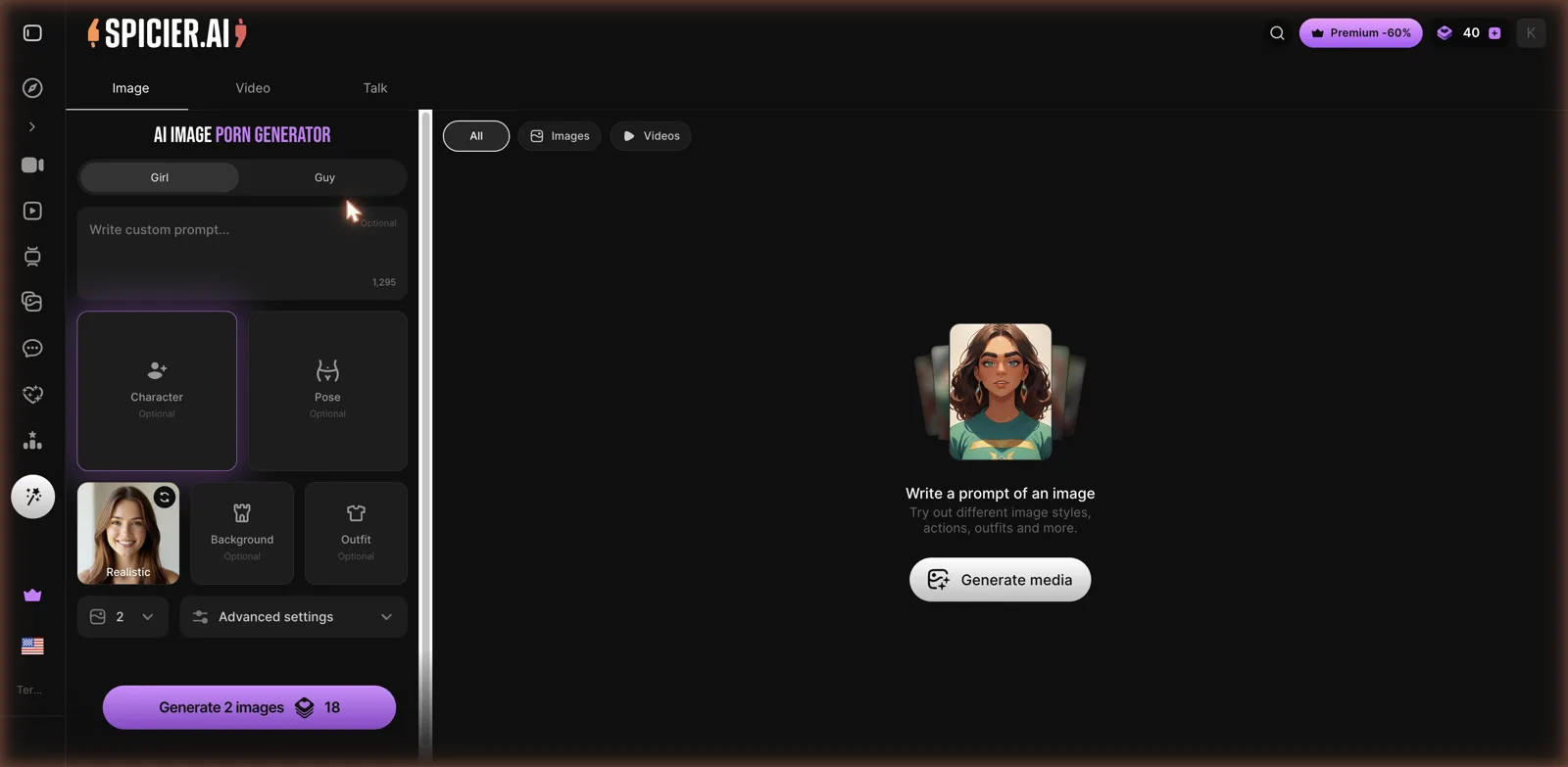
What works here is that it does not demand prompt-writing skill. The optional Character, Pose, Background, and Outfit slots let you build a scene from menus instead of typing a paragraph of tags, while the big prompt box stays there for anyone who wants full control. That blend of guided and freeform is the right call, and it makes the tool approachable for beginners while still useful for people who know what they want. A batch of two images ran 18 credits in my session, so your balance drains predictably based on how much you queue. If you want to compare how other generators price this, CreatePorn and PornX approach it from a different angle.
The Advanced settings panel is where the more serious users will spend their time, and it is the right instinct to tuck it away rather than shove it in a newcomer’s face. Someone who just wants a quick result can ignore it entirely and get something usable from the Girl toggle and a one-line prompt, while someone who knows exactly what they want can open it up and get specific. The preview area on the right stays clean until you generate, with a simple nudge to write a prompt and try different styles, poses, and outfits. It is the kind of layout that does not intimidate a first-timer but still rewards a power user, and given how many generators get that balance wrong in one direction or the other, it is worth crediting here even if the credit really belongs to the shared engine.
Video and the talking-video tool
Video generation sits right next to images under the same tools menu, so moving from a still to a clip is a single tab away. The more unusual feature is Talk, which Spicier AI calls a talking video generator. You feed it an image, pick a voice (mine defaulted to Voice 1.5), type what you want the character to say, and it produces a lip-synced clip of that image speaking.
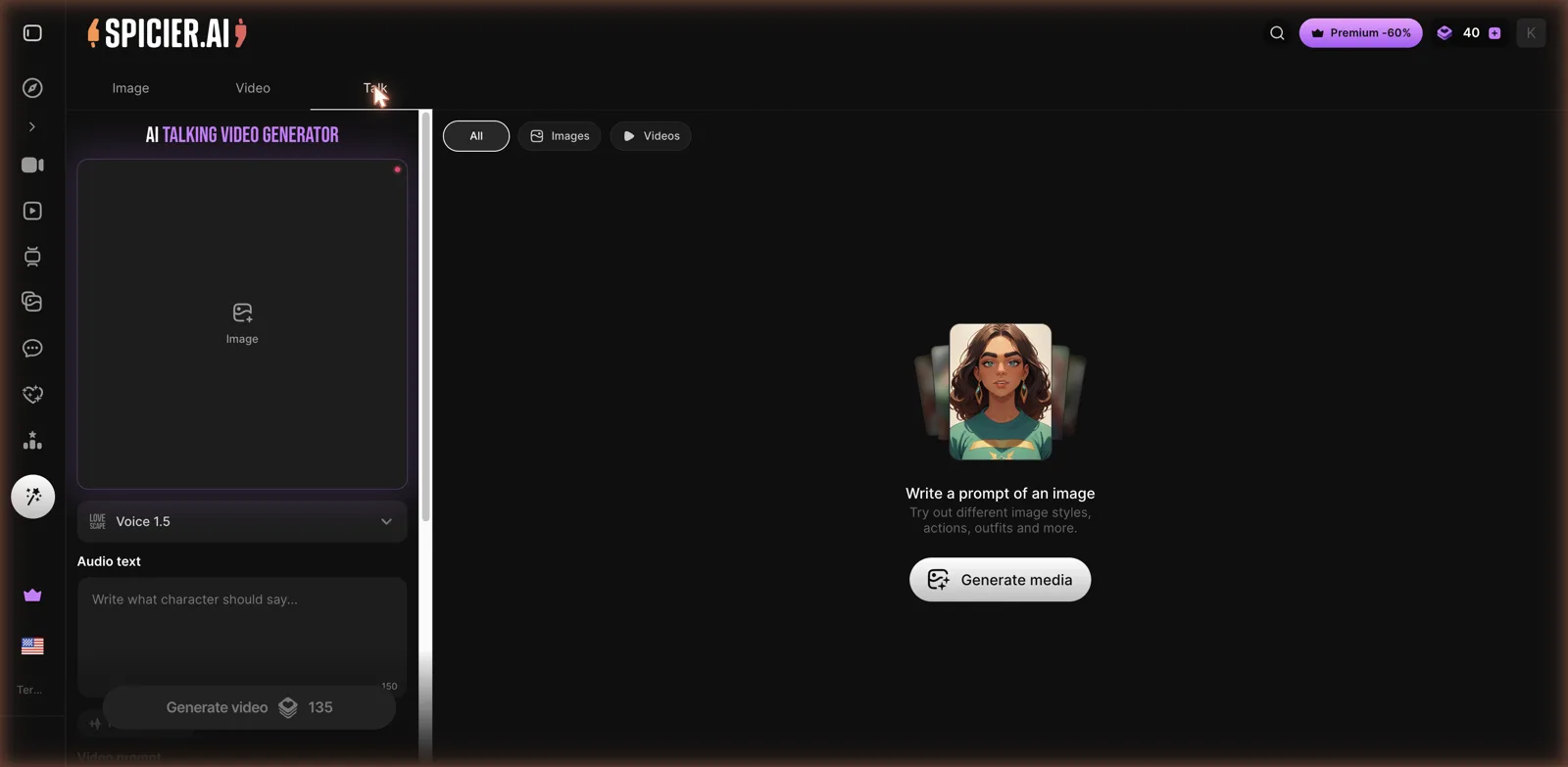
That lip-sync tool is the piece that lifts the platform above a plain image factory, and it is not something every competitor offers. It costs more than a picture, listed at 135 credits for a talking video in my session, so it is a treat rather than something to spam. Its advantage is that it lives in the same place as everything else, so you are not stitching together three separate subscriptions to get chat, images, and talking clips. If face-based video is your main interest, a dedicated swap tool like DeepSwap AI tackles moving faces differently, but Spicier AI’s appeal is having it all under one roof.
The voice picker on the Talk tool is a small detail that matters more than it looks. Rather than being stuck with a single default voice, you can choose how a character sounds when you make a lip-sync clip, which lets you match a voice to a face instead of settling for whatever the tool assigns. For anyone who cares about the result feeling coherent rather than slapped together, that choice is the difference between a novelty and something you would actually want to keep. It also hints at the Lovescape roots of the engine, since the voice model carries that branding, another quiet reminder that you are using a shared backend dressed up in Spicier AI’s colors.
Chat and the companion layer
Spicier AI has a Chats section where you can talk to its characters or create your own. As on its siblings, this feels secondary to the generator rather than the headline act. The pricing markets hot roleplays and voice messages, so the companion layer is there, but the site’s center of gravity is clearly the image and video tools.
That is a fair design choice, and it is the opposite of a chat-first companion app. If your main goal is a girlfriend you talk to daily who remembers your conversations, a dedicated companion suits you better, and my virtual girlfriends guide covers the platforms built for that. If your main goal is making images and clips with an optional chat on the side, Spicier AI has the balance tipped that way, and that is who it is for.
What Spicier AI costs
Spicier AI splits its money into two buckets: a subscription for features and Chips for topping up credits. The subscription tab has two flavors, Premium and Creative PRO, and the numbers are identical to its network twin.
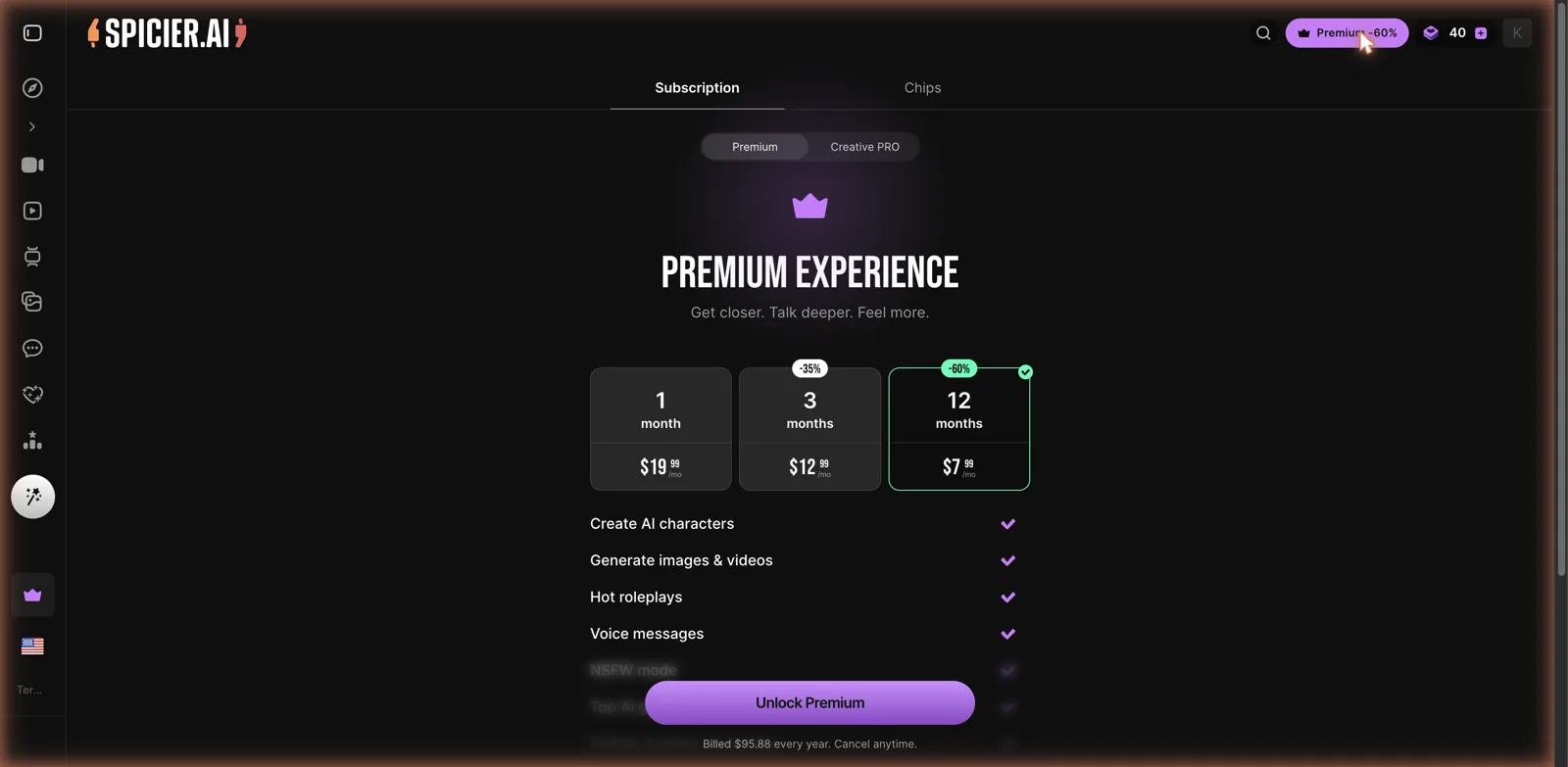
Premium runs on the usual ladder. One month is $19.99. Three months drops to $12.99 a month with a 35 percent discount. Twelve months falls to $7.99 a month at 60 percent off, billed as $95.88 for the year. So the annual plan cuts your monthly rate by more than half, which is the same math nearly every site in this space uses. Premium unlocks creating AI characters, generating images and videos, hot roleplays, voice messages, and NSFW mode, with more perks listed further down.
Sitting on top of that is the Chips system, which is how you buy extra credits when your monthly allowance runs dry. That two-layer setup, a subscription plus a credit top-up, is the part to watch. You are not just paying monthly, you are also metering your fun in credits every time you generate. There is also a Creative PRO tier next to Premium aimed at heavier users who want more headroom. My honest read: the annual Premium plan at $7.99 a month is the sensible entry point if you already know you like the tools, but the Chips meter means your real monthly cost depends entirely on how heavily you generate.
How it stacks up
Spicier AI’s strengths are exactly its twin’s: four tools under one login, an image builder that balances guided menus and freeform prompting, and a lip-sync talking-video feature that most competitors lack. The tools are clean and easy to drive, and the category range is huge. If you landed here first and never touch its siblings, you would have no complaints.
The catch is that it offers nothing its network twin does not. Same engine, same tools, same prices, so which of these clones you use comes down to which link you clicked. The credit economy is the other familiar snag: between the subscription and the Chips top-ups, the fun is metered, and the free 40 credits vanish fast. And the companion side is thinner than the generation side, so anyone coming for deep roleplay may find it underbaked. Its closest comparison is its own twin, Delur.ai, and if you want a straightforward image generator without the extra tabs, Pornify covers that lane.
Who Spicier AI is for
Spicier AI is a good pick if you want a single adult site that generates images and video, makes talking lip-sync clips, and offers character chat on the side, and if you do not mind managing a credit balance to use it all. The tools are approachable, the category range is huge, and the talking-video feature is a real point of difference from plain image mills.
It is a weaker pick if you want deep, memory-heavy companion chat, since this is generation-first, or if a subscription plus a separate credit top-up feels like paying twice. And because it is functionally identical to its network twin, there is no strong reason to prefer one over the other. My advice: use the small starting credit balance to run a couple of image batches and, if you can spare the credits, one talking video, because that lip-sync tool is the thing you cannot easily get elsewhere. It is 18-plus, it is upfront about what it makes, and taken as a broad generation suite, it does the job cleanly, even if it brings nothing new to the table its family did not already have.