Penly is a bit of an outlier in this space. Most of the platforms I look at are built around one thing, usually a companion to chat with or a generator to make pictures. Penly instead throws a whole workshop of AI tools at you: portrait generation, face swap, image-to-video, inpainting, upscaling, background removal, an anime converter, and a companion chat, all bolted onto one dashboard. I dug through the guest-accessible side to map out what it actually offers and how the credits work. Here is the rundown.
Top AI Girlfriend Platforms — Our Picks

Hyper-realistic AI companions with adaptive memory that recall your past conversations.


Create a custom AI girlfriend with her own personality, generated images, and ongoing chat memory.
Build a custom AI companion and bring her to life with chat, images, and video.

Characters that hold memory and context, so the relationship builds over time instead of resetting.

Chat with a fully custom AI girlfriend — choose her personality, outfits, and more.
Personalized AI companions for ongoing roleplay, with a simple, discreet signup.

Build a custom AI girlfriend, boyfriend, or anime character — choose the look and personality.
Customizable AI girlfriend personalities with realistic, ongoing conversations.
What Penly is
Penly, at aipenly.com, is an all-in-one AI creative suite rather than a single-purpose app. When you land on the dashboard you are met with a Creative Dashboard and a left-hand menu grouped into categories: video tools, creation tools, and editing tools. It is closer to a Photoshop-style toolbox for AI generation than a girlfriend app, and the breadth is the whole selling point.
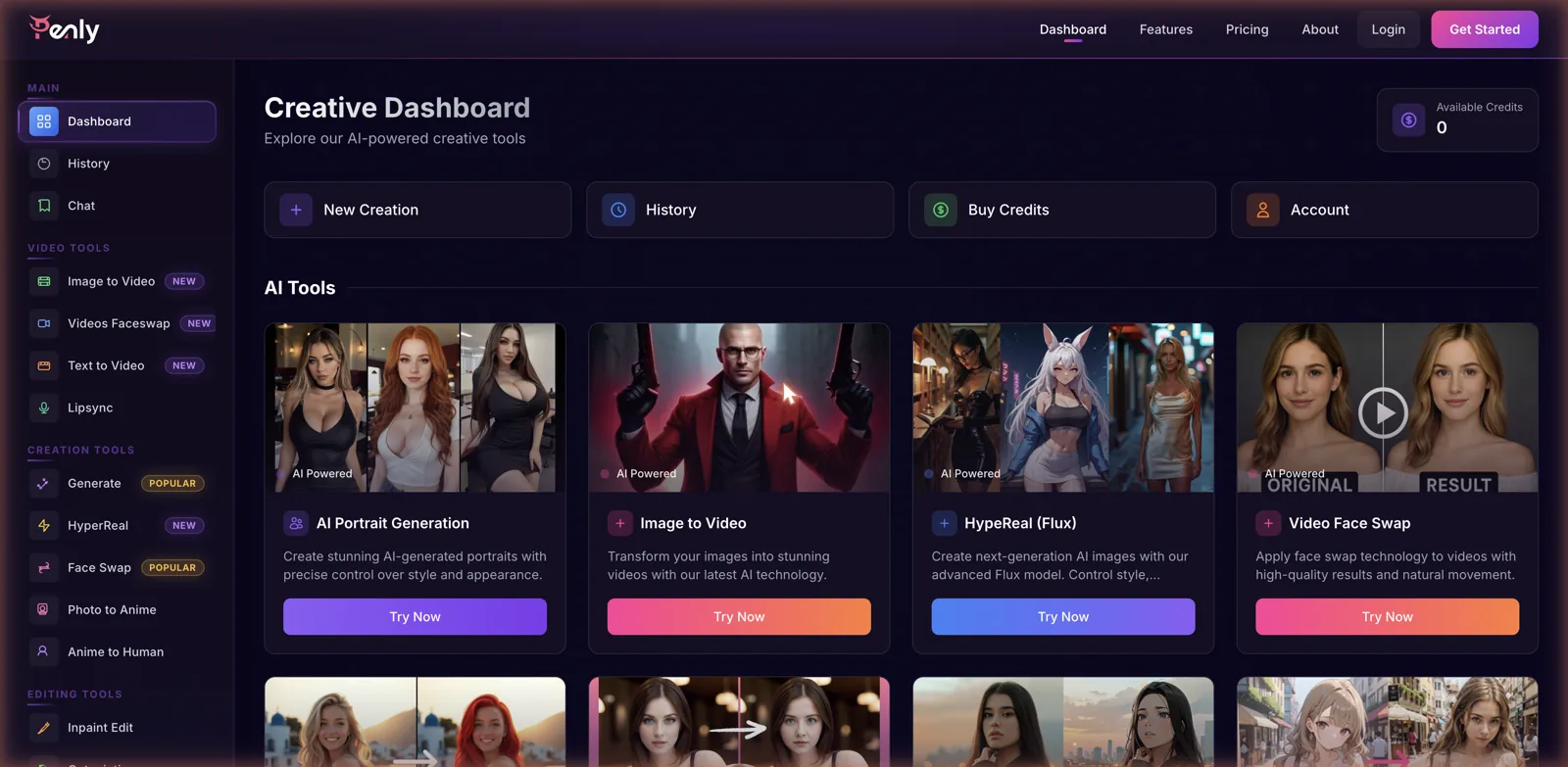
The creation tools cover the basics you would expect, with a Generate option marked popular, a HyperReal mode built on a Flux model for higher realism, Face Swap, and converters that turn a photo into anime or anime back into a human-looking image. The video side is newer, with image-to-video, video face swap, text-to-video, and lipsync all flagged as recent additions. On the editing front there is inpainting, outpainting, background removal, text and watermark removal, and AI upscaling. That is a genuinely deep list for one platform.
The companion chat
Tucked into the main menu is a Chat section that reframes part of the platform as a companion tool. Open it and you get a Meet Your AI Companion page with a couple of dozen characters, filterable by realistic or anime style and sortable into categories like Adventure, Fantasy, Historical, Drama, and Romance. So on top of being a generation suite, Penly also wants to be a place you talk to AI personalities. For dedicated companions, see my best AI chatbot girlfriend picks.
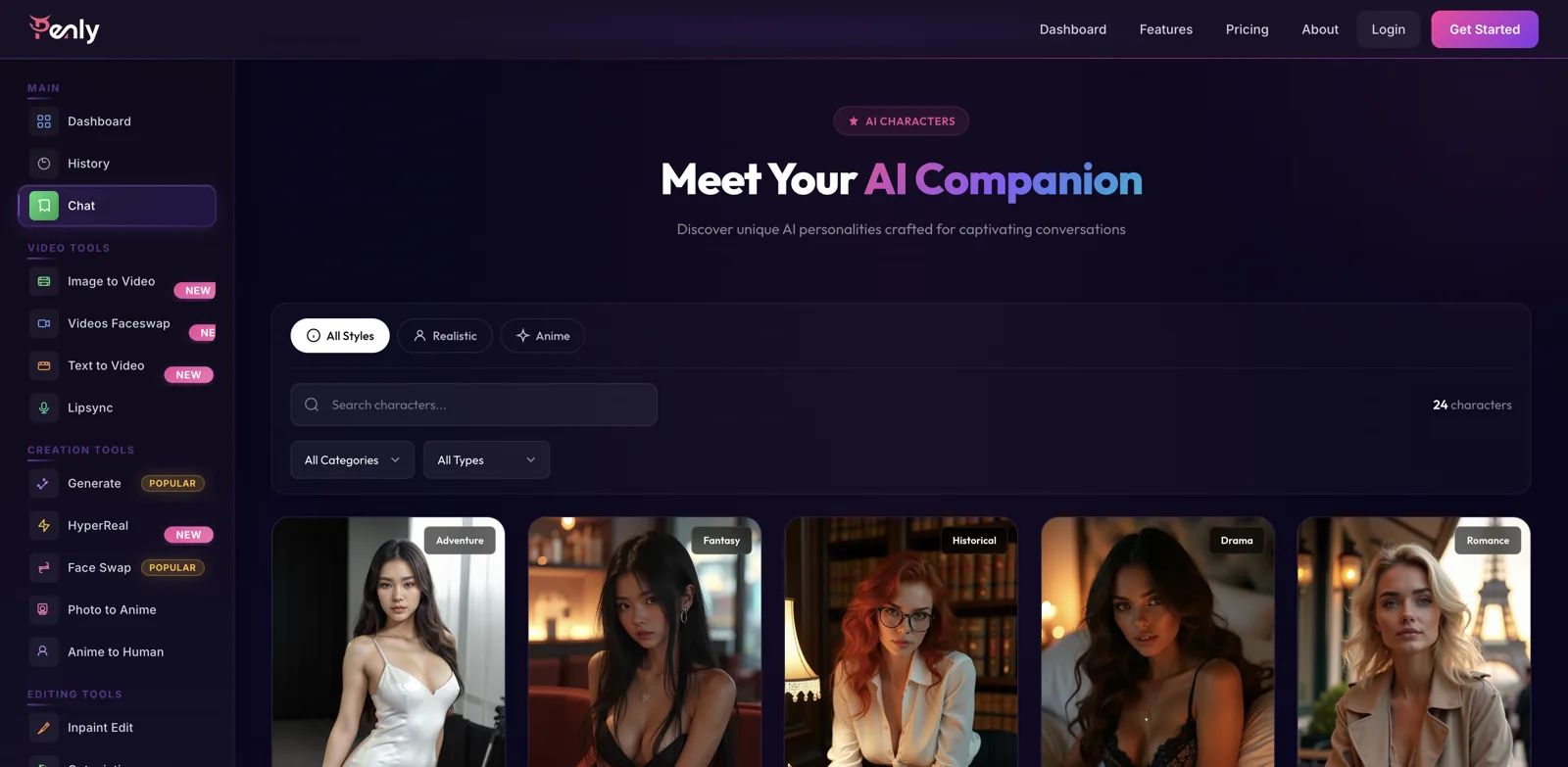
It is a smaller roster than a dedicated companion app, two dozen or so characters rather than thousands, which tells you the chat is a feature rather than the main event. If conversation is your primary interest, a platform built around it will give you far more variety. But as a bonus that sits next to a full image and video toolkit, having some characters to chat with is a reasonable addition, and it means you can generate an image and then talk to a personality without leaving the site.
A note on testing
Worth being upfront here: the moment I tried to open a character or a tool, Penly sent me to a login screen, and both the generation tools and the chat require an account and credits to actually run. I did not create an account, so this review is based on exploring the guest-accessible dashboard, the character gallery, and the features and pricing pages rather than firsthand generation. That means I can map what Penly offers and how it charges, but I cannot vouch for the output quality of each tool from personal use. Treat the tool list as the pitch, and go in expecting to sign up before you can judge the results yourself.
It is also worth flagging that the roadmap page still lists some features as coming in quarters from a couple of years back, even though the site otherwise reads as current. That kind of stale copy is a small thing, but it is the sort of detail that makes you want to double-check which features are genuinely live before you buy credits expecting a specific one.
How the credits work
Penly does not run on a subscription, which is unusual and, for a lot of people, welcome. Instead you buy one-time credit packs, and the site makes a point that the credits never expire. That removes the recurring-charge anxiety that puts people off a lot of these platforms: you top up when you need to, and unused credits just sit there until you use them.
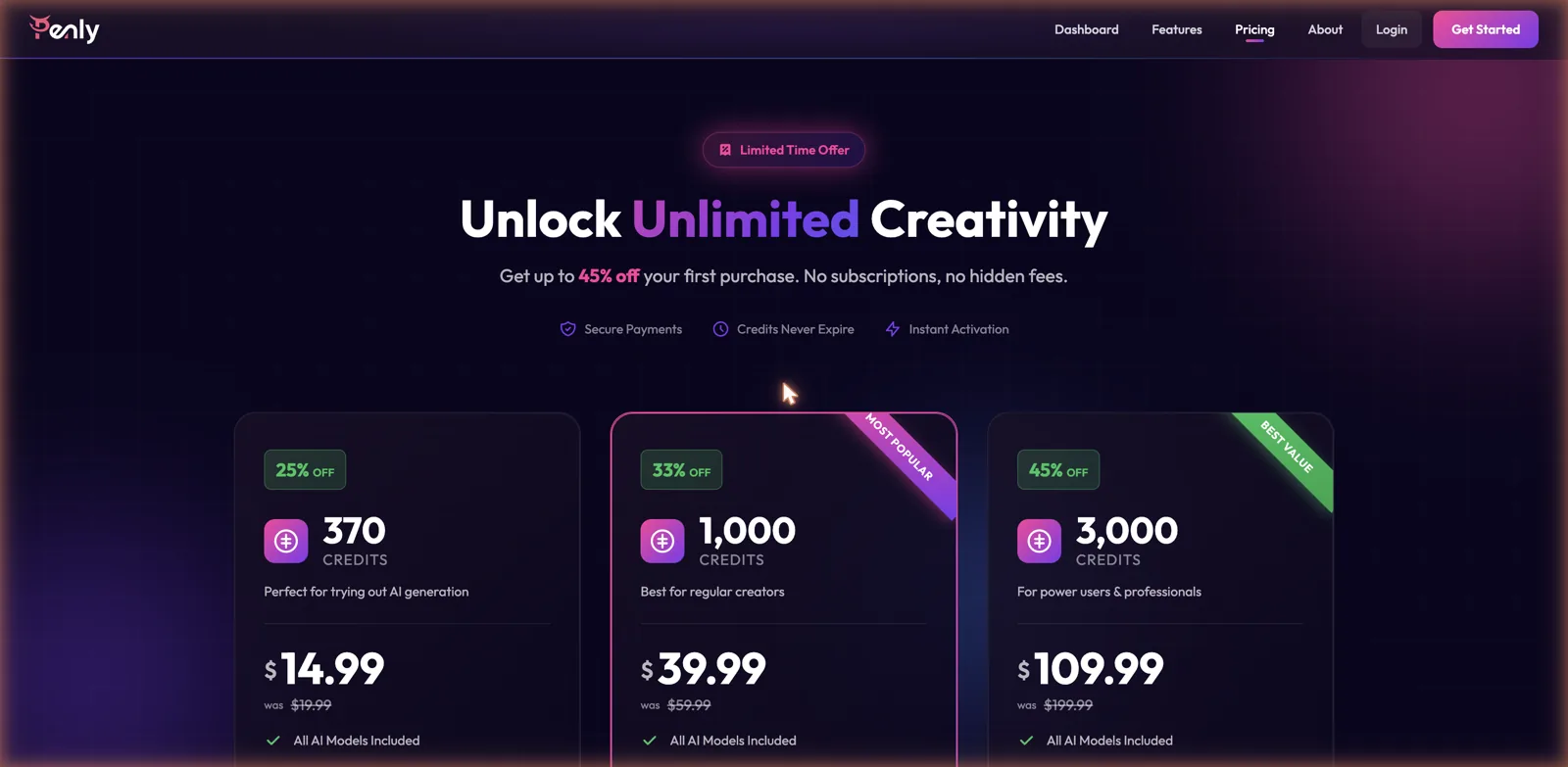
When I looked, the packs ran 14.99 dollars for 370 credits, 39.99 dollars for 1,000 credits as the most-popular option, and 109.99 dollars for 3,000 credits pitched at power users, each shown with a chunky launch discount off a higher original price. Every pack advertises access to all AI models, and the checkout leans on the usual reassurances of secure payment, instant activation, and no hidden fees. Different tools cost different amounts of credits, so how far a pack stretches depends entirely on what you generate, with video almost certainly costing more than a single still. As always, check the current prices and per-tool costs before buying, since these move around.
Free versus paid
There is a free tier, but the features page makes clear it is limited to the basics, with things like AI upscaling, face swap, outpainting, API access, and priority support reserved for the paid Pro level. Combined with the credit system, that means the free experience is a taste rather than a workspace. You can see what the platform does, but doing much of it in practice means buying credits and, for some tools, being on the higher tier.
The dashboard I saw showed a credit balance of zero for a guest, which reinforces the point: nothing meaningful happens until you top up. That is a fair enough model for a tool-heavy platform where each generation has a real compute cost, but it does mean Penly asks for commitment before it shows you much, unlike companion apps that let you chat for free first.
Where it sits on the content spectrum
The sample imagery across the dashboard and character gallery leans clearly adult, with a lot of glamour portraits and suggestive styling, so Penly is comfortable generating spicy content even though it markets itself as a general creative toolkit rather than an explicit platform. The human generation and portrait tools are the obvious route to adult images, and the companion characters carry the same mature tone. Because I did not run the tools myself, I cannot report exactly how far the generators will go, but the presentation makes it plain this is adult-capable rather than a strictly clean design app.
That dual identity, part professional-sounding AI toolkit, part adult generator, is worth understanding. Penly speaks the language of creators and productivity, but the content it showcases sits firmly in grown-up territory, so judge it as an adult-capable suite rather than a workplace tool.
How it compares
As a broad, multi-tool AI suite, Penly’s closest comparison is BasedLabs, which similarly bundles a stack of generation and video tools under one roof. For the face-swap side specifically, DeepSwap AI is a dedicated specialist that does that one job with more depth, and for straightforward spicy image generation, SpicyGen covers that ground without the wider toolkit.
On the chat side, Penly’s two dozen characters cannot really compete with a dedicated companion app like Botify AI, which offers a huge roster plus tightly integrated media. Penly’s actual pitch is not to beat any one of these at their specialty, but to give you a bit of everything in a single place with credits that never expire. Whether that convenience is worth more than best-in-class tools depends on how much of the toolkit you will realistically use.
Getting the most out of it
If you do decide to try Penly, the credit model rewards a little planning. Because credits never expire, there is no pressure to burn through a pack quickly, so the smart move is to buy the smallest pack first, test the specific tools you actually care about, and only scale up to a bigger pack once you know the output quality is worth it to you. Spreading a small pack across the two or three tools that matter most tells you far more than blowing it all on one type of generation.
It also pays to be clear-eyed about which tools are the reason you are here. Penly’s breadth is a strength, but it also means some tools will be stronger than others, and a suite that does ten things rarely does all ten as well as a specialist. Identify your must-have feature, whether that is face swap, portrait generation, or the anime converter, and treat everything else as a bonus rather than assuming the whole toolkit performs at the same level. The never-expiring credits at least mean you can experiment at your own pace instead of racing a subscription clock.
The video side
The part of Penly that feels most current is the video toolset, which the dashboard flags as newly added. Alongside the image tools you get image-to-video, which animates a still, a video face swap that carries the face-swapping idea into moving footage, text-to-video for generating a clip from a description, and lipsync for matching a voice to a face. That is an ambitious spread, because video is the hard, expensive frontier of AI generation, and most platforms in this corner still stick to stills.
The flip side is that video is exactly where you should temper expectations and watch your credit balance. Moving footage costs far more compute than a single image, so it will eat through a credit pack faster than anything else on the platform, and AI video in general is still less predictable than image generation. Because I did not run the tools myself, I cannot speak to how clean Penly’s clips come out, but the smart approach is to prove the still-image tools are worth your money before spending heavily on the video ones. If video is the specific reason you are considering Penly, buy a small pack and test that feature first rather than assuming it performs as well as the more mature image tools.
The good and the not so good
On the plus side, the sheer breadth is impressive, with image generation, video tools, face swap, a full set of editing utilities, and a companion chat all in one dashboard. The no-subscription, never-expiring credit model is genuinely friendly and rare in this space, the interface is clean and well organized, and having everything under one login is convenient if you would otherwise juggle several tools.
On the downside, almost nothing works without an account and credits, so there is very little you can actually try for free, and some tools are locked to the paid tier on top of the credit cost. The companion chat is thin compared with dedicated apps, the roadmap copy looks out of date, and a jack-of-all-trades suite inevitably means some tools will be weaker than a specialist would offer. You are trading depth for breadth.
Who it is for
Penly makes the most sense for someone who wants a single place to do a lot of different AI generation and editing tasks, and who likes the idea of buying credits once rather than committing to a monthly bill. If you regularly bounce between making portraits, swapping faces, cleaning up images, and turning stills into short videos, having all of that behind one login with credits that never expire is a real convenience.
If you only care about one thing, whether that is conversation, face swapping, or explicit generation, a specialist platform will almost certainly serve you better and let you test it more freely. Penly is a breadth play, so judge it on whether you will use enough of the toolkit to justify the credits, start with the smallest pack to check the output suits you, and go in knowing you will need to sign up before you can see much at all.