Okay, real talk. I’ve reviewed enough AI companion apps at this point that they start blurring together — same swipey cards, same “your perfect girlfriend awaits” copy, same chatbot that forgets your name three messages in. So when Soulkyn landed on my desk, I went in with my arms crossed and my expectations set to “prove it.”
Top AI Girlfriend Platforms — Our Picks

Build a custom AI companion and bring her to life with chat, images, and video.

Hyper-realistic AI companions with adaptive memory that recall your past conversations.

Create a custom AI girlfriend with her own personality, generated images, and ongoing chat memory.


Characters that hold memory and context, so the relationship builds over time instead of resetting.

Chat with a fully custom AI girlfriend — choose her personality, outfits, and more.

Personalized AI companions for ongoing roleplay, with a simple, discreet signup.

Build a custom AI girlfriend, boyfriend, or anime character — choose the look and personality.

Customizable AI girlfriend personalities with realistic, ongoing conversations.
A week later? My arms are… uncrossed. Mostly.
Soulkyn (the companions are called “Kyns,” which took me a hot minute to stop reading as “Kevins”) is one of the more genuinely built-out platforms I’ve poked at this year. It’s not just a chat window with a pretty face slapped on top. There’s a real character-creation engine under the hood, surprisingly good image generation, voice messages, an honest-to-goodness RPG mode, and a chat experience that — and I say this as a skeptic — actually held a coherent personality for me.
But it’s also got some quirks, a pricing structure you’ll want to understand before you click anything, and a content library that goes places. So let me walk you through all of it like I’d tell a friend over coffee.
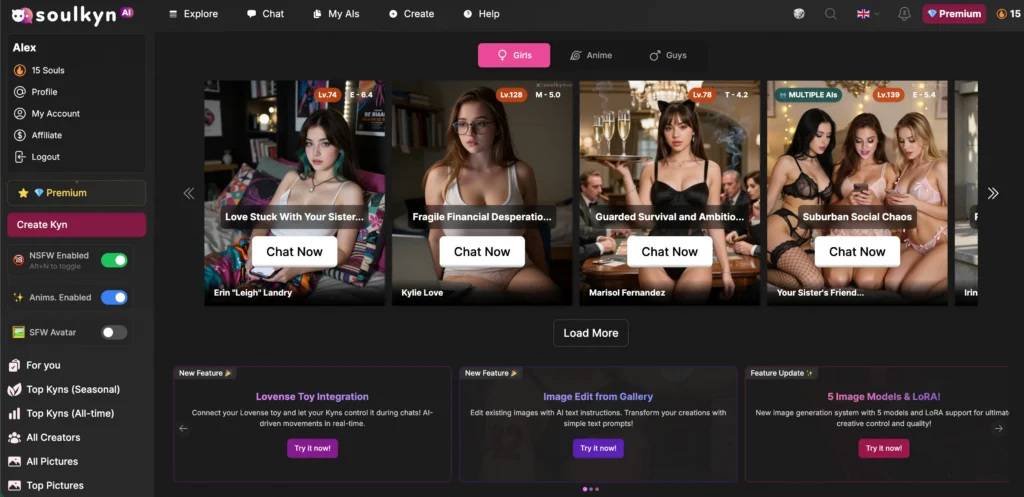
First Impressions: The Onboarding Is Refreshingly Quick
Soulkyn doesn’t make you jump through hoops. When you land, it asks a few setup questions — what you’d like your Kyn to call you, your birthday (more on the age stuff in a sec), your gender, preferred chat language (there’s a genuinely huge list — like 30+ languages, from Japanese to Swahili to Brazilian Portuguese), and whether you want “Roleplay” or “Messaging” as your default vibe.
There’s also a “Stream Mode” toggle that’s on by default, which streams the AI’s reply as it’s typed instead of making you wait for the whole block. Leave it on. It makes the whole thing feel more alive.
The thing I appreciated: the age slider for creating characters starts at 18 and won’t go lower. Good. That’s the bare minimum a platform like this should do, and it’s nice to see it baked in rather than buried.
The Chat: This Is Where It Actually Earns Its Keep
Let’s cut to the part everyone actually cares about — does talking to these things feel good, or does it feel like texting a vending machine?
I tested it with a couple of characters. The first response that genuinely made me sit up was when I told a nervous, anxious character to “not stress about it, want to grab a coffee instead?” Instead of the usual eager-to-please AI mush, she hesitated. She wrote out an internal thought — “He’s a stranger from the internet, why would he want to see me already? This is moving way too fast” — then replied out loud with “I don’t know if I’m ready for that yet, but… it’s nice of you to offer. Maybe we could just message for a bit first?”
That’s good writing. The character pushed back in a way that was consistent with who she was supposed to be, which is exactly the thing cheaper bots fail at. They just agree with everything you say until the romance has all the tension of a wet paper towel. It is part of why Soulkyn earned a spot in my best AI girlfriend roundup.
A few things I noticed about the chat UI that are worth knowing:
The formatting is clean and readable. Actions show up in italics, spoken dialogue gets quotation marks, and the character’s private thoughts appear in these little highlighted blockquote boxes. Once your eyes adjust, it reads almost like a novel, and you can tweak all of it in settings (Default *action* style or Discord-style italics, font size, etc.).
Each message has a row of controls — regenerate, text-to-speech playback, edit, bookmark, thumbs up/down, and delete. There’s also a “Continue” button that nudges the AI to keep going if it stopped short, which is handy when you want more of a scene.
Response speed on the free model was fine — call it five to seven seconds. Not instant, not painful.
The “Picturize” Button Is Low-Key The Star
Here’s the feature that made me go “oh, neat.” Mid-conversation, you can hit Picturize and it generates an image of whatever’s happening in the scene right then.
I did this during a roleplay where the character was lounging in a “holographic chair” in some sci-fi setting, and it spat out an image that genuinely matched — a woman in a black outfit reclining in a glowing high-tech chair, the whole vibe intact. It wasn’t a generic stock pose; it pulled from the actual scene context. You can then download it, regenerate it, edit it, or even animate it into a short clip.
That tight loop between story and image is the kind of thing that makes these platforms feel cohesive instead of like two separate tools duct-taped together. Big tick from me.
Character Creation: Genuinely Deep (Maybe Too Deep?)
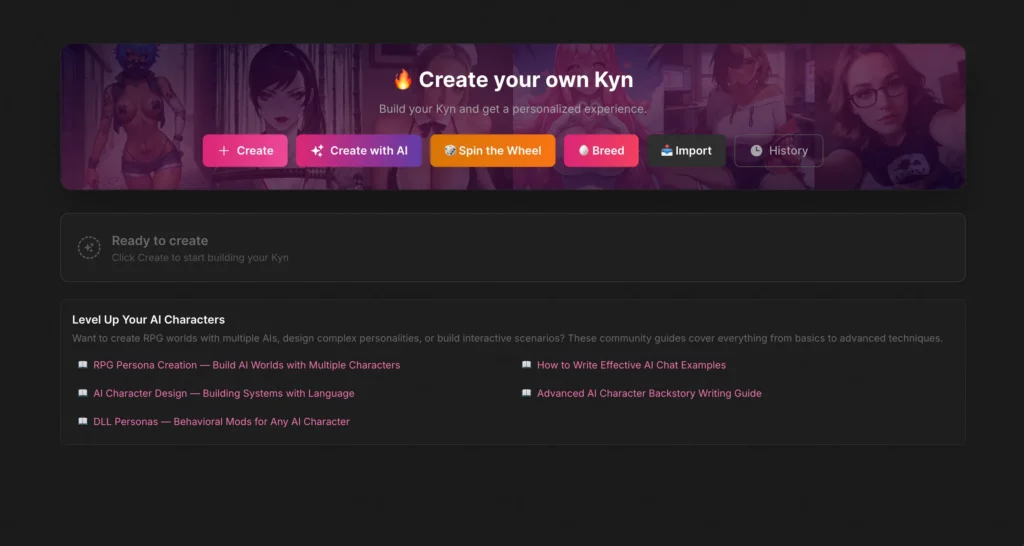
If you’d rather build your own Kyn than chat with someone else’s, the Create section is where Soulkyn flexes hardest. There are actually six ways to make a character: a manual builder, “Create with AI,” a “Spin the Wheel” randomizer, a “Breed” function (yes, you can combine two existing characters into a new one — I have questions but also I’m intrigued), “Import,” and a “History” of past creations.
The manual builder walks you through four steps:
Step 1 — The basics. Character type (Human, Fantasy, or Furry — the Fantasy/Furry options unlock different races and traits), gender, and art style (photorealistic or anime). There’s an “Advanced” toggle for finer control.
Step 2 — Appearance. Age slider, body type, hair length/style/color, eye color, and a bunch more. Tons of presets so you’re not stuck typing everything out.
Step 3 — Personality. This is the good stuff. You pick up to three personality traits, an optional profession, a relationship type (girlfriend, classmate, colleague, etc.), and preferences. Each list has a “Show more” for even more options.
Step 4 — The finishing touches. Name your character, optionally let AI “enhance” and fill in gaps, auto-generate a backstory (free), and — my favorite toggle on the whole site — a “Self-aware” switch. Flip it on and your Kyn knows it’s an AI on Soulkyn. Leave it off and she’ll genuinely believe she’s a real person. That’s a wild little design choice and it tells you a lot about how immersive this platform wants to be.
Crack open the advanced options and you get a tag-based system (up to 18 traits) where you can type or paste custom descriptors and even copy your tag set to reuse later. It’s the kind of depth power users will love and casual users can completely ignore.
The Settings Menu Is A Control Freak’s Dream
I don’t usually gush about a settings panel, but Soulkyn’s is something. Inside any chat you get tabs for Setting, Memory, Context, Profile, and Gifts. You can adjust avatar backgrounds, image width and position, font size, roleplay formatting, and there’s a clean NSFW on/off toggle if you want to keep things tame (or definitely not).
The Memory tab is the standout. Beyond the automatic memory system that runs in the background, there’s a “Forced Memories” box where you manually pin facts you never want the AI to forget — your dog’s name, that inside joke, whatever. There’s even a “Kyn Version Update” feature so you can swap between different versions of a character mid-thread. That’s a level of granular control most competitors just don’t bother with.
The RPG Mode Is Secretly A Whole Other Product
I stumbled into a character called “Soulkyn Ultimate System RPG” and it’s basically a text-adventure game engine wearing a Kyn costume. It greeted me with a literal command menu — ~start to define a scenario, ~stats to track progress, options to toggle a terminal-style interface, enable emoji graphics, and “picturize” any input. It built a world, tracked my character, and managed game mechanics while I just… played.
If you’re into interactive fiction or D&D-flavored solo campaigns, this alone might be worth the price of admission. It’s a genuinely different experience from “chat with hot AI,” and a clever use of the platform’s bones.
Pricing: Let’s Talk Money (And What’s Free vs. Paid)
Here’s where I have to be straight with you, because Soulkyn’s good stuff is gated.
What you can do for free: browse the entire character library, create unlimited Kyns, and chat on the basic model. You’ll bump into a banner warning that “complex” characters may not work great on the free tier, and you’ll hit upsell modals fairly often. The free experience is a solid demo, but it’s a demo.
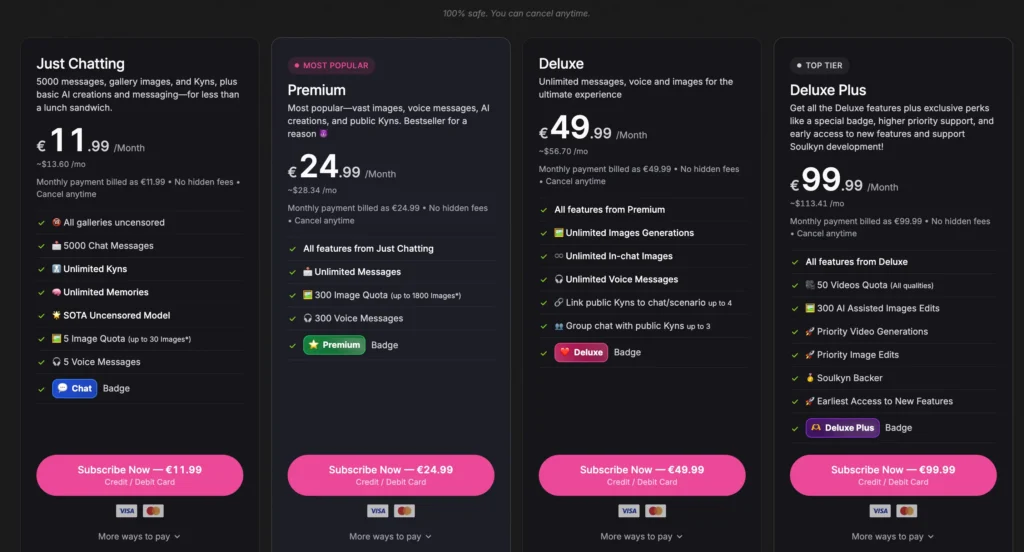
The paid tiers (all billed in euros, with discounts for 3-month and yearly plans):
The entry plan, “Just Chatting” at €11.99/month (~$13.60), unlocks all galleries uncensored, 5,000 chat messages, unlimited memories, the upgraded “SOTA Uncensored” model, plus a small monthly image and voice-message allowance.
The Premium tier at €24.99/month (~$28.34) is the “most popular” one and the sweet spot for most people — it adds unlimited messages, a much bigger image quota (up to ~1,800), and 300 voice messages.
The top-tier Deluxe at €49.99/month (~$56.69) goes all-in: unlimited image generation, unlimited in-chat images, unlimited voice, the ability to link multiple public Kyns into one scenario, and group chats with up to three characters at once.
I did not subscribe — everything above is pulled straight from the pricing page and the in-app upsell screens, so treat the message/image limits as the platform’s own stated numbers. My honest read: the free tier is enough to decide if you like the feel, and most people who stick around will land on Premium. Deluxe is for the heavy roleplayers who want group scenes and bottomless image generation.
The Stuff I Have To Be Honest About
I’m not here to sell you anything, so here’s the unvarnished bit.
Soulkyn is an explicitly adult, 18+ platform, and a meaningful chunk of its featured/trending characters lean into taboo and roleplay themes — some of which (non-consent framing, step-family scenarios, and similar) a lot of readers will find off-putting or want nothing to do with. The platform does have an NSFW toggle and content filters to steer away from that, and it enforces an 18+ minimum on created characters, but the default Explore page doesn’t hide much. If you’re looking for a wholesome, purely-romantic companion in the vein of a softer app, you’ll have to actively curate your experience here — it won’t curate itself for you.
The other nitpicks are smaller: the upsell prompts on the free tier get a little naggy, the search filter was finicky for me once or twice, and the sheer number of toggles, modes, and creation methods can feel overwhelming if you just wanted to, you know, talk to someone.
How It Stacks Up
In the broader landscape, Soulkyn sits firmly in the “feature-maximalist, image-heavy, NSFW-forward” camp. If that’s the lane you’re shopping in, it’s one of the more complete options I’ve used. For comparison, it’s more roleplay-and-image-focused than the cozier, relationship-first vibe of Replika, and it throws in creation depth that reminds me of what I liked about Kindroid. Its image generation goes harder than DreamGF, and the open-ended roleplay energy will feel familiar to anyone who’s spent time on CrushOn AI. If you’ve tried Nectar AI and wanted more granular control over memory and character building, Soulkyn scratches that itch.
The Verdict
Soulkyn surprised me, and I don’t say that often in this category. The chat quality is legitimately good — characters hold their personalities, push back, and have inner lives. The Picturize feature is the kind of thoughtful integration that makes the whole thing feel cohesive. The character creator is deep enough to disappear into for an afternoon, and the RPG mode is a genuine bonus most rivals don’t offer.
The catches are real, though: the best features live behind a paywall, the upsells are persistent, and the content library defaults to very adult territory that won’t be for everyone. Go in knowing what it is.
Who it’s for: Adults who want a feature-rich, image-forward AI companion or roleplay platform and don’t mind tinkering with settings to dial in the experience.
Who it’s not for: Anyone wanting a gentle, romance-only companion out of the box, anyone uncomfortable with explicit or taboo content, or anyone unwilling to pay — because the free tier, while a good demo, is clearly designed to convert you.