
Okay, so here’s the thing. I’ve reviewed a lot of AI companion apps at this point. Enough that I can usually tell within five minutes whether something is a genuinely polished product or just another wrapper slapped on top of an API with a stock-photo girlfriend on the homepage. So when Nectar AI landed on my desk, I went in a little jaded. Pleasantly surprised? Mostly. Eyebrow raised once or twice? Also yes. Let me walk you through all of it.
Top AI Girlfriend Platforms — Our Picks

Hyper-realistic AI companions with adaptive memory that recall your past conversations.

Create a custom AI girlfriend with her own personality, generated images, and ongoing chat memory.


Characters that hold memory and context, so the relationship builds over time instead of resetting.

Chat with a fully custom AI girlfriend — choose her personality, outfits, and more.

Personalized AI companions for ongoing roleplay, with a simple, discreet signup.

Build a custom AI girlfriend, boyfriend, or anime character — choose the look and personality.

Customizable AI girlfriend personalities with realistic, ongoing conversations.
This is the kind of review I’d give you if we were grabbing coffee and you asked, “hey, is this one actually any good?” No corporate fluff. Just what I found clicking around for an afternoon.

First Impressions: It Looks Expensive (In a Good Way)
The landing page hits you with a “Live your Dream Fantasy” banner and immediately throws you into the deep end with featured storylines — a Hogwarts-style multi-character world, a sprawling farm drama, that sort of thing. And honestly? The UI is clean. Dark theme, smooth, no janky pop-ups fighting for your attention. It feels less like a sketchy corner of the internet and more like a real streaming app. Big tick from me there, because a surprising number of competitors still feel like they were designed in 2014.
The left sidebar keeps things simple: a home/discovery feed, your chats, a create button, the image generator, and the upgrade gem. You’re never more than one click from anywhere, which I appreciate. Good navigation is one of those things you only notice when it’s bad, and Nectar nails the basics.
Browsing is genuinely fun, too. There’s a tag system across the top — Female, Male, Anime, Realistic, Romantic, plus a frankly enormous list of more specific tags — and a NSFW toggle that’s off by default. There’s a search bar, a “For You” feed, and little engagement counters on each card so you can see what’s popular. It’s basically Netflix for AI companions, and the comparison is intentional on their part.

A Quick, Honest Word About the Content
I’m not going to dance around this, because you deserve a straight answer. Nectar’s catalog leans hard into roleplay, and a noticeable chunk of the most popular characters are built around taboo and family-themed fantasy scenarios. Everything is labeled as fictional adults 18+, and that’s standard for the genre, but it’s more front-and-center here than on, say, the gentler companionship-focused apps. If you’re coming to this purely for a wholesome “AI girlfriend who texts you good morning” vibe, just know the catalog skews more adult-roleplay than cozy-companion.
That said, there’s plenty of lighter stuff too — gaming buddies, slow-burn romances, banter-y best-friend characters. You can absolutely curate your own experience. I just wouldn’t want you to be caught off guard scrolling the feed at work. (Don’t do that anyway.)
If you want a softer, relationship-first alternative for comparison, our Replika review and Anima review cover apps that lean more emotional-companion than fantasy-roleplay.
Building Your Own Companion: Surprisingly Deep
This is where Nectar started to win me over. The character creator is a proper step-by-step flow, and it doesn’t overwhelm you. You pick a starting point (a standard build or a photo-reference option), choose Realistic or Anime art style, then move through a genuinely thoughtful set of choices.
You set ethnicity and age — there’s an actual age slider starting at 18, which is the kind of thing I’m glad is locked sensibly. Then hair style, hair color, eye color (the usual suspects, plus fun options like pink and blue hair if you’re feeling it), and body type. Each option comes with a preview image, so you’re not just guessing from text labels. It’s tactile and fast.
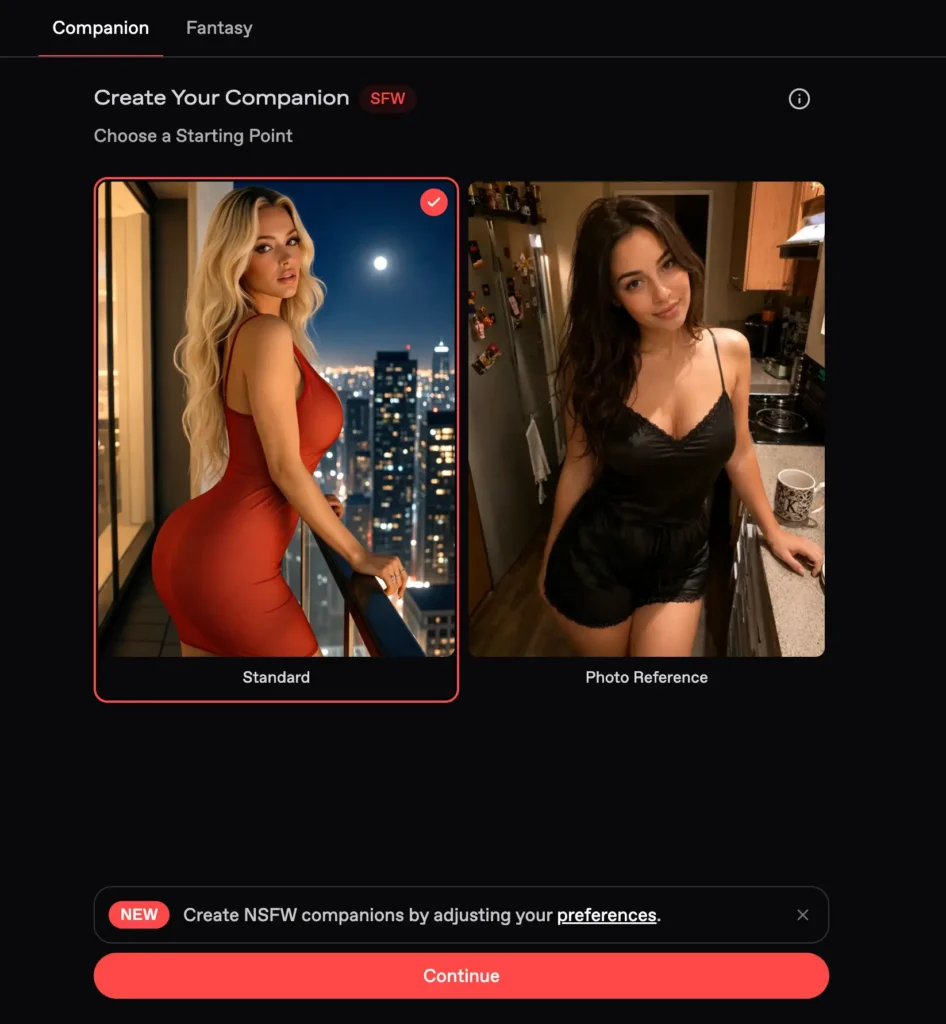
The final step is where it gets characterful. You name her, write a free-text personality description (their example is literally “sassy, flirtatious”), pick a voice — yes, voice — and there’s an Advanced Options drawer hiding extra fields for additional physical traits, a custom greeting, and an author comment. So if you want a companion with a specific quirk, a scar, glasses, a catchphrase, whatever, you’ve got room to do it.
Compared to a lot of competitors where “customization” means picking from four hairstyles and calling it a day, this is genuinely robust. It reminds me of the depth I praised in our Kindroid review, though Nectar’s flow feels a touch more beginner-friendly. You can be up and chatting in about two minutes, but the depth is there if you want to fuss over the details.
One note: there’s a “Visible to public?” toggle, and keeping your creations private is gated behind the paid Ultimate plan. So on the free tier, your custom character is technically public by default. Worth knowing if privacy matters to you.
The Chat: Does It Actually Feel Real?
This is the whole ballgame, right? You can have the prettiest UI in the world, but if the conversation is flat, none of it matters.
I jumped in with Pixie — a “small but deadly” gamer girl character — partly because she seemed fun and partly because sarcastic characters are a good stress test. Bratty personalities are where a lot of AI models faceplant; they either go limp and agreeable or they overcook it into cartoonish meanness.
Her opening message set the scene at an arcade, with narration in italics and dialogue in plain text — a nice, readable format. I fired back something cocky: “haha bring it on, shortstack. what game are we even playing?”

And she got it. She picked Mortal Kombat, smirked, selected Scorpion, and rolled with the trash talk — staying perfectly in character. The response came through quickly, streamed in word by word like a real text, and didn’t lose the playful-competitive thread I’d set up. No weird tonal lurch, no breaking character to ask how it could “assist” me. For a casual back-and-forth, it felt natural and genuinely entertaining.
Is it perfect? It’s an AI, so no — push any of these systems long enough and the seams show. But on first impression, the conversational quality is up there with the better platforms I’ve tested, and clearly ahead of the budget-tier stuff. If you’ve read our CrushOn AI review or DreamGF review, Nectar slots in comfortably alongside those in the “actually fun to talk to” category.
The Model Menu: This Is Where the Nerdy Magic Happens
Okay, this feature I loved. Open the chat settings and you’ll find a whole menu of AI models you can switch between, each with little rated bars for Consistency, Creativity, Descriptiveness, and Memory. It’s like picking a difficulty setting, except it’s picking how your companion thinks.
The lineup runs from the free Nectar Basic Model (solid for shorter chats, included in your plan limit) up through a tiered range of premium models — Orchid Lite, Fuchsia, DeepSeek V4 Flash, a new emotionally-focused one called Primrose, and their flagship Orchid at the top. The catch (and yes, this is a paid feature) is that the premium models cost credits per message — ranging from a few credits for the lighter ones up to 20 credits per message for the flagship Orchid.

I really like the transparency here. You can see that the flagship model scores higher on memory and descriptiveness, and you can decide for yourself whether richer responses are worth burning more credits. It puts you in control instead of hiding everything behind a vague “premium = better” wall. The same settings panel also lets you toggle long-term Memory, set a Persona for yourself, adjust Writing Style and Speech, and tweak the chat Appearance. Lots of knobs to play with.
Just be aware: at 20 credits a message, a long conversation on the flagship model will eat through a credit pack faster than you might expect. Pace yourself, or stick to the mid-tier models for everyday chatting.
Images, Video, and Voice: The Multimedia Side
Nectar isn’t just text. There’s a dedicated Image & Video Creator where you describe your dream companion and generate visuals. There’s a handy “Enhance” button that beefs up your prompt for you (costs a few credits), and you can flip between Image and Video generation.
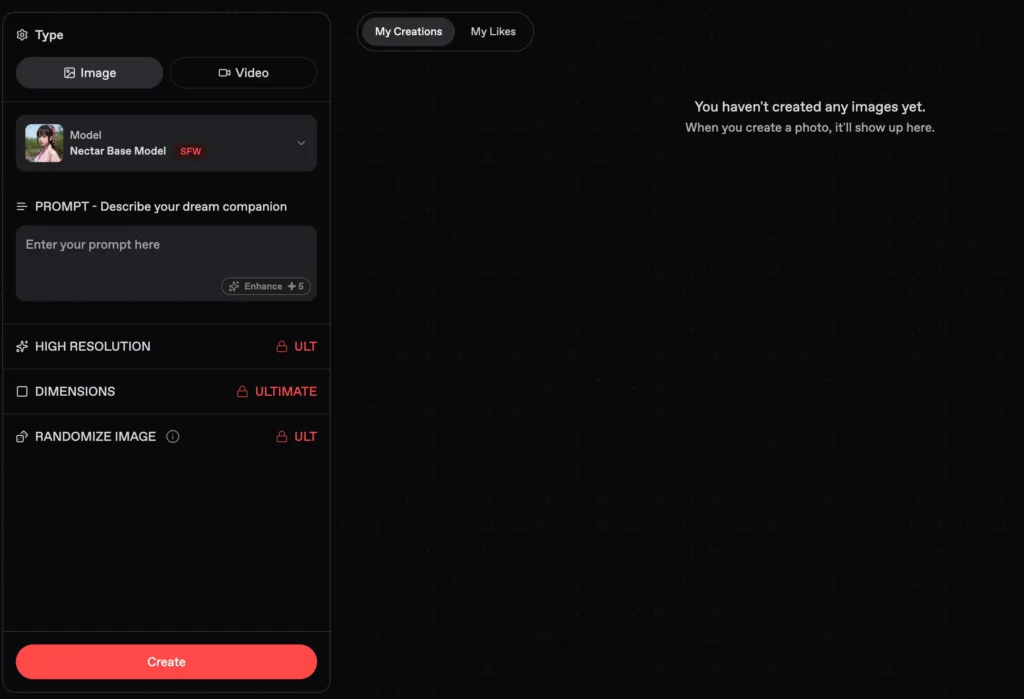
Here’s where the paid walls are clearest, and I’ll be upfront about them: High Resolution, custom Dimensions (landscape/portrait), and the Randomize Image feature are all locked behind the Ultimate plan. On the free tier you can still generate, but you’re capped at the standard model and standard output. Inside chats, you can also request photos and videos from your companion directly via a little camera button — again, the good stuff (video generation, voice messages, voice chat) lives on the paid plan.
The voice angle is worth flagging because not every competitor bothers. Between voice selection during creation and voice messages/calls in chat, Nectar is clearly trying to be a full multimedia experience rather than text-only. Whether the voices are great I’d want more time to judge, but the feature set is ambitious. Apps like the ones in our Soulmate AI review and Nomi AI review have set a high bar for immersion, and Nectar is clearly gunning for that same tier.
Fantasies vs. Companions: The Storytelling Twist
One thing that genuinely sets Nectar apart is the distinction between single Companions and multi-character Fantasies. The Fantasies are full scenario worlds — think a whole cast of characters in one storyline that remembers your choices and adapts. The featured Hogwarts-style world drops you into a school full of characters; the farm scenario gives you an entire household of distinct personalities.
It’s a more cinematic, choose-your-own-adventure approach than the usual one-on-one chat, and it’s a nice change of pace if straight companionship gets repetitive. Each character also tends to have multiple “Fantasies” (scenarios) attached, so the same companion can be a gaming rival in one and something completely different in another. Good replay value.
Pricing: Genuinely Reasonable (With a Catch)
Let’s talk money, because this is where a lot of these apps get greedy.
Nectar’s Ultimate plan is the headline subscription. On the annual deal it works out to about $4.99/month, billed $59.99/year — and they advertise a chunky discount versus paying monthly (the monthly option sits around $50/mo, so the yearly is a massive saving if you’re committed). Honestly, five bucks a month for unlimited messaging, all the customizations, the best models, landscape/portrait modes, long-term memory, video and voice features, and a monthly credit allowance? That’s competitive. It undercuts a lot of rivals.

Then there are credit packs sold separately, since premium models, image enhancement, and media generation all run on credits. These start at $4.99 for 2,500 credits and scale up to $99.99 for 50,000 credits, with bigger packs throwing in bonus credits. Payment-wise, they take card (Mastercard/Visa) and crypto, and they advertise no hidden fees with cancel-anytime.
The catch — and it’s a real one — is that the credit system means your costs aren’t purely fixed. “Unlimited messaging” applies to the included model, but if you fall in love with the flagship Orchid model or you’re cranking out high-res images, you’ll be topping up credits on the side. It’s not predatory, it’s clearly displayed, but budget for it mentally. I’d have liked the subscription to bundle a slightly more generous credit pool, but the entry price is low enough that I’m not mad about it.
For context on how the credit-versus-flat-fee debate plays out across the industry, our Kupid AI review and HeraHaven review both wrestle with similar pricing models, and our My Dream Companion review is a good reference point for what “good value” looks like in this space.
What I Liked
Let me just be real about the highlights. The UI is polished and a genuine pleasure to navigate. The character creator hits the sweet spot between approachable and deep. The model picker is brilliant — transparent, flexible, and it respects your intelligence. The chat held up well in testing, staying in character and reading naturally. The Fantasies feature adds real variety you don’t get everywhere. And the entry price is hard to argue with at roughly five bucks a month annually.
What Made Me Pause
No platform’s perfect, so here’s the other side. The credit system stacks on top of the subscription, so true costs can creep if you live on the premium models. Privacy for your custom characters is paywalled, which feels like it should be a baseline freebie. The content catalog skews heavily toward taboo roleplay, which won’t be everyone’s thing and is worth knowing before you scroll. And while the chat impressed me, I’d want a longer-term test to see how well that flagship memory really holds up over weeks, not minutes — that’s the true test of any companion app.
The Verdict: Who Should Actually Use This?
Here’s my honest take, friend to friend. Nectar AI is one of the more polished and feature-complete companion platforms I’ve poked at recently. It’s clearly built by people who’ve studied what works — the model transparency, the Fantasies system, the slick onboarding. It doesn’t feel cheap, and that counts for a lot.
If you’re into immersive roleplay, love the idea of deep character customization, and you want to experiment with different AI “brains” for your companion, Nectar is genuinely worth a look. The free tier is generous enough to get a real feel for it before you spend a dime, and the Ultimate plan is priced low enough that upgrading isn’t a wallet-killer (just keep half an eye on credit usage).
If you want a strictly wholesome, emotional-support companion with zero adult edge, you might find the catalog’s center of gravity a little much, and one of the softer apps we’ve reviewed might suit you better.
But for what it sets out to be — a slick, customizable, multimedia AI companion playground — Nectar AI delivers. It earns a solid spot near the top of the pile. I came in jaded and left mostly impressed, and that doesn’t happen as often as I’d like.
Pippin Club Rating: 4.4 / 5 — Polished, flexible, and genuinely fun. Mind the credits, and you’ve got yourself a winner.