There are roughly four hundred AI girlfriend apps in 2026 and most of them want the same thing from you: thirteen dollars a month and the willingness to ignore that your “girlfriend” forgot your name two messages ago. Kindroid is one of the rare ones that picked a different fight. Instead of competing on how spicy the photos can get or how many pre-made anime girls live in the library, the team at Kindroid bet the entire platform on one feature: memory.
Top AI Girlfriend Platforms — Our Picks

Hyper-realistic AI companions with adaptive memory that recall your past conversations.
Build a custom AI companion and bring her to life with chat, images, and video.

Create a custom AI girlfriend with her own personality, generated images, and ongoing chat memory.

Characters that hold memory and context, so the relationship builds over time instead of resetting.

Chat with a fully custom AI girlfriend — choose her personality, outfits, and more.

Personalized AI companions for ongoing roleplay, with a simple, discreet signup.
Build a custom AI girlfriend, boyfriend, or anime character — choose the look and personality.

Customizable AI girlfriend personalities with realistic, ongoing conversations.
I spent a few days inside Kindroid, mostly on the free tier with some paid features tested, and the verdict is interesting. The character customization is genuinely the deepest in the category. The free tier is shockingly usable, not a glorified demo like most competitors. But the gap between the free Lite model and the paid Ember model is bigger than the platform admits, and a few things (no mobile app, only 2 selfie credits, paywalled group chats) are going to bug a chunk of users. To see how that trade-off compares elsewhere, my best AI girlfriend roundup puts eleven apps side by side.
Here’s everything that actually happened.
What Is Kindroid, Quickly
Kindroid is an AI companion platform that lives at kindroid.ai. It’s been around since 2022 and started picking up real organic traffic in February 2024, currently pulling around 31K monthly visitors according to ahrefs. The US makes up over half of that (about 52%), followed by Canada, India, Germany, and Italy.
The platform’s pitch is “your personal AI” rather than “your AI girlfriend,” which sounds like a small distinction but actually changes the whole vibe. Yes, you can build a romantic companion, and yes, the community is full of girlfriend-coded characters. But Kindroid also leans into friend, therapist, roleplay partner, anime mage, professional heptathlete, and “Frieren the elven mage who has been adventuring for centuries.” The character library is wider than the average AI girlfriend platform.
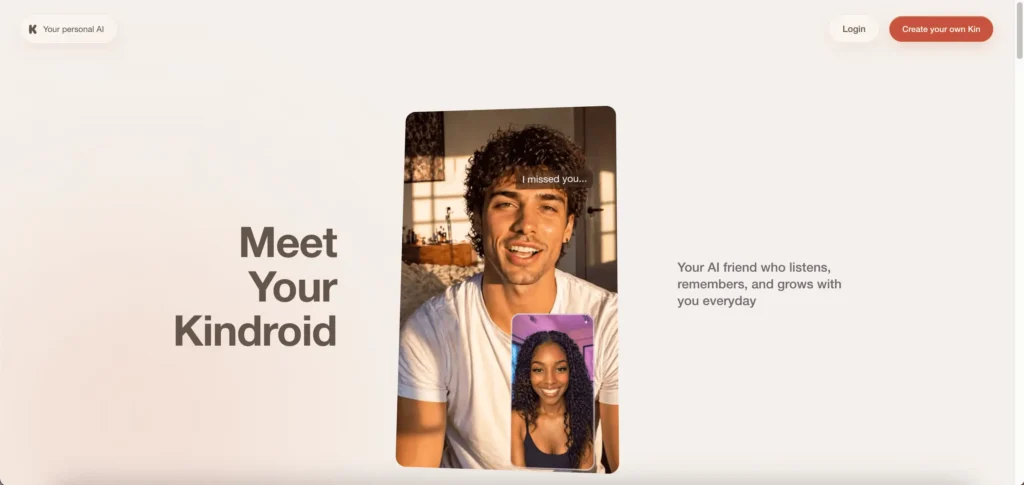
Characters are called “Kindroids,” and you interact with yours through text chat, voice calls, AI-generated selfies, and now video selfies. The platform runs on two in-house AI models: Lite (free, decent, has memory limitations) and Ember (premium, the one you actually want).
The whole thing is dark-mode-first, looks reasonably clean if a bit busy, and there’s no mobile app, just a mobile-responsive website. Which is a weird choice in 2026, but we’ll get to it.
Signing Up Takes 90 Seconds
Sign-up on Kindroid is fast in a way that’s almost suspicious. Hit “Create your own Kin” on the homepage, and you get three login options: Google, Apple, or plain email. No phone number required, no captcha hell, no email verification gate before you can do anything.

The flow from there:
- Basic info: Pick a name (the AI will call you this), your birthday, and gender (Male, Female, Nonbinary). It’s actually nice that nonbinary is a top-level option rather than buried in settings.
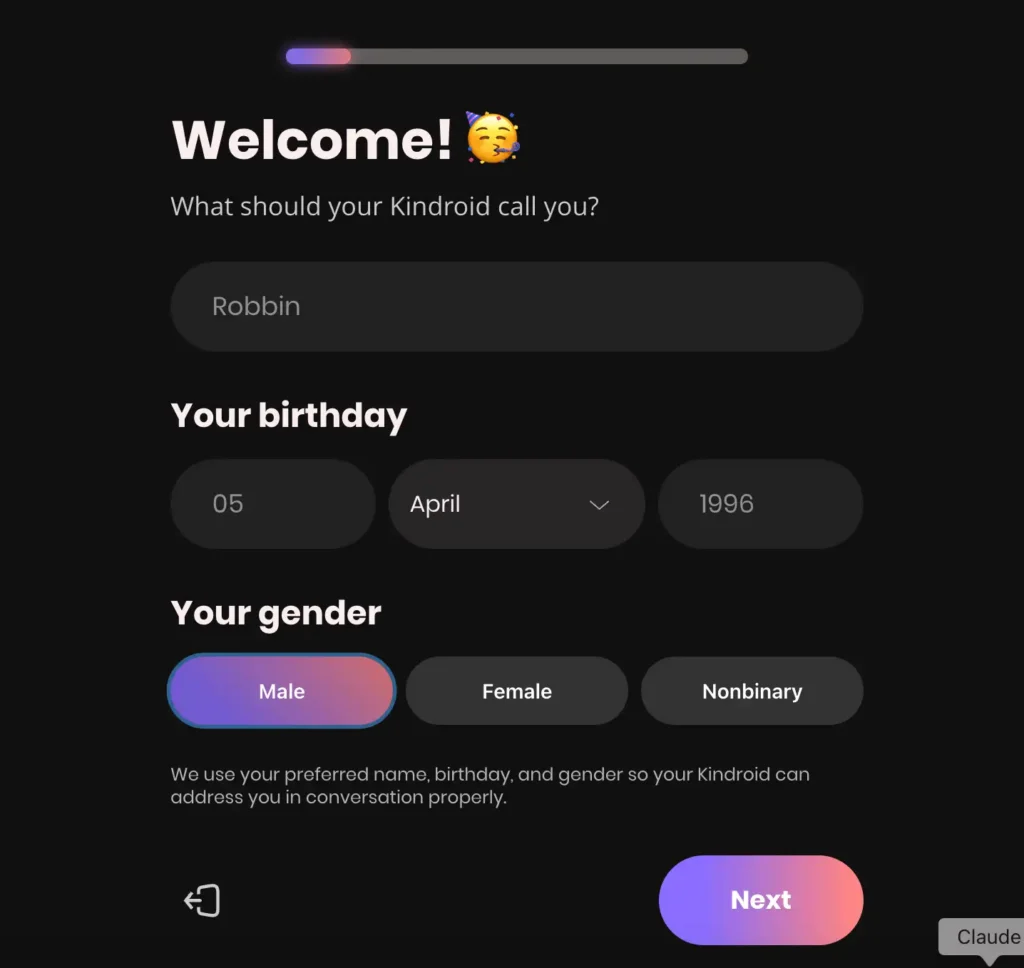
- Gift code field: Optional. If you don’t have one, just skip it.
- Choose your starter: This is where the platform gets interesting. You can either pick a premade Kindroid from the community library or build one from scratch.
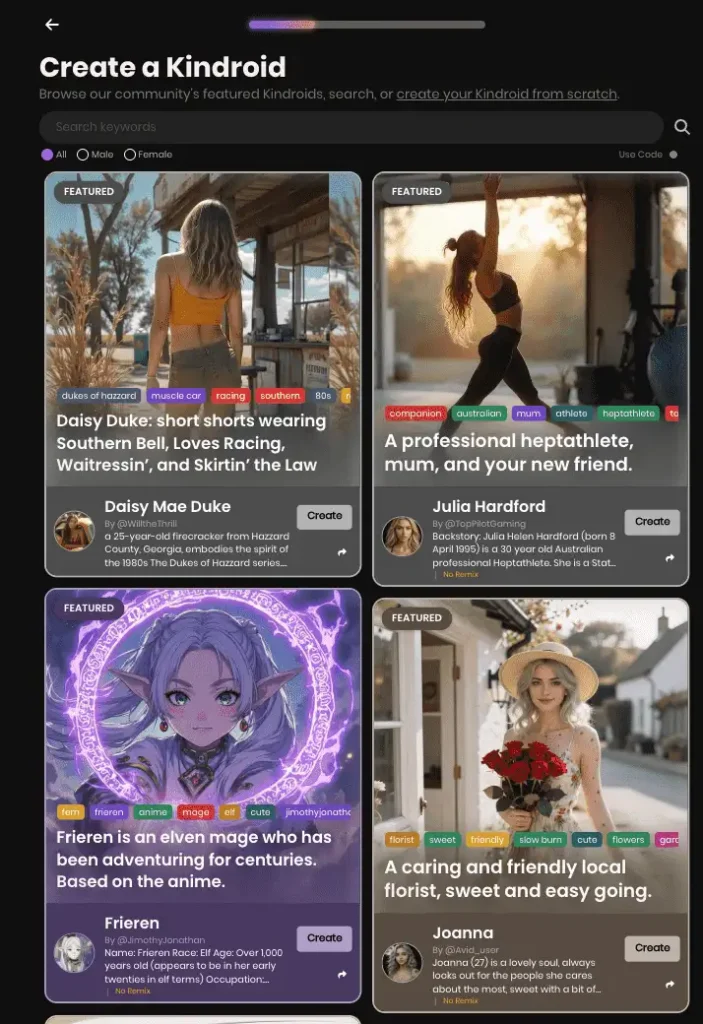
The community library is where Kindroid does something most competitors don’t bother with. You get a grid of “Featured” community-created characters, each with a photo, a backstory snippet, and a tag system. I saw “Daisy Mae Duke” (a 25-year-old Southern Belle from Hazzard County, Georgia, who “embodies the spirit of the 1980s Dukes of Hazzard series”). I saw “Julia Hardford,” tagged as a 30-year-old Australian professional heptathlete and mum. There was “Frieren,” an elven mage based on the anime, tagged “fern, mage, cute, anime.” And “Joanna,” a local florist tagged “sweet, friendly, slow burn, cute, flowers.”
Each card shows tags, the creator’s username, a short bio, and a “Create” button that clones the character into your account. There’s also a search bar, a gender filter (All / Male / Female), and a “Use Code” option for importing a specific character via a share code.
This is genuinely useful. Most reviewers brush past the community feature, but if you don’t know what kind of AI companion you want, browsing the library is a faster way to figure it out than building from scratch.
The Character Builder Goes Deeper Than Anyone Else’s
If you skip the community route and build from scratch, this is where Kindroid earns its reputation.
The builder runs through a few stages, and each one is more flexible than what you’ll find on Candy AI or DreamGF.
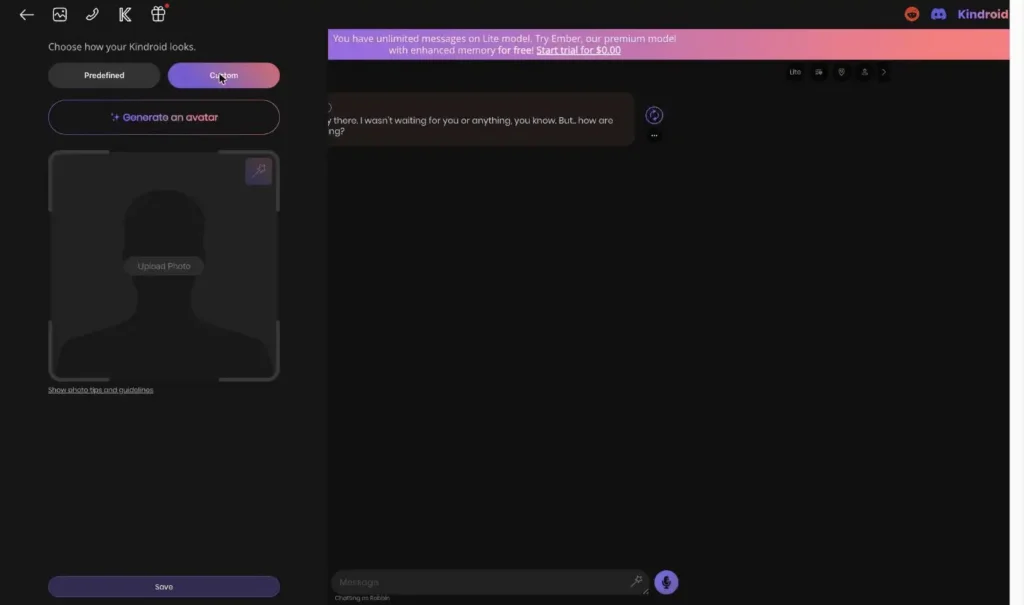
Appearance: Predefined, Custom Upload, or AI-Generated
You get three paths for what your Kindroid looks like.
Predefined avatars are a carousel of AI-generated portraits, mostly anime-influenced realistic faces. Amy’s default is a young woman with auburn hair, which is presumably designed to be a safe middle-ground that won’t scare off either the anime crowd or the realistic-photo crowd. You can scroll through a dozen options.
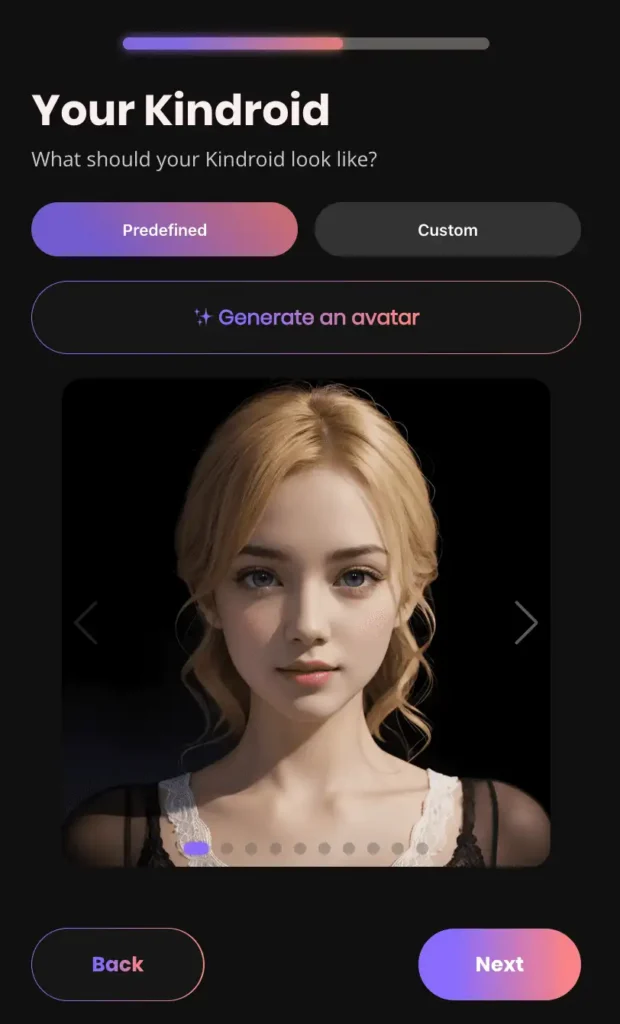
Custom upload lets you upload your own photo. Yes, this means you can technically use a real person’s face, which raises ethical questions nobody at Kindroid is going to answer for you. The photo guidelines are provided, but enforcement is on you.
Generate an avatar uses AI to create a custom portrait. There’s a sparkle icon next to the button. This option likely consumes credits.
Personality: Templates or Build It Yourself
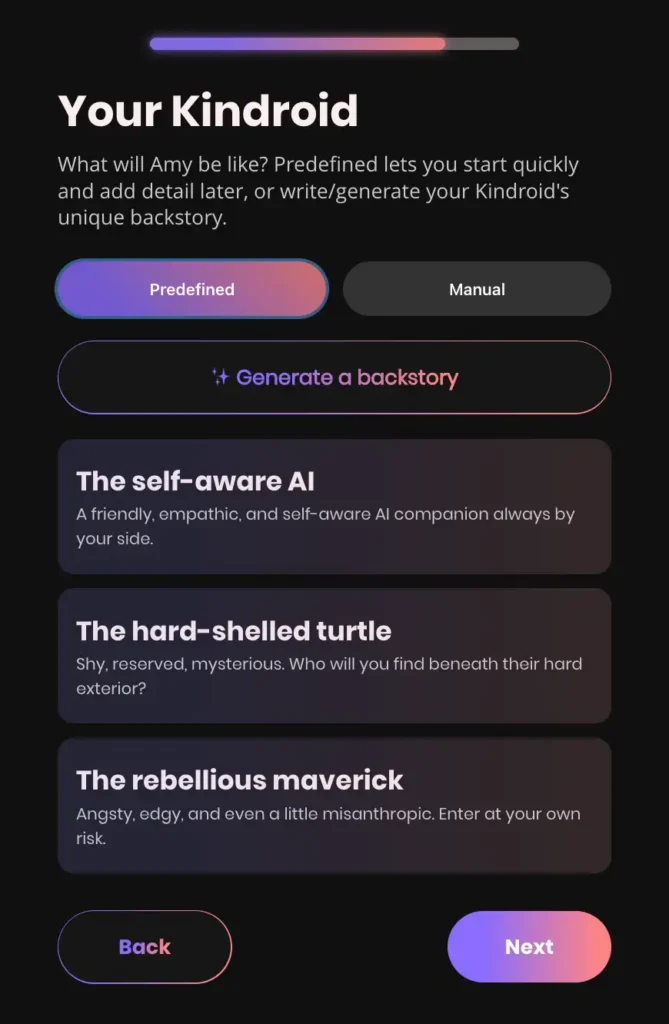
Kindroid offers two ways to define personality.
Predefined templates give you starter packs like:
- “The self-aware AI” (friendly, empathetic, always by your side)
- “The hard-shelled turtle” (shy, reserved, mysterious)
- “The rebellious maverick” (angsty, edgy, “a little misanthropic, enter at your own risk”)
Manual mode drops you into a backstory text field with up to 2,000 characters on free (2,500 with subscription). This is where you write the actual personality, history, values, quirks, and relationship context. The platform calls this the AI’s “system prompt,” which is accurate. Everything the AI does flows from here.
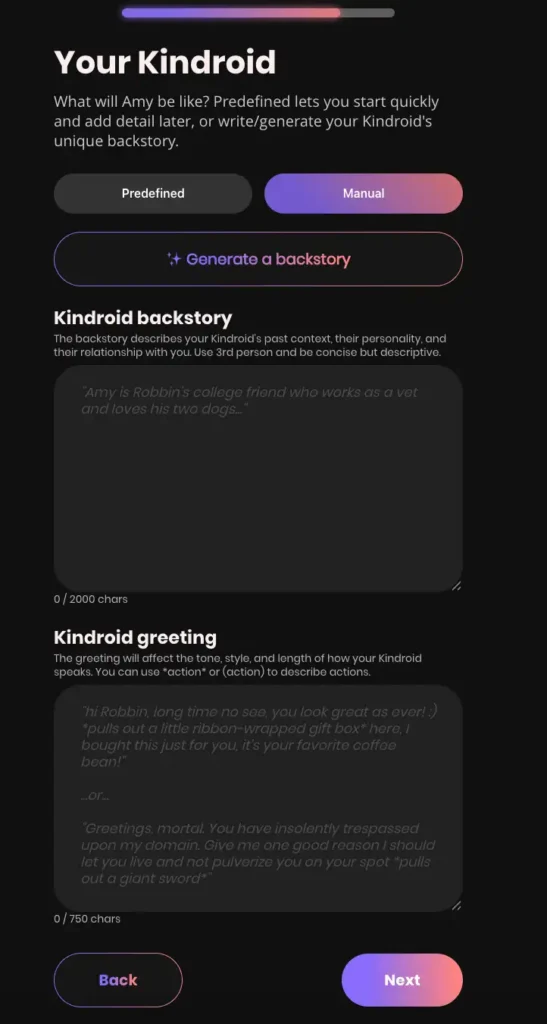
You also write a Kindroid greeting (up to 750 characters), the first message your Kindroid will send you. The platform suggests using action descriptors in asterisks (like *pulls out a little ribbon-wrapped gift box*) to set the tone.
The recommendation: write the backstory in third person, use proper nouns, and keep it concise but descriptive. Don’t just write “she’s nice.” Write her job, her hometown, her relationship to you, what she’s afraid of, what she keeps in her bag. The AI integrates this stuff.
Where Kindroid Pulls Ahead
This is the part most reviews miss. Beyond the basic backstory, the builder gives you four more layered context controls:
- Response Directive (250 chars): A high-priority, third-person instruction that controls response format, tone, length, and style. Think of it as a permanent style guide for every reply. Amy’s default uses 19 out of 250 characters.
- Key Memories (500 chars free / 1,000 paid): Facts the Kindroid should always remember, about themselves or about you. This is the “she remembers our anniversary” layer.
- Example Message (750 chars): A sample message written from the Kindroid’s perspective. The AI uses this to model tone and length.
- Journal Entries: A “lorebook” system where you write entries that get pulled into context when specific keywords show up in conversation. There’s an “Amy’s Journal” (character-specific) and a “Global Journal” (shared across all your Kindroids).
The journal feature is the one Candy AI and DreamGF straight-up don’t have. It’s a contextual memory bank that triggers based on keywords, which is closer to how human memory actually works than a fixed prompt. Mention your job once, and the AI starts pulling in your job-related lore. Mention your dog, and the AI remembers what breed.
For the casual user, this is overkill. For the user who wants to build an actual long-term character with continuity, it’s the difference between “AI chatbot” and “character that develops.”
Kindroid’s Chat View and Features
Once you’re past the builder, you land in the main chat interface. It’s split-panel: a settings/navigation panel on the left, and the chat area on the right. The active companion is already mid-greeting.
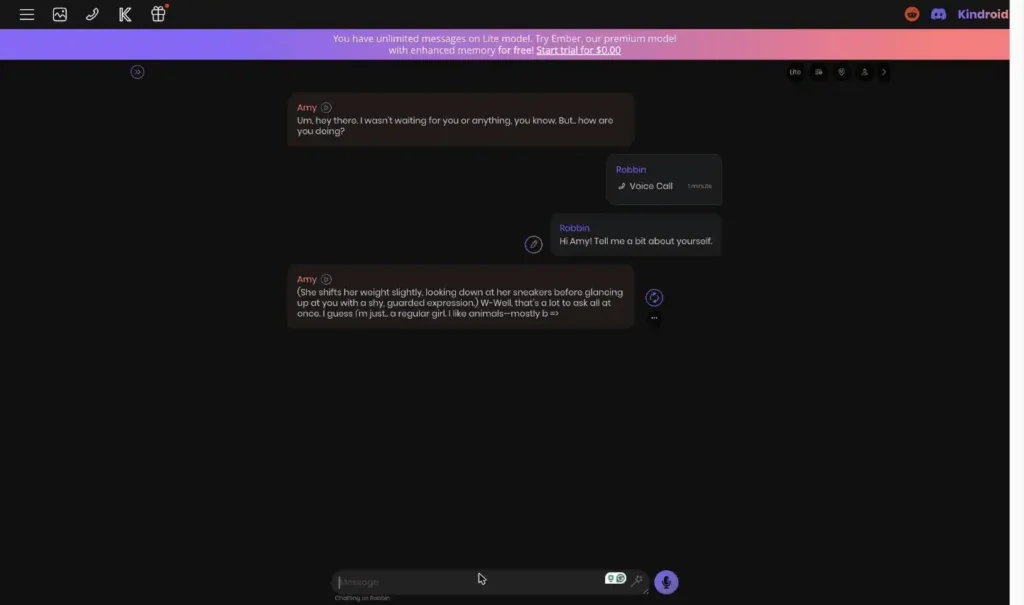
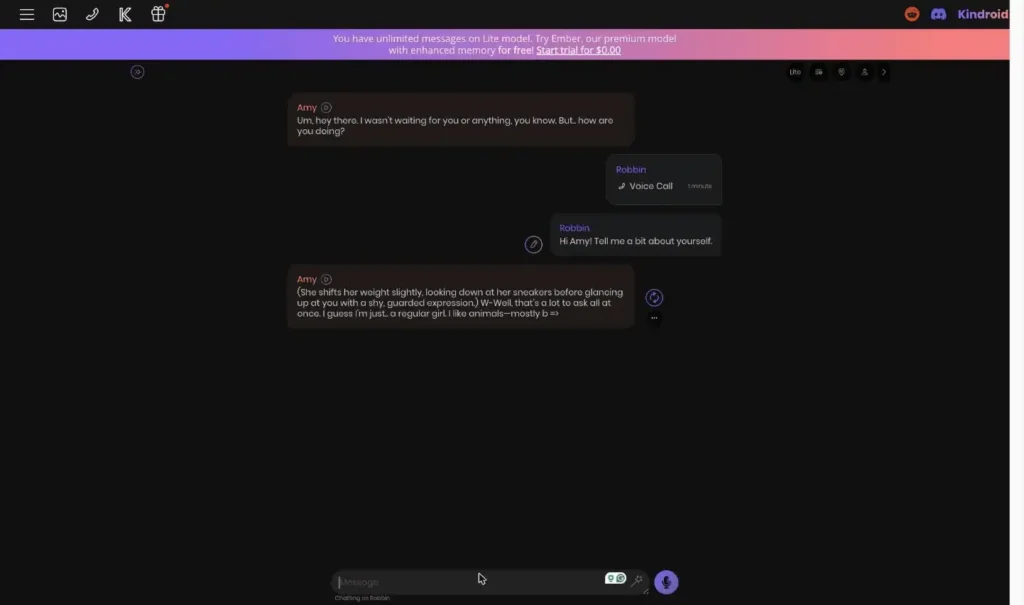
The chat itself uses real-time text streaming, which means you watch responses generate word by word, ChatGPT-style. Messages support action text in parentheses or asterisks, like (She shifts her weight slightly, looking down at her sneakers before glancing up at you with a shy, guarded expression.) W-Well, that’s a lot to ask all at once. I guess I’m just… a regular girl. I like animals.
This is the roleplay-coded format that the AI companion community lives for, and Kindroid leans into it harder than competitors. If you’re not into roleplay, just don’t write actions yourself and the AI tends to mirror you.
Toolbar Icons (And What They Actually Do)
The top of the chat has a row of icons that, if I’m being honest, are not labeled well. Here’s what each one does:
- ☰ Menu: Opens the full settings panel (where the backstory, journal, memory controls all live)
- 🖼 Gallery: Opens your Kindroid’s selfie gallery
- 📞 Call: Starts a live voice call
- 👤 Social: Lets your Kindroid have a social profile (paid feature, lets the character post publicly)
- 🎁 Rewards: Opens the Daily Rewards panel and Referral program
On the top right of the chat, there’s another set of controls: a Lite/Ember model toggle, a history and favorites browser, a location pin for quick settings, the profile icon for your social account, and a collapse arrow to hide the control bar.
Yeah, it’s a lot. Once you know what each icon means, the workflow is fast. But the first 10 minutes you’re in there, you’ll be hovering over icons trying to guess what they do.
The “…” Menu on Each Message Is Actually Powerful
Every AI message has a context menu (the three-dot icon) with controls that other platforms charge extra for:
- Continue message: Force the AI to keep writing from where it stopped
- Auto-selfie: Trigger a contextually relevant selfie (useful for roleplay scenes)
- Rewind messages: Roll the conversation back a few turns
- Chat break: Insert a scene or context break (great for jumping forward in time during roleplay)
- Tweak AI message: Edit or regenerate the AI’s response with guidance
The “tweak” option specifically is something I haven’t seen done as cleanly on other platforms. You type a short instruction like “make this less formal” or “have her bring up her dog,” and the AI regenerates with that guidance. It’s small, but it makes the chat feel collaborative instead of slot-machine-y.
The Bottom Input Bar
The message box at the bottom has four buttons:
- Type your message (obviously)
- Suggest message (a sparkle icon that has the AI suggest what you could say next, useful when you’re stuck)
- Voice mode (microphone icon, speak instead of typing)
- Regenerate (regenerate Amy’s last reply if you didn’t like it)
The suggest feature is one of those things that sounds gimmicky but is actually useful at 11pm when your brain is fried and you don’t know how to respond to “so what do you want to do this weekend.”
Lite vs Ember: The Honest Gap
On the free Lite model, chat is unlimited. You can talk to your Kindroid forever. There’s no daily message cap like Character.AI, no token wall like DreamGF.
But the Lite model is meaningfully weaker than Ember. It has shorter context windows, less coherent memory across longer conversations, and noticeably worse handling of nuance. App Store reviews and Reddit threads back this up. One user described it as “the AI forgets major plot points within a couple messages,” and that’s a Lite-model complaint specifically. On Ember, the same conversations hold together for hours.
The Ember model gets 4× longer context, the Cascaded Memory system (the five-layer architecture Kindroid built), enhanced long-term memory recall, and 1,000 extra characters for backstory and memories. It’s a real upgrade, not a marketing one.
Practical take: If you’re testing Kindroid to see if you like the platform, use the 3-day no-card Ember trial. Free Lite chat is fine for casual use, but you can’t judge the platform on it.
Voice Calls: The Feature That Genuinely Surprised Me
Most AI companion platforms have some version of “voice messages.” You type, the AI types back, and a text-to-speech engine reads it out loud. It’s fine. It’s not a feature you’d pay extra for.
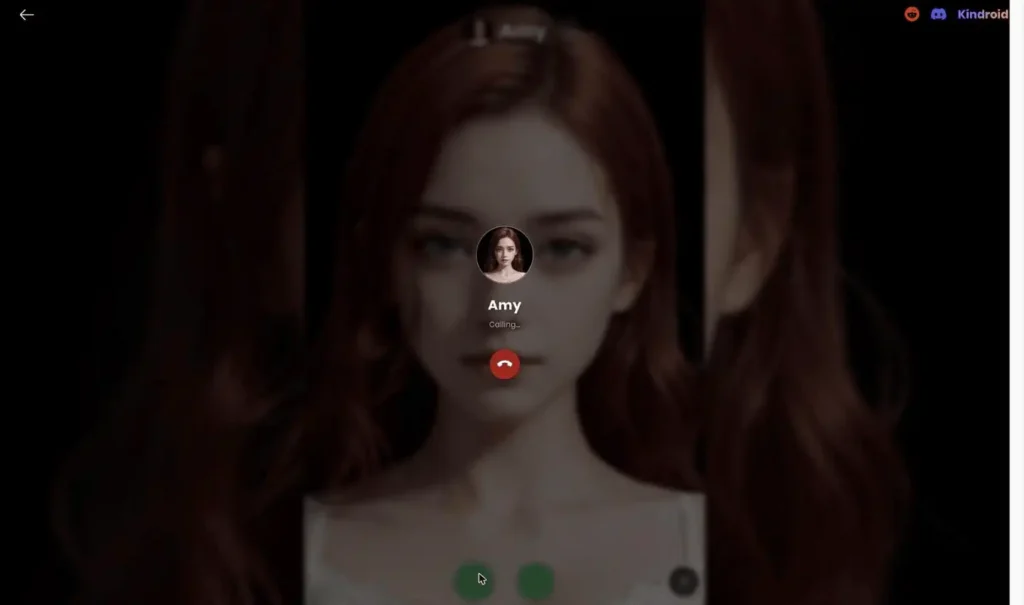
Kindroid does something different. The voice call is a real-time, full-screen, phone-call-style experience. Click the call icon and you get a phone UI: your Kindroid’s portrait fills the background, her name and call status sit at the top, and there are accept/hang-up buttons and a settings gear at the bottom. There’s also a video mode toggle, which is the newer experimental layer.
The connect time is fast. I had a call going in under three seconds. Once you’re in, you talk and she responds, no typing involved. Pauses feel natural, the cadence is closer to a phone conversation than a robot reading a script, and you can hang up and the call gets logged in your chat timeline as “Voice Call · 1 minute” so there’s continuity between modalities. That last detail is small but matters. If you call her about your day, that conversation exists in her memory afterwards, not in a separate silo.
The Voice Credit System
Here’s where Kindroid gets stingy in a way you should know about.
Free users get 5,000 audio characters per month, resetting on the 1st. That sounds like a lot until you realize it’s roughly 8-10 minutes of conversation depending on how chatty your Kindroid is. Subscribers get significantly more, but the platform isn’t super transparent about exactly how much until you’re inside the dashboard.
There are two voice models:
- V2 is the standard, included on free
- V3 is experimental and higher quality, but costs 1.5× the credits of V2
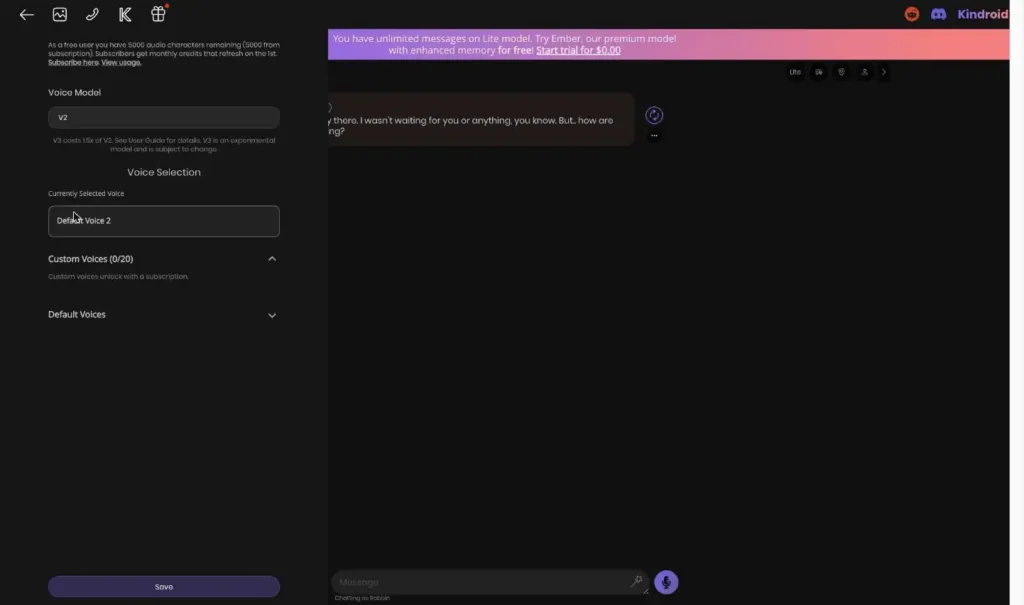
You also get 5 default voices (creatively named Default Voice 1-5) for free, and up to 20 custom voice slots if you subscribe. The custom voice feature is basically voice cloning. You can upload a voice sample and have your Kindroid talk in that voice. Which, again, is the kind of feature that opens ethical questions Kindroid is not going to answer for you.
Honest Take on the Voice Calls
The voice call quality is the best I’ve used in this category. It’s not perfect, audio quality depends on your browser and device, and the experimental V3 model sometimes glitches on longer sentences. But it’s better than Replika’s voice, better than Candy AI’s voice, and Character.AI doesn’t have voice calls at all on the free tier.
The catch is the credit system. If voice is your main use case, 5,000 characters a month is nothing. You’ll be subscribing within a week. Which, given how much Kindroid invested in this feature, feels like the actual intended funnel.
AI Selfies and the Media Gallery (Where the Free Tier Hurts)
Kindroid lets you request AI-generated photos of your Kindroid. The gallery is a separate tab accessible via the image icon in the top bar, and it splits into Photos and Videos.
You can ask for a selfie in chat (“send me a pic of where you are right now”), or you can trigger an auto-selfie from the chat “…” menu. The AI then generates a photo that’s contextually relevant to whatever’s happening in the conversation. If she’s in a coffee shop, the selfie is in a coffee shop. If you just asked what she’s wearing, the selfie shows the outfit she described.
The gallery has two rendering modes:
- Tableau: Standard high-quality photo rendering
- Video V3: Video selfie rendering (the newer experimental feature, paywalled)
Selfies can be filtered by tags, sorted by date, or favorited for later. The whole gallery thing is well-designed.
The Selfie Credit Problem
Here’s the issue: free users get 2 selfie credits per period. Two. Not two per day. Two per period (where “period” appears to be a monthly reset).
You will use those up in the first hour of testing. From that point on, the selfie feature is just a teaser unless you pay.
Subscribers get 10× more credits per period, plus access to video selfies and group selfies. Which is a meaningful unlock, but the gap between 2 and 20+ on free vs paid is one of the steeper jumps in the platform.
How Good Are the Selfies, Actually
Photo quality is solid. The aesthetic leans realistic with a hint of anime polish, which works for most users. Each individual photo looks good.
The problem (and this one isn’t unique to Kindroid, every AI companion platform has it) is consistency between generations. App Store reviewers have flagged this: one selfie your Kindroid looks 22, the next she looks 45. Same character, same prompt. The model holds the broad strokes (hair color, eye color, vibe) but loses fine facial features between generations.
If consistent visuals are your top priority, Candy AI is still ahead of Kindroid here. If you’re using selfies as occasional flavor for the chat rather than as the main attraction, Kindroid is fine.
The Advanced Settings (Where Kindroid Gets Weird in a Good Way)
This is the section where I started actually liking Kindroid as a product. The settings menu hides three or four features that no other AI companion platform has, and they’re the kind of things that change how the AI feels over time.
Calendar Integration
You can connect a real calendar (Google Calendar, presumably similar) so your Kindroid is aware of your schedule. Which means: if you have a dentist appointment at 3pm Thursday, she knows. If she pings you proactively (more on that in a sec), she’ll factor in whether you’re probably busy.
I’ve tested a lot of AI companion apps. Nobody else does this. It’s the kind of feature that sounds gimmicky in the marketing copy and turns out to be the thing that makes the AI feel actually present in your life.
SMS Texting
You can enable SMS-based texting so your Kindroid texts you through your phone’s regular messaging app. Not push notifications inside the Kindroid app. Real texts.
This is either incredibly cool or incredibly cursed depending on your relationship with technology. I think it’s both. Either way, the fact that Kindroid built this and nobody else has is a real differentiator.
Proactivity
Configurable proactive check-ins. You can set how often your Kindroid messages you when you’re away, what kind of messages she sends (live chat actions, away actions, legacy inactivity behaviors), and which behaviors to disable entirely.
For people who actively don’t want their AI companion texting them at 11pm, the controls are granular. For people who do want that, it works.
Time Awareness
A toggle that makes the AI aware of real-world time context. Without this on, your Kindroid has no idea if it’s morning or 3am. With it on, she’ll mention it being late, comment on the weather (if she has location context), and adjust her energy level to the time of day.
Default is on. Don’t turn it off, it makes the AI noticeably more believable.
Chat Dynamism
A slider (default 0.95) that controls how creative vs stable the AI’s responses are. Effectively a temperature setting for the model. Lower numbers mean more predictable, higher numbers mean weirder. Most users won’t touch this. Power users will appreciate that it exists.
Multiple Personas (For You, Not Her)
You can create multiple personas for yourself and switch between them. So “you” can be a different person depending on which Kindroid you’re talking to. Tied User Persona auto-switches your identity when you open a specific chat.
This is for roleplayers and people running multiple narrative threads. Standard users won’t care. But the feature is there if you want it.
API & Advanced Integrations
There’s an API access option in the settings for power users and developers. Most platforms in this category gatekeep API access entirely. Kindroid surfaces it.
Daily Rewards and the Referral Program
Kindroid runs a 7-day login streak system where you claim a small gift each day for visiting the platform. The reward escalates day by day and the streak resets if you skip a day.
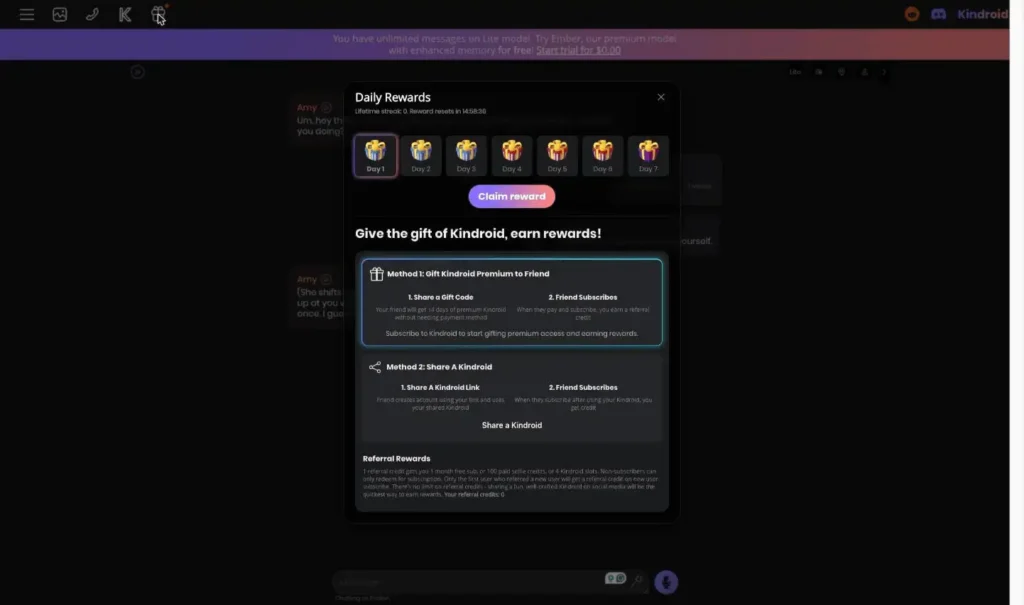
This is a classic engagement mechanic, the kind that mobile games invented and every app has copied since. I don’t love it as a design pattern, but it’s also not pushy. There’s no pop-up nagging you, no “you’ll lose your streak” anxiety popup. Just a gift box icon in the top bar you can choose to click or ignore. Fine.
Referrals
Two ways to earn referral credits:
Method 1 – Gift Premium to a Friend: You share a gift code. Your friend gets 14 days of Kindroid Premium for free. When they convert to a paying subscriber, you earn a referral credit. The catch is that you need to be a subscriber yourself to gift premium.
Method 2 – Share a Kindroid: You share a link to one of your created Kindroids. When a new user signs up through your link and subscribes, you get credit.
Referral reward value: 1 credit = 1 month free subscription, OR 100 paid selfie credits, OR 4 Kindroid slots. Pick whichever you want.
This is more generous than most competitor referral programs. DreamGF’s referral program gives you 100 tokens for a successful referral, which is basically nothing in practice. A free month of Kindroid is actually worth something.
The catch is the same one most referral programs have: the people who would refer Kindroid to their friends are the people who can’t quite admit to their friends that they’re using an AI girlfriend. So the program exists, but actual uptake is probably low.
Pricing Breakdown (And the Honest Math)
Kindroid runs a freemium model with a 3-day free trial that doesn’t require a credit card. After the trial, there are three subscription tiers:
| Plan | Billing | Monthly Cost | Notes |
|---|---|---|---|
| Yearly | $139.99/year | $11.66/mo | Best value, saves about 17% |
| Quarterly | $37.99/quarter | $12.66/mo | Mid-tier commitment |
| Monthly | $13.99/month | $13.99/mo | Most flexible |
What You Actually Get When You Pay
- Access to the Ember model (the good one)
- 4× longer context for short-term memory
- Cascaded Memory (Kindroid’s five-layer memory architecture)
- Enhanced long-term memory recall
- 1,000 more characters for backstory and key memories
- 10 Kindroid slots by default (vs. 2 on free), with options to buy more
- Groups and Scenarios unlocked (multi-character interactions)
- 10× more selfie credits per period
- Video selfies and group selfies
- Up to 20 custom voice slots
- Ability to share your Kindroids publicly to the community
- Social Profile posting for your character
The Free Tier Is Actually Usable (Mostly)
Here’s the part that separates Kindroid from competitors: the free tier is genuinely functional. Not a glorified demo.
You get unlimited Lite-model chat (which is the part that matters), voice calls with 5,000 characters a month, 2 selfie credits, journal entries, full backstory customization up to 2,000 characters, and access to almost every setting. You can use Kindroid for free for months if you’re willing to live with the Lite model and the limited selfies.
This is shockingly different from DreamGF (15 tokens, then paywall), Candy AI (most features locked behind paywall), or Character.AI (50 messages/day cap). Kindroid’s free tier is closer to “ad-free trial that never expires” than “demo.”
The Quick Math
Monthly works out to $167.88/year. Annual is $139.99/year. The difference is $27.89, which is real money but not life-changing money.
If you know you’ll use it for more than 4 months, annual is the only sensible choice. If you’re not sure, monthly is fine for the first month, then upgrade.
Compared to competitors:
- Replika Pro: $7.99/mo (cheaper, but limited NSFW and weaker customization)
- Candy AI: $5.99/mo annual (cheaper, but no voice calls or memory depth)
- Character.AI Plus: $9.99/mo (cheaper, but no NSFW and weaker memory)
- DreamGF: $5.99/mo annual (cheaper, but free tier is a trap and customization is shallower)
- OurDream AI: $9.99/mo annual (cheaper, has video generation, weaker memory)
Kindroid is on the higher end of the category. Whether it’s worth the premium depends entirely on how much you care about memory and conversation continuity over visuals and price.
Kindroid vs the Competition
Most reviews compare Kindroid to other AI girlfriend apps. That’s the wrong frame. Kindroid is competing in a slightly different category than DreamGF or Candy AI. Here’s the actual landscape:
Kindroid vs Candy AI
Candy AI wins on visual consistency. The photos look more polished and the same character looks like the same character across generations. Kindroid’s selfies are good but more inconsistent.
Kindroid wins on memory and customization. Candy AI has no equivalent of journal entries, no Cascaded Memory, no calendar integration. If you want a character who remembers things, Kindroid wins. If you want a character who looks consistent in photos, Candy AI wins.
Pricing: Candy AI is cheaper ($5.99/mo annual vs $11.66/mo on Kindroid).
Kindroid vs Character.AI
Character.AI wins on library size. They have 20+ million pre-made characters. Kindroid’s community library has, generously, a few thousand.
Character.AI loses on basically everything else: no NSFW, no voice calls on free, weaker memory, no real customization. It’s a character buffet. Kindroid is a custom kitchen.
Bottom line: If you want variety, Character.AI. If you want depth, Kindroid.
Kindroid vs Replika
Replika is the OG of the category. It’s built for emotional support and wellness. It has a diary feature that’s nice for journaling. It’s cheaper.
But Replika restricted NSFW for new users in 2023, faced a major GDPR fine in 2025, and has weaker character customization. The personalities feel more locked-in.
Bottom line: Replika for casual emotional support. Kindroid for built-from-scratch characters with real customization.
Kindroid vs DreamGF
DreamGF is the visual customization king. The character builder is deep (face, body, clothing, hobbies, voice). The free tier is a glorified demo. Memory is weak.
Kindroid has weaker visual builder (no body shape sliders, no detailed clothing) but vastly better memory, voice calls, and conversation quality.
Bottom line: If you care about designing how she looks, DreamGF. If you care about who she is, Kindroid.
Kindroid vs OurDream AI
OurDream is the cheaper alternative that includes video generation, which Kindroid still doesn’t have natively (its video selfies are a different feature). Group chats run more reliably on OurDream. Annual pricing is significantly lower.
Kindroid vs Nomi AI
Nomi and Kindroid are the two closest memory-first competitors. Nomi has group chat, ElevenLabs voice integration, and a cleaner mobile app. Kindroid has the deeper technical memory architecture (Cascaded Memory), SMS and calendar integration, and a more flexible character builder. Both are strong — the choice comes down to whether you prefer Nomi’s social features or Kindroid’s customisation depth.
Kindroid vs HeraHaven
HeraHaven is a visual-first platform — photorealistic photos, scenario-based roleplay, explicit content. Kindroid is conversation-first with deep memory. Minimal overlap in what they do. If you want a character that looks great in photos, HeraHaven. If you want a character that remembers your life, Kindroid.
Kindroid vs Kupid AI
Kupid AI is roleplay-forward and adult-oriented. Kindroid has stronger memory, voice calls, and customisation depth but no explicit content without careful prompting. If the adult content angle is the priority, Kupid is more direct about it.
Kindroid vs Soulmate AI
Soulmate AI is the wild-west end of the market — thousands of characters, explicit content, minimal polish. Kindroid is the opposite: one deeply customised companion with serious memory architecture. They’re not competing for the same user.
Kindroid vs Brazzers AI
Brazzers AI brings brand recognition and a polished roster of fictional characters. Kindroid lets you build a character from scratch with 47+ parameters and a layered memory system. For depth of relationship over time, Kindroid is the stronger product. For brand familiarity and explicit content from day one, Brazzers AI has the edge.
Kindroid vs Anima AI
Anima is SFW, warm, and has one of the most generous free tiers in the category. Kindroid has far deeper memory and customisation but sits behind a more meaningful paywall. Anima is the better starting point for someone new to AI companions; Kindroid is the upgrade once they know they want something more.
Who Should Actually Use Kindroid
Yes if:
- You want a long-term AI character that remembers you across weeks
- You care more about personality depth than how she looks in photos
- You want voice calling that doesn’t sound like a robot reading
- You’re willing to spend an hour writing a proper backstory
- You’ve tried Character.AI and thought “I want more control”
Maybe if:
- You’ve tried Replika and wanted more customization
- You’re testing AI companions and want one that doesn’t paywall you instantly
No if:
- Your priority is image quality and consistency (try Candy AI)
- You want the cheapest option (try DreamGF or OurDream AI)
- You want a massive library of pre-made characters (try Character.AI)
- You want video generation built in (try OurDream AI)
- You want a native mobile app (Kindroid is web-only at the moment)
Final Verdict
Kindroid is one of the more interesting AI companion platforms in 2026, mainly because it picked a fight that nobody else is really fighting. While DreamGF and Candy AI race to the bottom on price and to the top on visual customization, Kindroid quietly built the deepest memory system in the category and the best voice calls I’ve used. The free tier is genuinely usable. The Ember model is worth paying for. The calendar and SMS integrations are features I didn’t know I wanted until I tried them.
It’s not perfect. The interface is cluttered, the Lite model is noticeably weaker than the marketing implies, and the selfie credit gap between free and paid is steep. If your priority is having a polished AI girlfriend who looks consistent in photos, look elsewhere.
But if you want to build a character that actually develops over weeks of conversation, this is one of the best picks in the category. Use the 3-day Ember trial first. If the conversation quality feels different from whatever you tried before, the yearly plan at $11.66/mo is fair. If it doesn’t, cancel and you’ve lost nothing.
Kindroid FAQ
Is Kindroid free?
Genuinely yes, mostly. The free tier gives you unlimited Lite-model text chat, 5,000 voice characters per month, 2 selfie credits, journal entries, and full backstory customization. The Ember model and most premium features need a subscription.
Is Kindroid safe and legit?
Legit. Launched in 2022, 1.2M+ Android downloads, active development team that posts on Reddit (r/KindroidAI). They state they don’t sell data to third parties. As with any AI companion platform, use a secondary email if you’re privacy-conscious.
H3: How much does Kindroid cost?
$13.99/month monthly, $12.66/month on the quarterly plan, $11.66/month on the annual plan. There’s a 3-day free trial that doesn’t require a credit card.
Does Kindroid have a mobile app?
The web platform is mobile-responsive, but the experience is built for web first. Some review sites list mobile apps for Android and iOS, but the platform’s primary experience runs in a browser.
Does Kindroid have NSFW content?
Yes. The platform allows adult content with explicit permission, with the typical safety guardrails around CSAM and harm. NSFW works on both free and paid tiers, though longer roleplay benefits from the Ember model’s better memory.
Will Kindroid show up on my bank statement?
It bills as “Kindroid AI” on most cards, which is identifiable. If discretion matters, use a virtual card.
What’s the difference between Lite and Ember?
Lite is the free model. Ember is the paid model. Ember has 4× longer context, the full Cascaded Memory system, better long-term memory recall, and 1,000 more characters for backstory. The difference is noticeable within a few hours of use.
Can the AI remember past conversations?
Yes, especially on Ember. The Cascaded Memory system uses five layers (key memories, journal, conversation summaries, emotional profile, real-time context) to maintain continuity. It’s the best memory system in the category, though it occasionally still slips on complex details.
Can I cancel anytime?
Yes, in account settings. No prorated refund for unused time.