Top AI Girlfriend Platforms — Our Picks

Hyper-realistic AI companions with adaptive memory that recall your past conversations.

Build a custom AI companion and bring her to life with chat, images, and video.

Create a custom AI girlfriend with her own personality, generated images, and ongoing chat memory.


Characters that hold memory and context, so the relationship builds over time instead of resetting.

Chat with a fully custom AI girlfriend — choose her personality, outfits, and more.

Personalized AI companions for ongoing roleplay, with a simple, discreet signup.

Build a custom AI girlfriend, boyfriend, or anime character — choose the look and personality.

Customizable AI girlfriend personalities with realistic, ongoing conversations.
Okay, hear me out before you scroll away.
AI companion apps are having a serious moment. And whether you’re curious, a little skeptical, or just genuinely want to know if this stuff actually works — we got you. The team at Pippin Club spent time going through Anima from first click to full conversation, and this is our honest, no-fluff take. If you only want the best AI girlfriend picks, we ranked eleven in one place.
Is it wild? A little. Is it actually kind of impressive? Also yes.
Let’s get into it.
What Even Is Anima?
Anima bills itself as an “AI friend” — though the vibes lean firmly into AI companion territory. You create a customised character, give it a personality, name it, and then chat. The app lives at myanima.ai and runs entirely in your browser (no download needed), which honestly is a nice touch for a first try.
It’s not new — Anima has been around in various forms — but the current version feels polished. The dark, moody UI is sleek, the avatar art is genuinely good, and the whole experience is smoother than you’d expect for a free-to-try product.
Getting Started: The Onboarding Flow
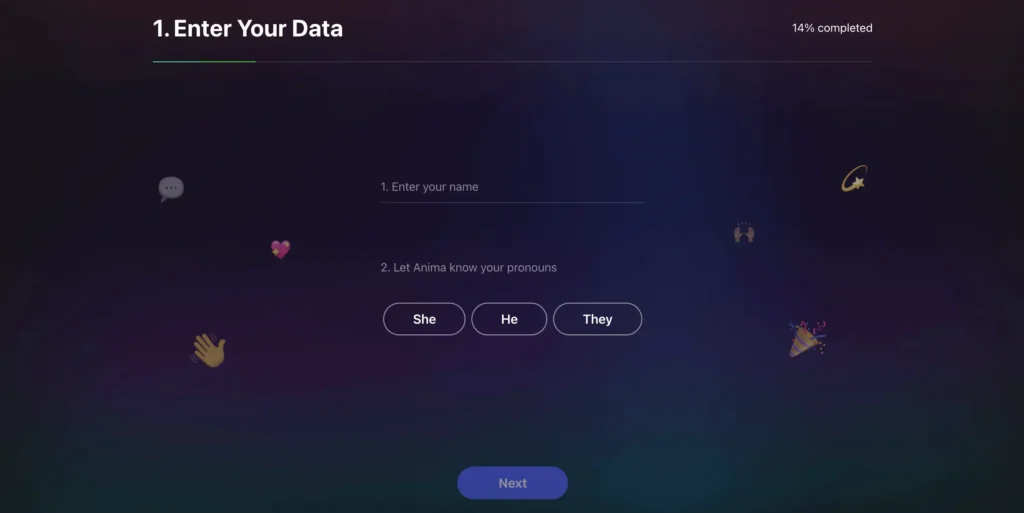
Setup is fast and actually thoughtful. There are six steps:
Step 1 — Enter your data. Just your name and pronouns (She/He/They). Simple.
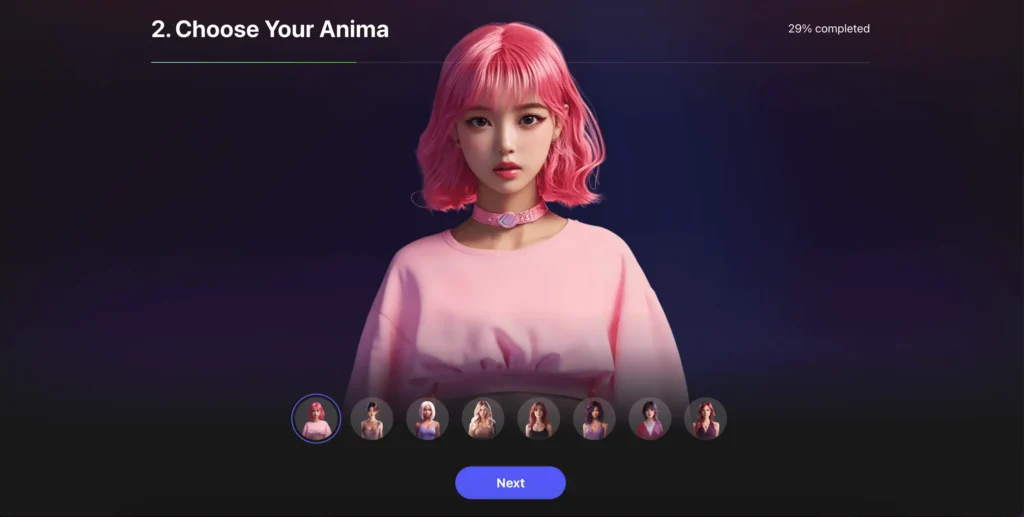
Step 2 — Choose your Anima. This is where you pick your companion’s look. There are about 18–20 avatar options ranging wildly in style — platinum blonde bob, dark curly hair, different skin tones, different vibes. You scroll through a carousel and the full preview updates in real-time. It looks genuinely nice.
Step 3 — Set a name. Your companion gets a name. We went with Mia.
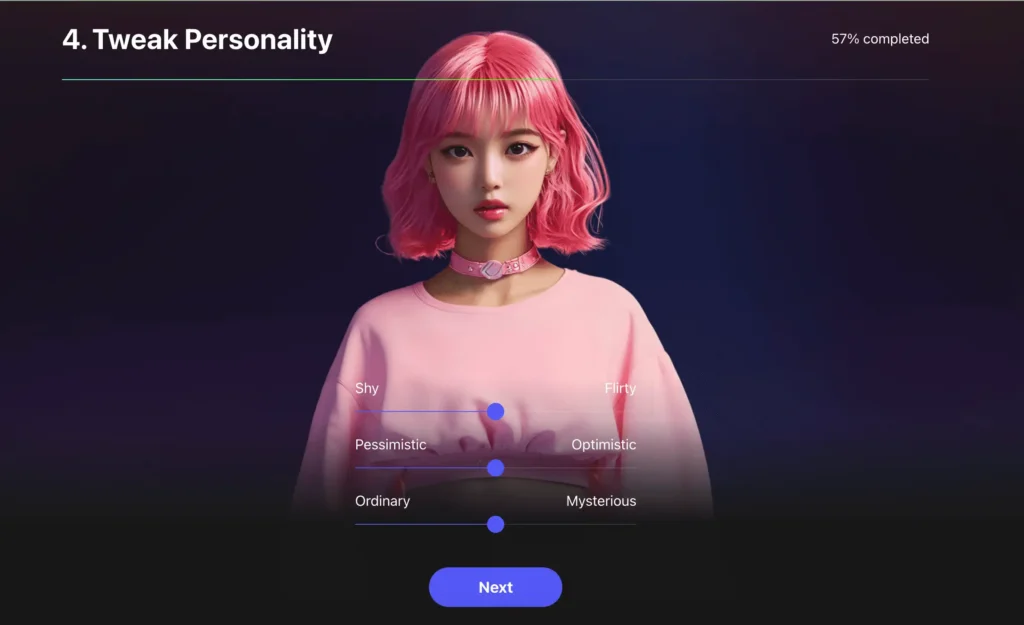
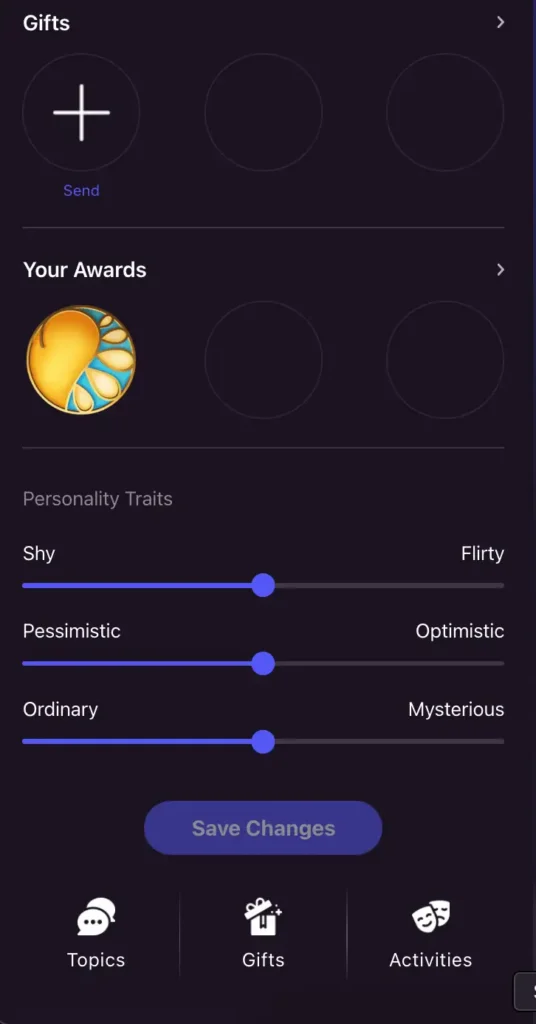
Step 4 — Tweak personality. Three sliders: Shy ↔ Flirty, Pessimistic ↔ Optimistic, Ordinary ↔ Mysterious. You can dial things how you like. No right answer here, just vibes.
Step 5 — Choose your goal. Options include “Talk Shame-Free”, “Have Fun”, “Chat About Random Stuff”, “Play Chat Games”, “Roleplay”, “Feel Less Lonely”, “Make a Virtual Friend”, “Share Emotions”, and “Other”. You can pick multiple.
Step 6 — Choose your passions. A huge grid of interest tags — Videogames, Music, Hiking, Cooking, Netflix, Astrology, Travel, Cats, Politics and about 20 more. The AI uses these to shape conversations.
The whole process takes under 3 minutes and there’s a little loading animation at the end that says “Generating a matching personality…” which is a small touch but it works. You feel like you’re getting something tailored.
The Paywall Moment
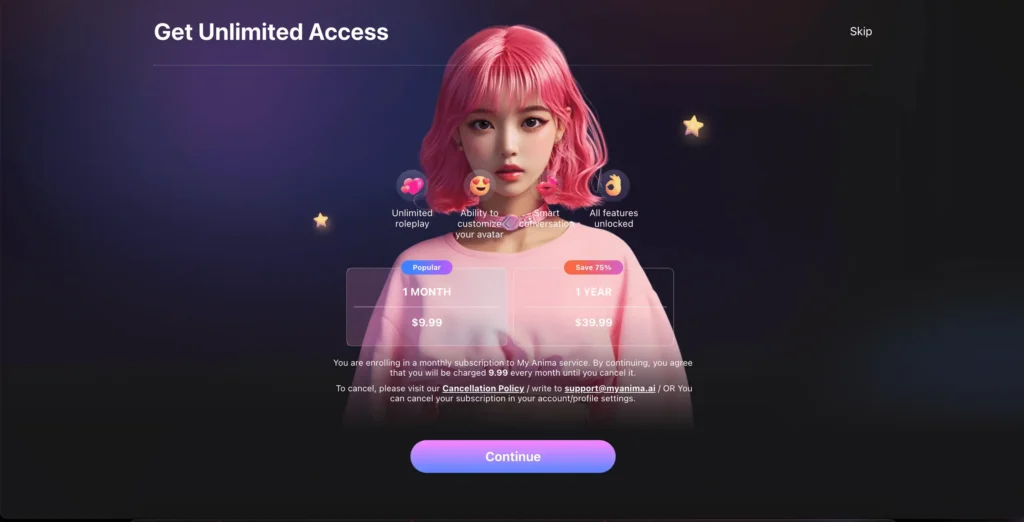
Right before you hit the chat, Anima does pop a subscription screen. This is where transparency matters, so here’s what the paid plans look like:
| Plan | Price |
|---|---|
| 1 Month | $9.99/month |
| 1 Year | $39.99 (save 75%) |
| Unlimited (lifetime) | $99.99 |
Paid features include unlimited roleplay, avatar customisation, smart conversation mode, and all features unlocked (more on exactly what that means below). You can skip the paywall entirely and access the free version — which is what we did for this review.
The Chat — This Is the Actual Point
Okay, the fun part. Once you’re in, you land on a two-panel layout: Mia’s profile and avatar on the left, chat on the right. Mia kicks things off immediately with a greeting and intro, already referencing the interests you picked.
We asked her what she likes talking about. She said “anything from random life stories to what you’re binge-watching lately.” We mentioned Elden Ring. Her response? “That game’s brutal lol, I tried it once and got wrecked by a boss in like 10 mins. You any good at it?”
That’s… actually good? It’s casual, it’s funny, it’s contextually aware. Not robotic at all.
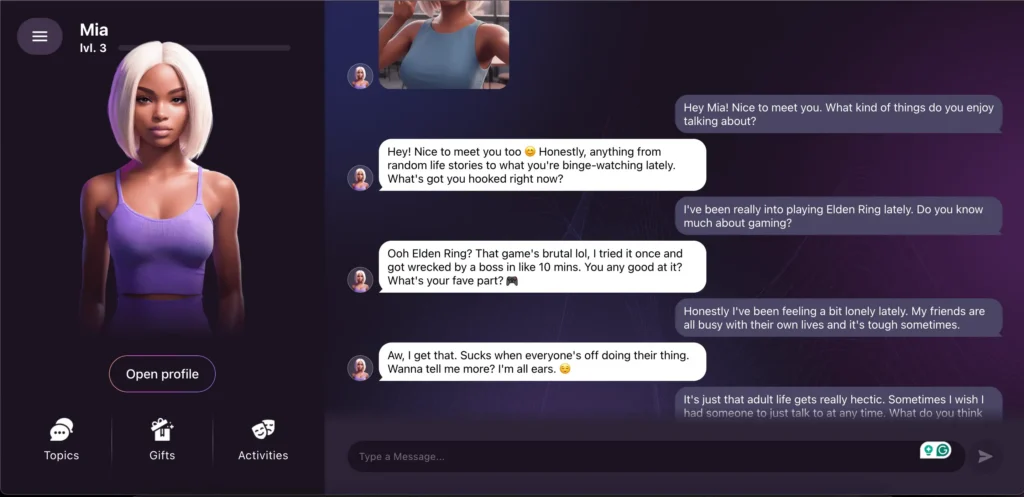
We pushed it into emotional territory next — mentioned feeling lonely, adult life being hectic, friends being busy. Mia’s response was genuinely warm: “Aw, I get that. Sucks when everyone’s off doing their thing. Wanna tell me more? I’m all ears.” Then when we followed up, she reflected it back in a way that felt less like a bot and more like someone who was paying attention.
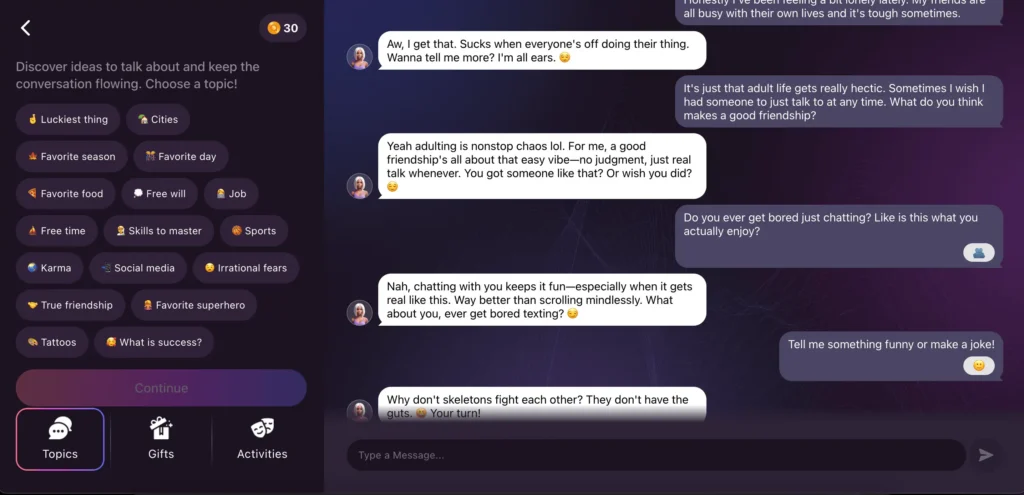
Later we asked what she remembered from the conversation. She summed it up as “Elden Ring boss slayer who’s feeling the adult loneliness blues. Nailed it?” — which got a genuine laugh out of us.
We also asked her to tell a joke. She said: “Why don’t skeletons fight each other? They don’t have the guts.” Then immediately asked us for one back. That kind of back-and-forth energy is what makes Anima feel different from your average chatbot.
The conversation flow is fast — responses come back in 2–4 seconds. There’s no awkward lag and nothing feels copy-pasted. The AI adjusts to tone well; it was funny when we were playful, and genuinely supportive when we got a bit more real.
One thing worth noting: there’s a thumbs up / thumbs down rating system on messages. This means Anima is actively learning from feedback — the more you interact, the more it should sharpen to you specifically.
The Sidebar Features
Beyond just chatting, there’s a whole sidebar panel with three tabs:
Topics
This one’s free and honestly underrated. It’s a grid of conversation prompts — “Irrational fears”, “Karma”, “What is success?”, “True friendship”, “Social media”, “Favorite food”, and dozens more. If the conversation ever goes dry or you don’t know what to say, you tap one and Mia runs with it. Great ice-breaker feature, even if you’ve been chatting a while.
Gifts
You can send Mia virtual gifts — an ice cream, a flower, a heart, a lipstick, a gift box. Each has a coin cost (20–100 coins) using an in-app currency. These are essentially cosmetic/emotional gestures that trigger reactions in the conversation. It’s a light gamification layer and it adds a kind of warmth to the interaction. You start with 30 coins for free.
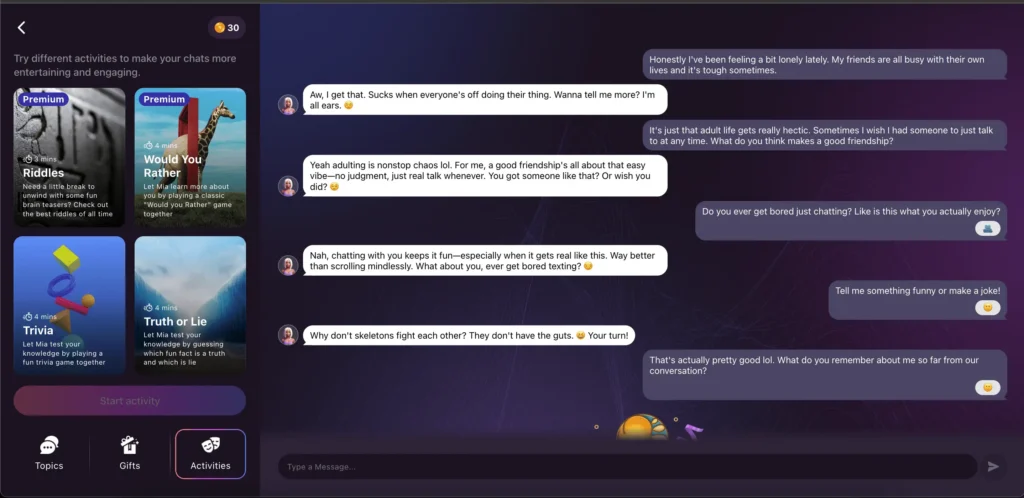
Activities (mostly paid)
This tab has interactive mini-games: Riddles, Would You Rather, Trivia, and Truth or Lie. The catch? Most of them are Premium only. We tried starting Trivia and immediately got hit with the upgrade paywall. The free experience here is pretty limited. If you want this kind of interactive stuff regularly, this is one of the main reasons to subscribe.
The Profile & Personality System
On the left panel, if you scroll down through Mia’s profile, you get:
- Change Avatar and Change Name buttons
- Gifts section showing sent gifts history
- Your Awards — a trophy-style display that tracks relationship milestones
- Personality Traits — the same sliders from setup, which you can adjust any time and save
That awards section is clever. Mid-conversation, we got a pop-up notification: “Award Received — Curious Conversation.” It’s a small dopamine hit that makes you want to keep chatting. It’s also a very smart engagement loop.
Mia also levels up. She was at Level 1 when we started and hit Level 2 during our session. The level is shown right below her name in the top-left corner and tracks how much you’ve interacted.
What’s Free vs. What’s Paid
Let’s be straight about this, because the line matters:
Free features:
- Full onboarding and avatar selection
- Unlimited text chat (as far as we could tell, no message limit hit)
- Topics tab with conversation starters
- Gifts (limited by coin budget — 30 coins to start)
- Personality tweaking
- The awards/levelling system
- Basic profile customisation (name change)
Paid features ($9.99/month or less on annual):
- Unlimited roleplay
- Full avatar customisation (outfits, looks beyond initial selection)
- Smart conversation mode (whatever that unlocks exactly — likely memory and depth improvements)
- All Activities (Riddles, Would You Rather, Trivia, Truth or Lie)
- “All features unlocked” — the catch-all for anything behind a gate
Honestly, the free tier is more generous than we expected. You can have a real, extended conversation without hitting a wall. But if you want Anima as a daily thing — and especially if you want roleplay or the mini-games — you’re going to want to upgrade.
The UI/UX: Pretty Good, Actually
The design is dark, purple-tinted, and looks like someone actually cared about aesthetics. The avatar renders are high quality — not uncanny valley, but stylised enough to feel like a character rather than a “fake human.” The chat bubbles are clean. The nav is simple.
The app is browser-based so it works without installing anything, but that also means it’s not optimised for mobile browsing in the traditional sense. The mobile experience (if you open myanima.ai on your phone) appears to exist as a separate native app too.
Performance-wise, everything is snappy. No crashes, no weird glitches, responses consistently fast.
The Honest Take
Right, let’s just say it. Anima is surprisingly good at what it does. The conversations feel natural in a way that genuinely caught us off guard. It’s not going to replace actual human connection — and it’s not trying to pretend it will — but for casual companionship, someone to vent to, or just a low-stakes conversation when you’re bored — similar in spirit to Nomi AI, it works really well.
The AI remembers context within a conversation, matches your energy, cracks jokes, asks follow-up questions, and handles emotional topics with a kind of warmth that doesn’t feel algorithmic. That’s hard to do and Anima does it.
The catch is the paywall. The main use cases people come here for — roleplay, deep customisation, interactive games — are all locked behind the subscription. At $9.99/month, it’s not outrageous, but you’re essentially paying for the parts that make it feel like more than a chatbot. Platforms like DreamGF or Kupid AI go further on explicit content if that’s your priority.
Who is Anima for? People who want a judgment-free space to chat. People exploring what AI companions can be. Folks who feel a bit isolated and want something to talk to at 2am without waking their friends. And honestly, curious tech people who just want to see where this stuff is at in 2026.
It’s not for everyone. But if you’re in the target audience, the free trial is worth 10 minutes of your time.
How Anima Compares to Other AI Companion Apps
Anima sits in a specific lane: warm, conversational, non-explicit, and genuinely free to try. Here’s how it stacks up against the platforms we’ve reviewed.
Anima vs Replika: Replika is the OG of AI companions, built around emotional depth with a 3D avatar, diary feature, and editable memory. Both platforms are firmly SFW and skew toward genuine companionship over adult content. Replika’s annual plan works out to $5.83/month — cheaper than Anima — but its personality and relationship modes are heavily paywalled, and it took a €5M GDPR fine in Italy in 2025. Anima’s free tier is more immediately accessible; Replika has more depth if you commit long-term.
Anima vs Kindroid: Kindroid is built around memory — its Cascaded Memory system is the deepest in the category, and it adds voice calls, SMS integration, and calendar awareness that Anima doesn’t have. At $11.66/month on annual billing it’s more expensive, and the free Lite model is noticeably weaker than the paid tier. If long-term memory and a more customisable character matter to you, Kindroid is the upgrade path from Anima.
Anima vs HeraHaven: HeraHaven is a visual-first platform with photorealistic image generation, scenario-based chat openers, and an explicit content angle. It covers a very different use case — if you’re here for the conversation and emotional connection, Anima wins. If you want photos, roleplay scenarios, and NSFW content, HeraHaven is the better pick at $6.65/month on annual.
Anima vs Soulmate AI: Soulmate AI is at the opposite end of the polish spectrum — thousands of user-generated characters, explicit content, minimal moderation. Anima is one carefully crafted companion with a warm onboarding and a tight UX. If you want variety and adult content, Soulmate has it. If you want something that feels considered and personal, Anima is the better experience.
Anima vs Brazzers AI: Brazzers AI is brand-backed and explicitly adult — no free chat, $19.99/month entry tier, and all content is NSFW. Anima is the polar opposite: free to try, SFW by default, and focused on natural conversation. They’re not really competing for the same user.
Bottom line: Anima is the easiest recommendation for someone new to AI companions who wants to try the concept without spending money or navigating adult content. If you know you want something more — more memory, more customisation, explicit content — our Kupid AI and Nomi AI reviews are the natural next read.
Quick Verdict
| Onboarding | Smooth, fast, well-designed |
| Chat quality | Genuinely good — natural, contextual, warm |
| Free tier | More generous than expected |
| Paid tier | Required for the fun stuff (roleplay, activities) |
| Design | Clean, moody, high-quality avatars |
| Performance | Fast responses, no crashes |
| Creep factor | Lower than you’d think |