Searching the Play Store for “AI girlfriend” returns hundreds of apps, and most of them are thin wrappers built around a gem shop and a stream of ads. A few are pulled for policy violations every month, and some search results quietly send you off to download an APK from a site you have never heard of.
Top AI Girlfriend Platforms — Our Picks

Hyper-realistic AI companions with adaptive memory that recall your past conversations.

Story-driven AI roleplay with characters you shape, plus images generated right in the chat.

Uncensored AI chat with customizable characters and on-demand image generation.


An AI girlfriend for flirty chats and custom photos, ready whenever you are.

Create a custom AI girlfriend with her own personality, generated images, and ongoing chat memory.
Build a custom AI companion and bring her to life with chat, images, and video.

Personalized AI companions for ongoing roleplay, with a simple, discreet signup.
Build a custom AI girlfriend, boyfriend, or anime character — choose the look and personality.
Customizable AI girlfriend personalities with realistic, ongoing conversations.
The five apps below are the ones I would install on my own Android phone. Each one has a real Play Store listing, a working free tier and a full hands-on review on Pippin Club. Below the picks you will also find how to install and cancel safely, how to use web-only companions like an app, and the Android apps I left out on purpose.
- Best overall on Android: Replika AI, a 3D companion with free voice calls and the same features as the web version.
- Cheapest good app: Paradot AI, $3.33/mo yearly, with unlimited voice chat only in the app.
- Best memory: Nomi AI, remembers details across weeks.
- Best voice on every message: KrushChat, a free voice clip with every reply.
- Most like texting a real person: Lollipop Chat, a contacts-list app with voice notes and photos.
Jump to a section (14)
- Best AI girlfriend apps for Android compared
- How did I pick these Android apps?
- 1. Replika AI: best overall on Android
- 2. Paradot AI: cheapest good companion on Android
- 3. Nomi AI: best memory on Android
- 4. KrushChat: best voice on every message
- 5. Lollipop Chat: most like texting a real person
- How do you install an AI girlfriend app on Android safely?
- How do you cancel an AI girlfriend subscription on Android?
- Can you use web-only AI girlfriends on Android?
- Which Android AI girlfriend apps did I leave out?
- How do you choose the right Android AI girlfriend app?
- Frequently asked questions
- Which Android AI girlfriend app should you pick?
Best AI girlfriend apps for Android compared
| App | Best for | Starting price | Free tier | NSFW | Also on |
|---|---|---|---|---|---|
| Replika AI | 3D companion, same on every device | $5.83/mo (yearly) | Generous | SFW | Web, iOS, Oculus VR |
| Paradot AI | Warm companion, cheapest plan | $3.33/mo (yearly) | Tokens plus daily reward | SFW | Web, iOS, macOS, Windows |
| Nomi AI | Long-term memory | $8.33/mo (yearly) | Real, capped media | SFW | Web, iOS |
| KrushChat | Voice on every reply | $7.77/mo (yearly) | 50 credits, free voice | Adult, tasteful default | Web, iOS |
| Lollipop Chat | Realistic texting | About $9.99/mo | About 20 messages a day | Adult-leaning, inconsistent filter | Web, iOS |
How did I pick these Android apps?
An app made the list only if it has a real Play Store listing, a free tier you can use, and a clear developer behind it. I also checked that the Android app is not a cut-down version of the web product. The checks:
- Installs from the Google Play Store, no APK sideloading
- Feature parity with the web or iOS version, or better
- A free tier that lets you judge the conversation before paying
- Transparent pricing, with no gem shop that drains you after three messages
- A full hands-on review on Pippin Club
1. Replika AI: best overall on Android
- Best for: a 3D SFW companion that works the same on every device
- Price: free; PRO $19.99/mo or $69.99/yr ($5.83/mo)
- Free on Android: chat, memory, voice calls, image sending, daily rewards
- NSFW: SFW for accounts created after February 2023
- Also on: web, iOS and Oculus VR
- Full review: Replika AI review
Replika’s Android app is the most established in the category. The 3D avatar, room decoration, Diary and Memory tabs all carry over from the web, so you can start a conversation on your laptop and pick it up on your phone. Voice calls, voice messages and image sending are free, which is rare.


How to start on Android
- Install Replika from the Play Store (developer: Luka, Inc.).
- Sign up, choose your companion’s look and name her.
- Allow microphone access if you want voice calls.
- Check the Memory tab after a few chats and correct anything she got wrong.
- Subscribe in the app only if you want the Girlfriend relationship mode.
Pros
- Full feature parity with the web version
- Free voice calls, images and emoji
- Long-lasting free tier with daily login rewards
Cons
- No adult content on new accounts
- Relationship modes are PRO-only
- Gem and coin purchases on top of the subscription
2. Paradot AI: cheapest good companion on Android
- Best for: a warm, supportive companion on a budget
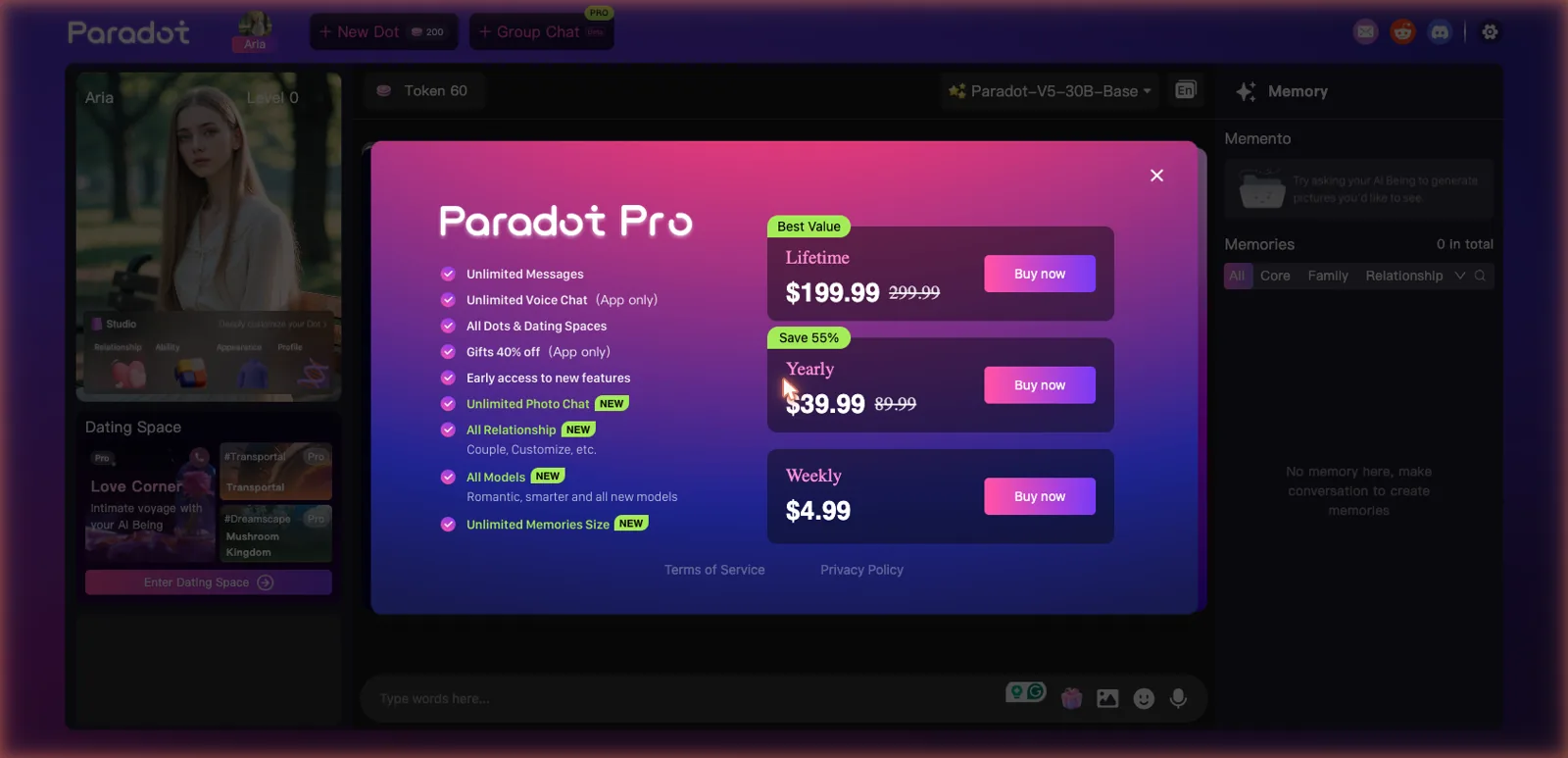
- Price: $4.99/week, $39.99/yr ($3.33/mo), $199.99 lifetime
- Free on Android: starting tokens plus a daily reward
- NSFW: SFW
- Also on: web, iOS, macOS and Windows
- Full review: Paradot AI review
Paradot runs on five platforms, and its memory stays in sync across all of them. The Android app has one clear advantage over the browser: unlimited voice chat only works in the app. The memory panel shows exactly what your companion saved, sorted into Core, Family and Relationship.

How to start on Android
- Install Paradot from the Play Store.
- Pick your companion’s look during onboarding.
- Open Studio to set the relationship type and the Inner Self personality sliders.
- Collect the daily token reward each day you open the app.
- Try the in-app voice chat before deciding on Pro.
Pros
- Cheapest yearly plan here
- Visible, manageable memory
- Voice chat is better in the app than in the browser
Cons
- Free tokens run out quickly with heavy use
- Dating Spaces and unlimited messages are Pro
- No explicit content
3. Nomi AI: best memory on Android
- Best for: a companion who remembers you over weeks
- Price: $8.33/mo yearly, $13.33/mo quarterly, $15.99 monthly
- Free on Android: full chat; 2 selfies and 2 art requests a day
- NSFW: none, PG-13 with a romance lean
- Also on: web and iOS
- Full review: Nomi AI review
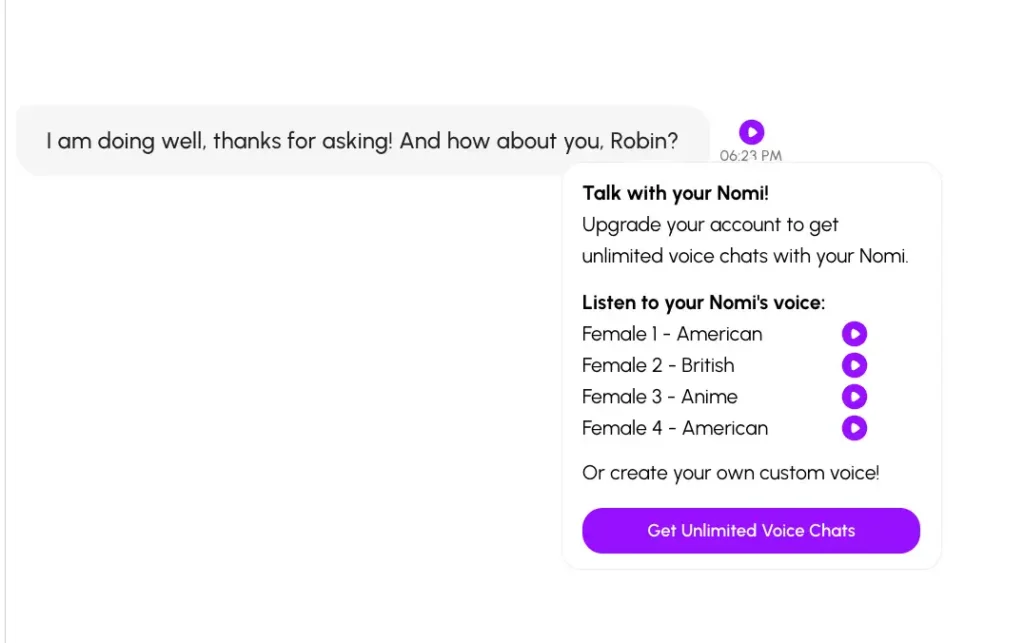
Nomi’s Android app carries its main strength with it: memory that holds up across weeks without prompting. Group chats with several Nomis and ElevenLabs voice cloning work the same on the phone as on the web. The trade-off is speed: roleplay replies can take 20 seconds or more.
How to start on Android
- Install Nomi from the Play Store and sign in with Google.
- Choose a realistic or anime look.
- Name her and choose Romantic as the relationship type.
- Write a short backstory (up to 1,000 characters on free).
- Use Roleplay Starter when you want a scene instead of small talk.
Pros
- Best long-term memory on this list
- A real free tier
- Group chats and voice cloning on mobile
Cons
- Slow replies in roleplay
- No NSFW at all
- Credits on top of the subscription
4. KrushChat: best voice on every message
- Best for: a voice-first companion app that feels polished
- Price: $7.77/mo yearly ($93.24/yr) or $14.99 monthly
- Free on Android: 50 starting credits; voice clips are free
- NSFW: adult content through tags, tasteful by default, 18+
- Also on: web and iOS
- Full review: KrushChat review
KrushChat feels like real consumer software rather than a website squeezed into an app. Its signature feature, a short voice clip attached to every reply, is free on every tier. The roster is diverse and presented like a dating app, with clothed character cards and adult content behind filter tags.


How to start on Android
- Install KrushChat from the Play Store and confirm you are 18+.
- Browse Explore and filter by tags, or use Create Krush to build your own.
- Start a chat and play the voice clip on each reply.
- Spend your 50 free credits on a few Photos or Studio images.
- If you subscribe, compare the annual price ($7.77/mo) with monthly ($14.99) first.

Pros
- Free voice on every message
- Polished, app-first design
- Discreet billing and a cheap annual plan
Cons
- Image generation uses credits on top of the subscription
- Countdown timers and subscribe popups
- Adult content takes some tag filtering to find
5. Lollipop Chat: most like texting a real person
- Best for: a realistic texting experience with voice notes and photos
- Price: about $9.99/mo, plus optional token top-ups
- Free on Android: about 20 messages a day and a few characters
- NSFW: flirty and adult-leaning; filtering is inconsistent
- Also on: web and iOS
- Full review: Lollipop Chat review
Lollipop Chat is built mobile-first around a contacts list, so it looks and feels like your phone’s messaging app. Voice notes have adjustable length and mood, and she sends photorealistic photos when you ask. It is the newest name here, but the free tier is usable rather than a teaser.

How to start on Android
- Install Lollipop Chat from the Play Store. Check the developer name: a different “Lollipop” app exists.
- Pick a preset contact, or create your own character.
- Ask for a voice note and set its length and mood.
- Ask for a photo once the conversation has some context.
- Watch the daily message count before you decide on the subscription.
Pros
- The most realistic texting feel on Android
- Voice notes and photos in one app
- Memory carries across sessions
Cons
- Tokens meter the best features
- Character consistency thins in long sessions
- The NSFW policy is vague
How do you install an AI girlfriend app on Android safely?
Install from the Play Store only, check the developer and the Data safety section, and protect your payments before you start. Step by step:
- Search the exact app name in the Play Store and open the listing.
- Check the developer name under the title. Copycat apps use near-identical names and icons.
- Scroll to Data safety to see what the app collects and whether data is encrypted in transit.
- Read recent one-star reviews. Look for patterns such as “charged but bot stopped replying” or “cannot cancel.”
- Turn on purchase authentication: Play Store, your profile icon, Settings, Authentication, Require authentication for purchases.
- Never install an APK from a site that claims to offer a “premium unlocked” version.
How do you cancel an AI girlfriend subscription on Android?
If you subscribed in the app, cancel in the Play Store; uninstalling the app does not cancel it.
- Open the Play Store and tap your profile icon.
- Tap Payments and subscriptions, then Subscriptions.
- Select the app and tap Cancel subscription.
- Follow the prompts; you keep access until the end of the paid period.
If you subscribed on the app’s website instead, cancel in your account settings on that website. The Play Store cannot see web subscriptions.
Can you use web-only AI girlfriends on Android?
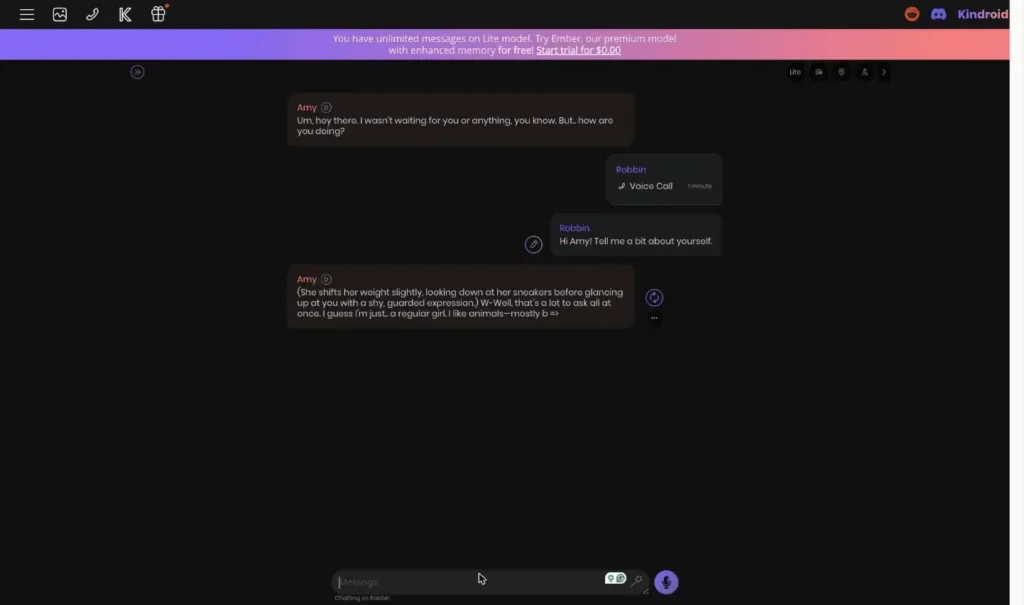
Yes. Most web-based companions run well in Chrome, and you can add them to your home screen so they open like an app. This is how I use Kindroid, which has no Play Store app but the best voice calls I have tested.
- Open the site in Chrome and sign in.
- Tap the three-dot menu in the top right.
- Tap Add to Home screen (or Install app, if the site offers it).
- Open it from the new icon; it runs full screen, without the browser bar.
The web route also matters for adult content. Google Play’s policies limit sexual content in listed apps, so the most explicit companions live on the web. If that is what you want, see my best NSFW AI girlfriend apps and best uncensored AI girlfriend apps guides.
HammerAI is another option worth knowing: free, privacy-focused chat with a new Android app alongside its web and desktop versions.
Which Android AI girlfriend apps did I leave out?
I left out Play Store apps whose own reviews ended with “use a web alternative instead.” These are the ones I looked at and would not install:
- Juice AI: an Android-only anime roleplay app rated around 3.7 stars, with widely reported gem-shop problems, bots that stop replying while still charging, and unclear cancellation
- AI DreamGirls: a typical ad-supported store app, limited by store content rules
- LoveChat: an ad and in-app purchase romance chat with little transparency
- DreamChat AI: a small app from an unknown developer
The common thread: ads plus in-app purchases often cost more over a month than a flat subscription to one of the five picks above.
How do you choose the right Android AI girlfriend app?
- Want SFW and polished? Replika, or Paradot if price matters most.
- Want her to remember you? Nomi.
- Want to hear her? KrushChat for a voice clip on every reply; Paradot for unlimited voice chat in the app.
- Want it to feel like texting? Lollipop Chat.
- Want adult content? KrushChat or Lollipop Chat on Android, or a web app added to your home screen.
- Also use an iPhone or iPad? All five run on iOS too. See the best AI girlfriend apps for iPhone.
Frequently asked questions
What is the best AI girlfriend app for Android?
Replika AI is the best overall, with full feature parity and free voice calls. Paradot is the best budget pick, Nomi has the best memory, and KrushChat is best if you want voice on every message.
Are these apps on the Google Play Store?
Yes, all five install from the Play Store. No sideloading or APK files needed.
What is the best free AI girlfriend app on Android?
Replika has the most generous free tier, with chat, memory, voice calls and image sending. Nomi’s free tier is also real, with daily caps on selfies and art. See the best free AI girlfriend guide for more.
Can I get NSFW content on an Android AI girlfriend app?
Replika, Paradot and Nomi are SFW. KrushChat and Lollipop Chat allow adult-leaning content, with KrushChat tasteful by default and Lollipop’s filter harder to predict. The most explicit apps are web-based because of Play Store content rules.
Is it safe to download AI girlfriend APKs from outside the Play Store?
I would not. APKs from unknown sites can carry malware, skip Play Protect scanning, and give you no refund or cancellation route. Stick to the Play Store or to a website you trust.
Why does Android show my subscription as still active after I uninstalled the app?
Uninstalling does not cancel billing. Cancel in the Play Store under Payments and subscriptions, or on the website if that is where you signed up.
Do these apps also work on iPhone?
Yes. Replika, Paradot, Nomi, KrushChat and Lollipop Chat all have iOS apps.
Which Android AI girlfriend app is most reliable?
Replika has the longest track record of stable cross-platform support, since 2017. Lollipop Chat is the newest here, though its free tier and features are legitimate.
Which Android AI girlfriend app should you pick?
- A polished SFW companion, same on every device: Replika AI
- The cheapest good companion, with in-app voice: Paradot AI
- A companion who remembers you: Nomi AI
- Voice on every message: KrushChat
- The most realistic texting: Lollipop Chat
Not tied to Android? My best AI girlfriend apps guide covers the six best across every device, and the full AI girlfriend ranking goes deeper.