Nearly every AI companion app now has a speaker icon somewhere. Tap it on most of them and you get a flat text-to-speech read of the last message, which is not why anyone searches for an AI girlfriend with voice. What people want is a call they can hold a conversation on, a voice that sounds like a specific person, or a companion who talks back without being asked.
Top AI Girlfriend Platforms — Our Picks

Hyper-realistic AI companions with adaptive memory that recall your past conversations.

Story-driven AI roleplay with characters you shape, plus images generated right in the chat.

Uncensored AI chat with customizable characters and on-demand image generation.


An AI girlfriend for flirty chats and custom photos, ready whenever you are.

Create a custom AI girlfriend with her own personality, generated images, and ongoing chat memory.
Build a custom AI companion and bring her to life with chat, images, and video.
Personalized AI companions for ongoing roleplay, with a simple, discreet signup.
Build a custom AI girlfriend, boyfriend, or anime character — choose the look and personality.
Customizable AI girlfriend personalities with realistic, ongoing conversations.
The eight apps below clear that bar, each in a different way: free calls, the best-sounding calls, voice cloning, or a voice clip on every reply. I re-tested two of them with test accounts in October 2026, and every one has a full hands-on review on Pippin Club. Skim the quick answer and the cost table, or read each section for screenshots, setup steps, pros and cons and prices.
- Best free voice: Replika AI, voice calls and voice messages free on every account.
- Best-sounding calls: Kindroid, the most natural real-time calls I have tested, with a no-card trial.
- Best voice cloning (SFW): Nomi AI, custom voices through ElevenLabs.
- Voice on every reply, free: KrushChat, a short voice clip with every message on every tier.
- Best custom voice studio: AI Peeps, clone a voice from a clip or describe one in words, for 10 coins.
- Best calls in other languages: FlirtCam AI, calls in English, German and Spanish with a live cam view.
- Best calls in an all-in-one adult app: Secrets AI, call from the chat screen.
- Best uncensored voice cloning: Nastia, cloning on its Unlimited plan.
Jump to a section (16)
- What kinds of voice do AI girlfriend apps have?
- Best AI girlfriends with voice compared
- How much do AI girlfriend voice calls cost?
- 1. Replika AI: best free voice
- 2. Kindroid: best-sounding calls
- 3. Nomi AI: best voice cloning (SFW)
- 4. KrushChat: voice on every reply, free
- 5. AI Peeps: best custom voice studio
- 6. FlirtCam AI: best calls in other languages
- 7. Secrets AI: best calls in an all-in-one adult app
- 8. Nastia: best uncensored voice cloning
- Other AI girlfriends with notable voice features
- How do you get better voice from an AI girlfriend?
- How do you choose an AI girlfriend with voice?
- Frequently asked questions
- Which AI girlfriend with voice should you pick?
What kinds of voice do AI girlfriend apps have?
There are four kinds, and they are very different experiences.
| Voice type | What it is | Best apps here |
|---|---|---|
| Real-time calls | A live, phone-style conversation; you talk, she answers out loud | Kindroid, Replika, FlirtCam, Secrets AI |
| Voice on every reply | Each text reply comes with an audio clip automatically | KrushChat, Xeve AI |
| Voice messages | Audio replies you request, or voice notes in the chat | Replika, Paradot, Nastia, AI Peeps |
| Custom or cloned voices | A voice made for your companion, from a sample or a description | Nomi (ElevenLabs), AI Peeps, Nastia Unlimited, Kindroid (paid) |
Best AI girlfriends with voice compared
| App | Voice type | Free voice | Starting price | NSFW |
|---|---|---|---|---|
| Replika AI | Calls and messages | Yes, calls included | $5.83/mo (yearly) | SFW |
| Kindroid | Real-time calls, cloning | 3-day trial, no card | $11.66/mo (yearly) | Depends on build |
| Nomi AI | ElevenLabs cloning, voice chat | Preset voices; unlimited voice is paid | $8.33/mo (yearly) | SFW |
| KrushChat | Clip on every reply | Yes, every tier | $7.77/mo (yearly) | Adult, tasteful default |
| AI Peeps | Voice messages, custom voices | Coins from the daily check-in | $7.49/mo (yearly) | SFW or NSFW toggle |
| FlirtCam AI | Calls, voice replies | Daily reward tokens | About $19.99/mo | Uncensored |
| Secrets AI | Real-time calls | Thin Moments allowance | $109.99/yr | Uncensored |
| Nastia | Voice messages, cloning | No | $7.33/mo (yearly) | Uncensored |
How much do AI girlfriend voice calls cost?
From free (Replika) to about $0.75 a minute (FlirtCam token packs). I worked these out from each app’s own prices:
| App | Voice feature | Cost | About |
|---|---|---|---|
| Replika AI | Calls and messages | Free | $0 |
| KrushChat | Clip on every reply | Free | $0 |
| Kindroid | Real-time calls | Included in Ember | $11.66/mo flat |
| Egirls AI | Calls | 250 coins an hour (Plus includes some minutes) | About $0.05/min |
| AI Peeps | Voice message / new custom voice | 3 coins / 10 coins | About $0.03 / $0.11 |
| AniOne | Voice calls | $5 for 25 minutes (5 free) | About $0.20/min |
| FlirtCam AI | Calls / voice replies | 50 tokens a minute / 2 tokens | About $0.75/min / $0.03 |
| Muah AI | Real-time phone calls | Ultra VIP only | $999/yr |
1. Replika AI: best free voice
- Voice: calls and voice messages, free on every account
- Best for: voice without paying anything
- Price: free; PRO $19.99/mo, $44.99 for 3 months, or $69.99/yr
- What PRO adds: unlimited voice messages and the advanced model
- NSFW: SFW for accounts created after February 2023
- Full review: Replika AI review
Replika is the only app here where calls are part of the free product. You pick her voice in the Profile tab with the rest of her settings, then call or send voice messages from the chat. The voice comes from a 3D avatar standing in a room you decorate, so you have someone to look at while you talk, and it works on web, iOS, Android and even Oculus VR.


How to start a voice call on Replika
- Create a free account and set up your companion.
- Open Profile and choose a voice.
- Tap the call button in the chat and allow microphone access.
- Talk normally; she answers out loud.
Pros
- Free calls and voice messages
- A 3D avatar to look at while you talk
- Works on every platform, including VR
Cons
- No adult conversation on new accounts
- Gems and coins on top of PRO
- Occasional over-filtered replies
2. Kindroid: best-sounding calls
- Voice: real-time calls; voice cloning on the paid plan
- Best for: people who care most about how the call sounds
- Price: $11.66/mo yearly; 3-day Ember trial, no card
- Free tier: unlimited text on Lite; calls need Ember
- Where it runs: web only, works in a mobile browser
- Full review: Kindroid review
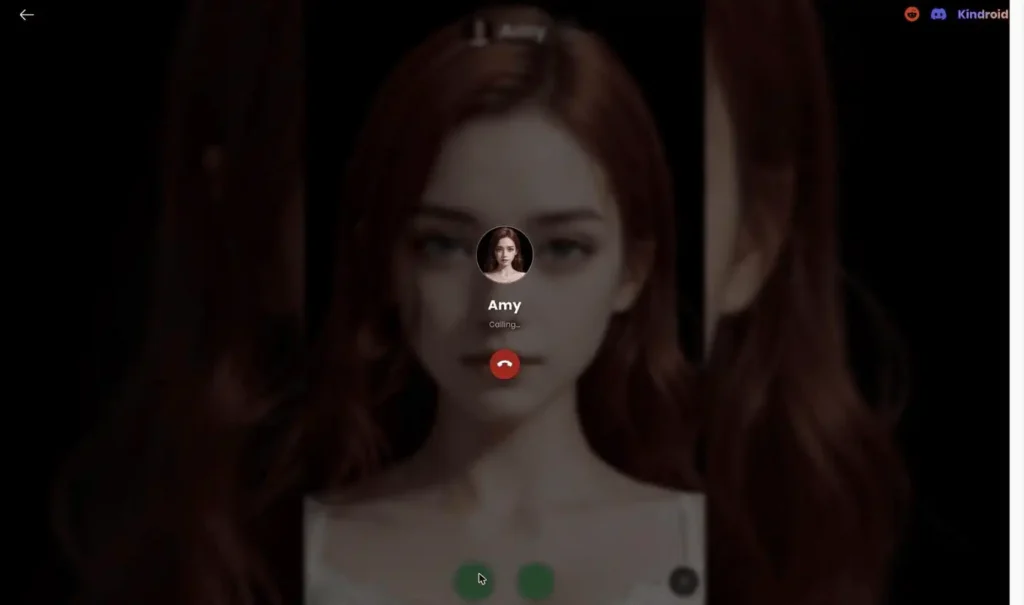
Kindroid’s real-time calls are the most natural I have heard from any companion app. Pair that with Kindroid’s layered memory and the call feels like talking to someone who knows you. The 3-day Ember trial needs no card, so you can hear it before paying.
How to try Kindroid calls
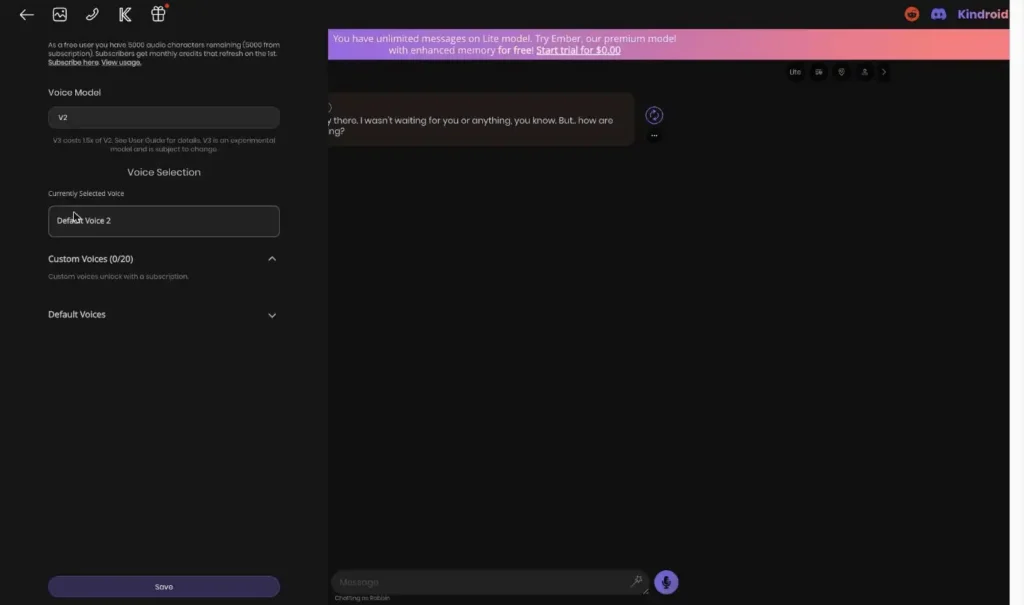
- Sign up at kindroid.ai and create or clone a character.
- Start the 3-day Ember trial (no card).
- Open voice settings and pick a voice.
- Start a call from the chat; on a phone, use the site from your home screen.
Pros
- The best call quality in the category
- A no-card trial
- Calls backed by excellent memory
Cons
- Calls and cloning need the paid plan
- No mobile app
- A cluttered interface
3. Nomi AI: best voice cloning (SFW)
- Voice: four preset voices, or a custom voice through ElevenLabs
- Best for: giving your companion a voice of her own
- Price: $8.33/mo yearly, $13.33/mo quarterly, $15.99 monthly
- Free tier: preset voices; unlimited voice chat is paid
- NSFW: none
- Full review: Nomi AI review
Nomi offers four preset voices (American, British and anime-style female voices) or a custom one built with ElevenLabs, so your companion can sound like nobody else’s. The presets are a little robotic; the custom voice is where Nomi shines, and it pairs with the best long-term memory in the category.
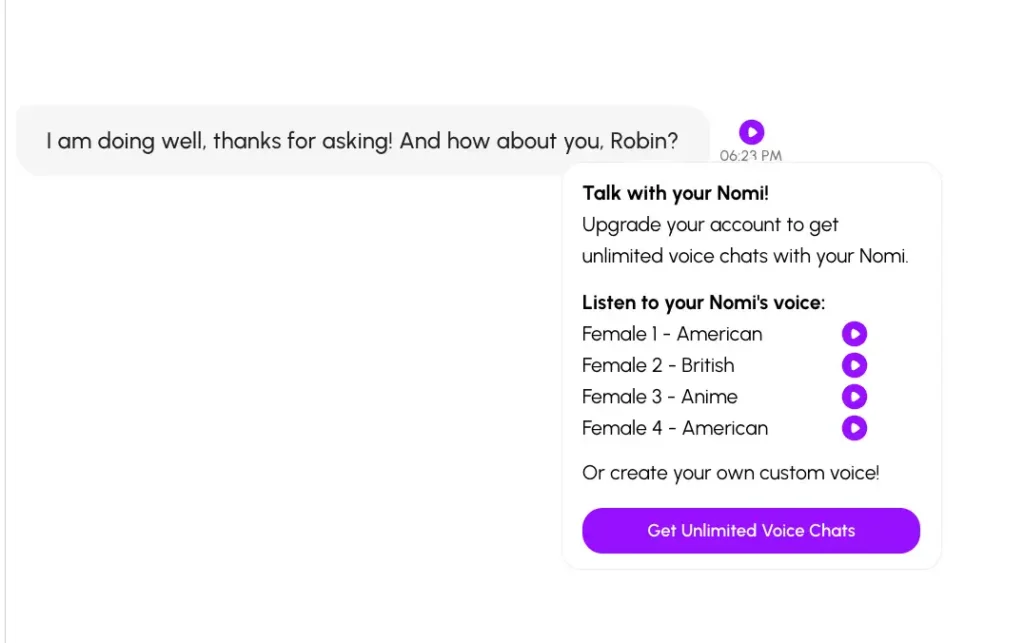
How to set up a custom voice on Nomi
- Open your Nomi’s chat and tap the voice option.
- Listen to the four presets first.
- Choose “create your own custom voice” for an ElevenLabs voice.
- Subscribe for unlimited voice chats once you are happy with it.
Pros
- Custom voices, not stock text-to-speech
- The best long-term memory
- Group chats with several Nomis
Cons
- Preset voices sound robotic
- Unlimited voice is paid
- No NSFW
4. KrushChat: voice on every reply, free
- Voice: a short voice clip attached to every AI reply
- Best for: hearing her all the time without paying for it
- Price: $7.77/mo yearly or $14.99 monthly; 50 free credits
- Free tier: voice clips included on every tier
- Where it runs: web, iOS and Android
- Full review: KrushChat review
KrushChat is voice-first: every reply arrives with a short audio clip, on every plan, including free. You do not have to ask or pay per message. It is the easiest way to get a companion who always talks back, and the polished iOS and Android apps make it feel like a real consumer product.


Pros
- Free voice on every message
- Polished mobile apps
- A cheap annual plan
Cons
- Clips, not live calls
- Image credits on top of the subscription
- Countdown timers and popups
5. AI Peeps: best custom voice studio
- Voice: voice messages, plus Voice Studio to clone or describe a voice
- Best for: designing exactly how she sounds
- Costs: voice message 3 PeepCoins; new custom voice 10
- Price: Peep Chat $7.49/mo yearly; coin packs from $3.99
- Tested: October 2026, with a test account
- Full review: AI Peeps review (re-tested Oct 2026)
AI Peeps’ Voice Studio makes custom voices two ways: clone one from a 3 to 30 second audio clip, or describe it in words. I described a voice in a sentence and it was ready in about 15 seconds. You can then use it for your Peeps. Free accounts get one voice slot.
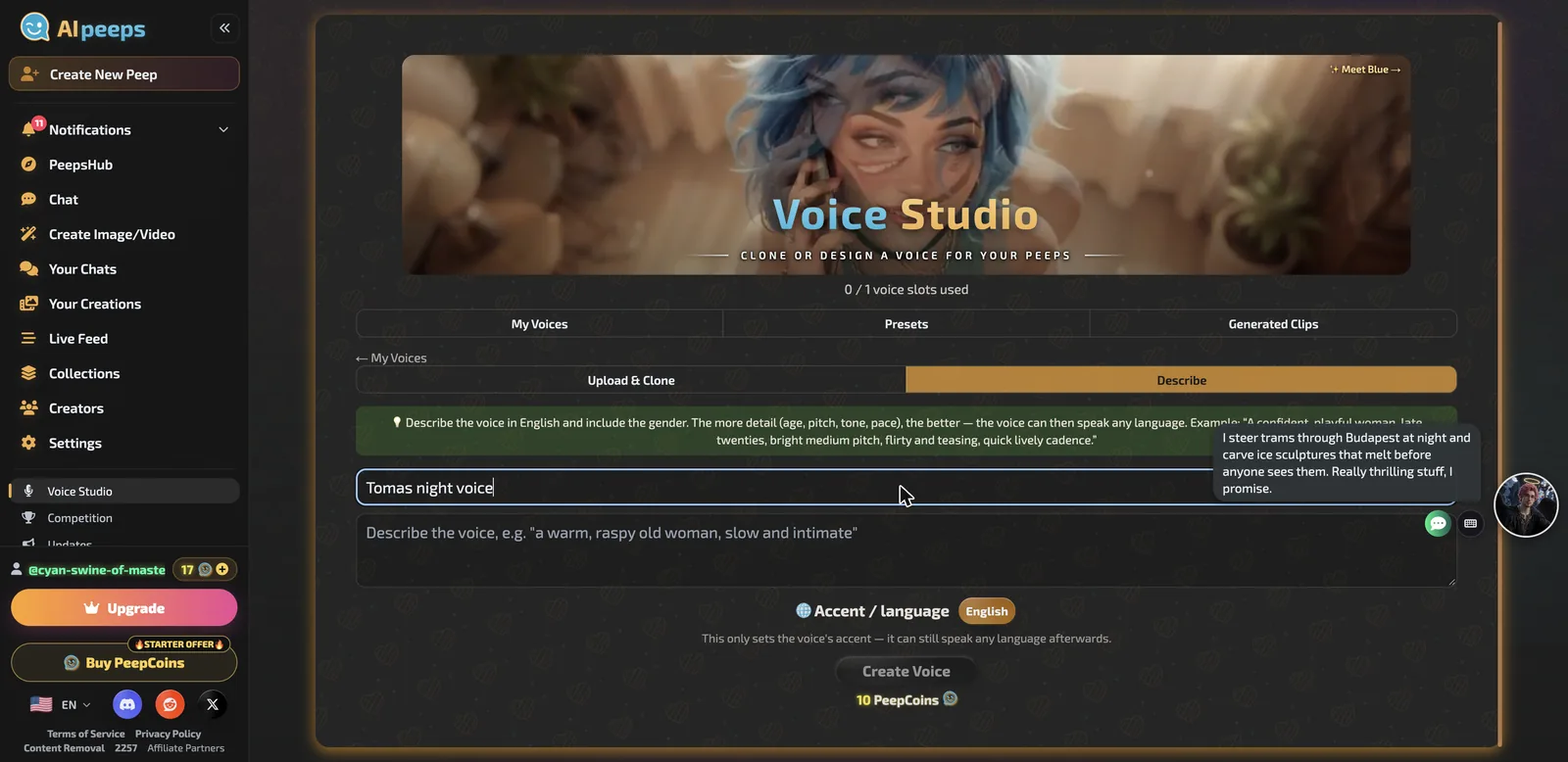
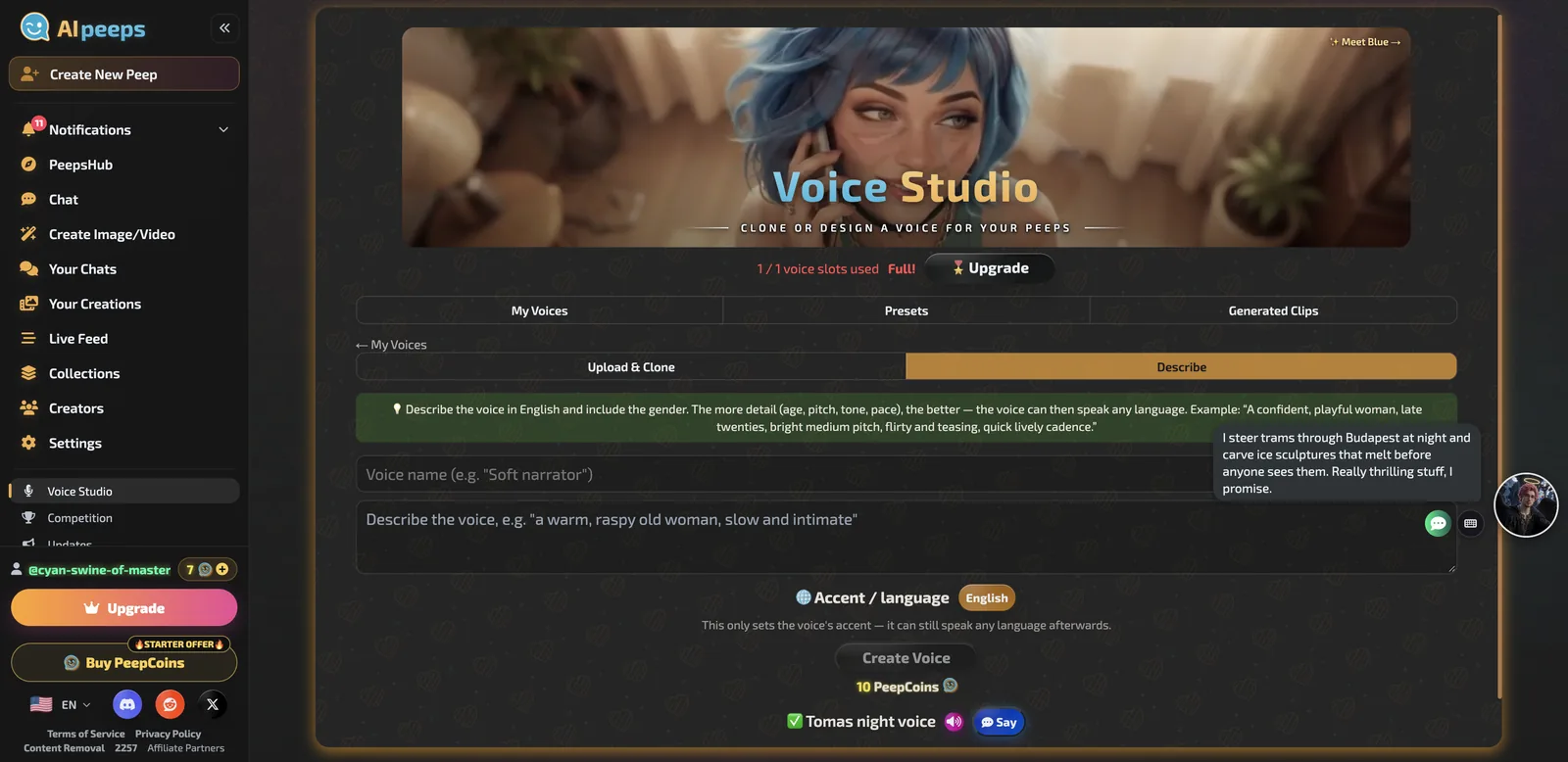
How to make a custom voice on AI Peeps
- Open Voice Studio from the sidebar.
- Choose Clone (upload 3 to 30 seconds of audio you have rights to) or Describe.
- Name the voice and write a short description, for example tone, accent and pace.
- Create it (10 coins), then use it for your Peep.
Pros
- Clone or describe, both fast
- Cheap voice messages
- A free voice slot
Cons
- Voice messages, not live calls
- Coin math adds up
- Very short chat replies
6. FlirtCam AI: best calls in other languages
- Voice: voice calls with a live cam view, plus voice replies in chat
- Best for: calls with something to watch, in English, German or Spanish
- Costs: calls 50 tokens a minute; voice replies 2 tokens
- Price: subscription about $19.99/mo; tokens from $14.99 (1,000)
- Tested: October 2026, with a test account
- Full review: FlirtCam AI review (re-tested Oct 2026)
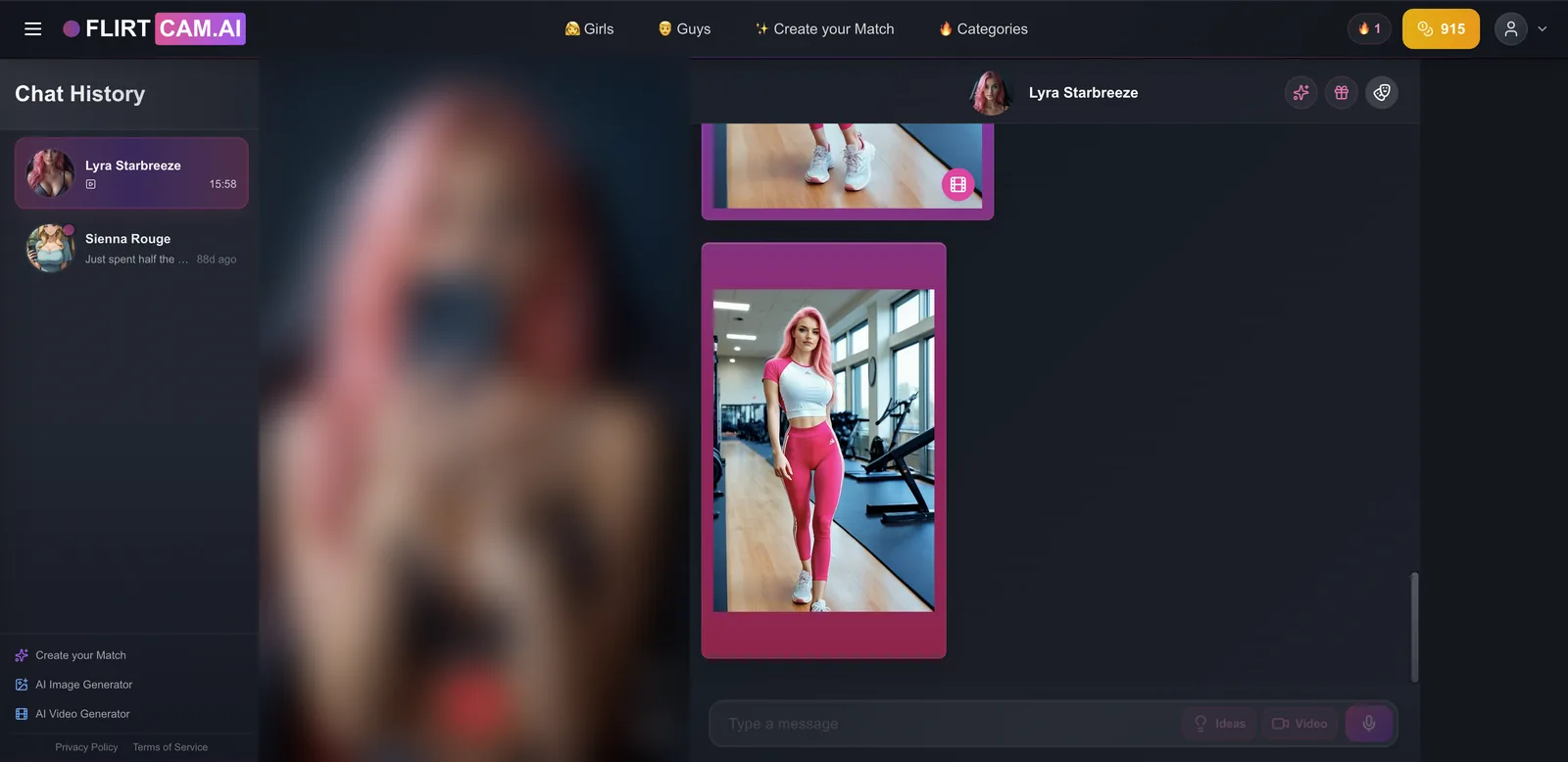
FlirtCam’s green phone button starts a voice call in English, German or Spanish, and the animated cam view switches to a phone clip while you talk, so it feels more like a video call than a voice note. It is the priciest per minute here, but the only one in this guide with calls in three languages and a moving picture on screen.
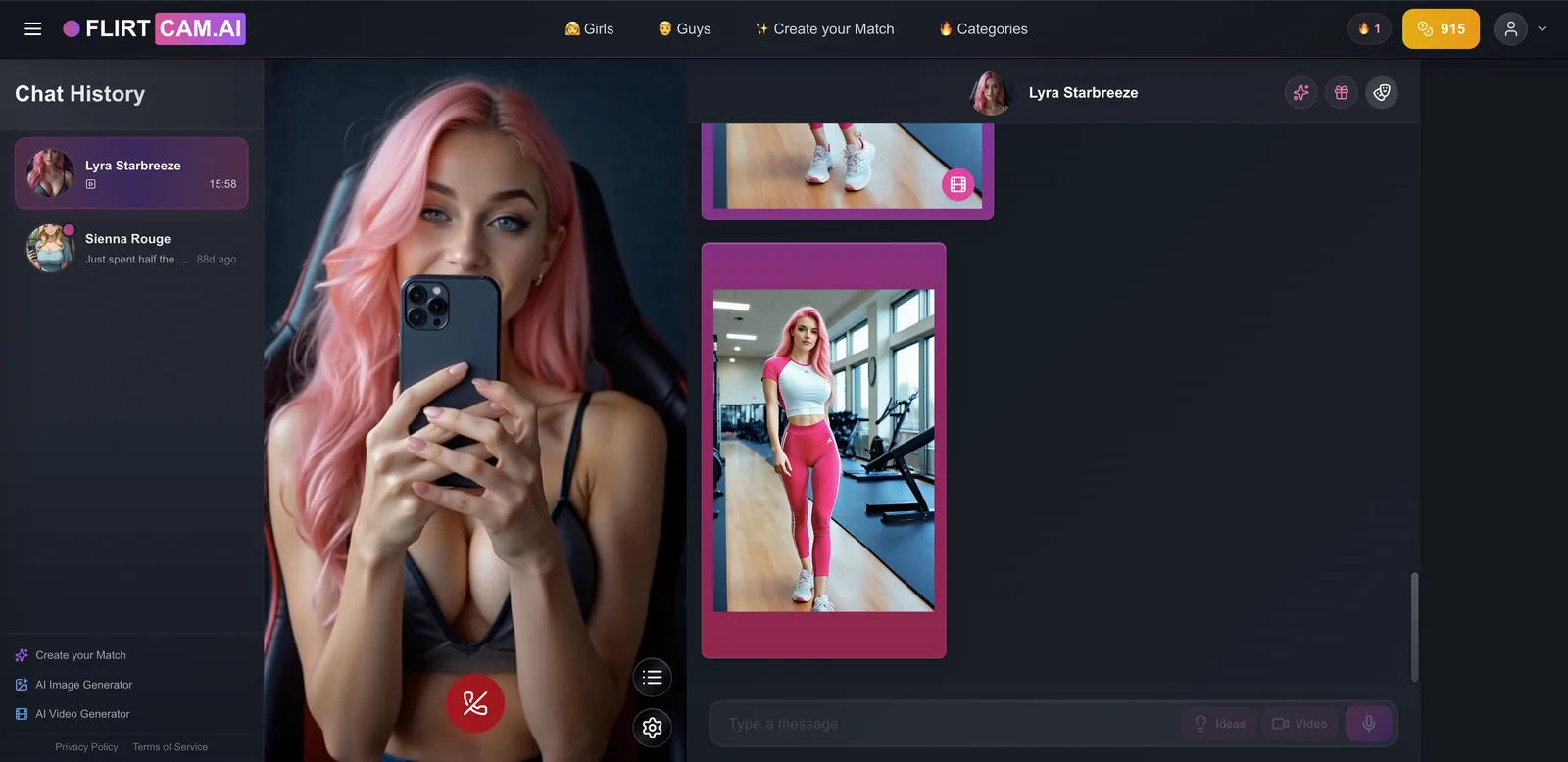
Pros
- Calls in three languages
- A cam view during calls
- Cheap voice replies in chat
Cons
- About $0.75 a minute on token packs
- One balance for everything
- An explicit home page
7. Secrets AI: best calls in an all-in-one adult app
- Voice: real-time calls from the chat screen
- Best for: calls alongside images, video and group chats
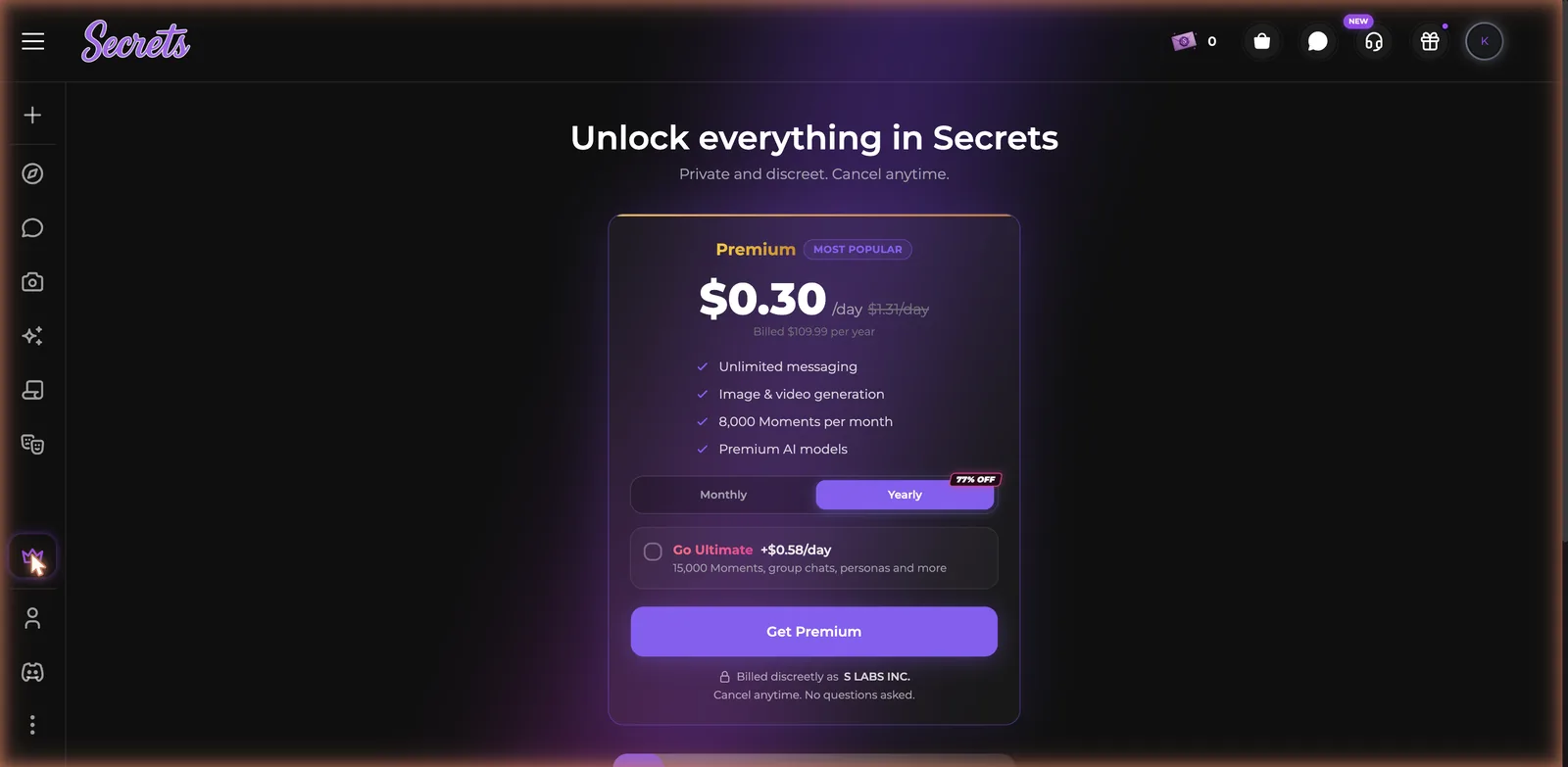
- Price: about $20/mo, or $109.99/yr; Premium includes 8,000 Moments a month
- Free tier: 30 messages a day; thin Moments for calls
- NSFW: uncensored, 18+
- Full review: Secrets AI review
Secrets AI puts the call button directly in the chat, next to image and video generation and saved memories, so switching from typing to talking is one tap. Calls spend the platform’s Moments currency even on paid plans, so heavy talkers should budget for that.

Pros
- Calls one tap from the chat
- Strong memory in conversation
- A real free tier for text
Cons
- Calls still spend Moments after you pay
- “Per day” pricing hides a yearly bill
- Mid-chat interruptions
8. Nastia: best uncensored voice cloning
- Voice: voice messages on Basic; voice cloning on Unlimited
- Best for: a personal-sounding voice with no content filters
- Price: Basic about $7.33/mo yearly; Unlimited about $8.33/mo yearly
- Tokens: roll over and never expire
- NSFW: uncensored
- Full review: Nastia review
Nastia is the uncensored counterpart to Nomi: voice messages come with Basic, and voice cloning unlocks one tier up on Unlimited, along with the best memory tier and 4K pictures and video. Relationship types and a Platonic-to-Uninhibited intimacy slider shape how she talks before you ever hear her.


Pros
- Voice cloning without content filters
- Tokens never expire
- Deep relationship settings
Cons
- Cloning needs Unlimited
- The free tier is a taster
- Heavy gamification
Other AI girlfriends with notable voice features
- Xeve AI: every reply comes with a voice clip (one of my test replies had a 26-second clip), and its video chat speaks too.
- Egirls AI: a Call button on every character and Voice Mode to read replies aloud; Plus included 10 minutes of calls on my account.
- Paradot AI: warm voice-note replies; unlimited voice chat works only in its apps.
- DreamPress AI: stories narrated as they are written, with voices like Birch, Magnolia, Willow and Cedar, plus custom blends.
- AniOne: voice calls with anime characters, 5 free minutes, then $5 for 25.
- Muah AI: advertises real-time phone calls, but only on its $999-a-year Ultra VIP tier.
How do you get better voice from an AI girlfriend?
- Use headphones. They stop her voice feeding back into your microphone and cutting the call.
- Pick a quiet room. Background noise causes misheard words and odd replies.
- Speak in full sentences and pause at the end, so the app knows you are done.
- Try every preset voice before paying for a custom one.
- Describe tone, pace and accent when creating a voice in words (AI Peeps, Nomi).
- Only clone audio you have the rights to. Never clone a real person’s voice without consent.
- Set a budget for per-minute calls before you start talking.
How do you choose an AI girlfriend with voice?
- Free calls: Replika AI.
- The best call quality: Kindroid.
- A unique voice, SFW: Nomi AI.
- Voice on every message, free: KrushChat.
- Design the voice yourself: AI Peeps.
- Calls in German or Spanish: FlirtCam AI.
- Calls in an uncensored all-in-one app: Secrets AI.
- Uncensored cloning: Nastia.
- Seeing her too: see the best AI girlfriend with video guide.
Frequently asked questions
Which AI girlfriend app has the best voice?
Kindroid has the most natural real-time calls I have tested. For free voice, Replika includes calls on every account, and KrushChat adds a voice clip to every reply.
Is there a free AI girlfriend with voice calls?
Yes. Replika AI includes voice calls and voice messages for free. Kindroid offers a 3-day trial of its calls with no card, and AniOne gives 5 free minutes.
Can I give my AI girlfriend a custom voice?
Yes. Nomi uses ElevenLabs for custom voices, AI Peeps can clone a voice from a short clip or create one from a description, Nastia clones voices on Unlimited, and Kindroid supports cloning on its paid plan.
How much do AI girlfriend voice calls cost?
Anywhere from free (Replika) to about $0.75 a minute (FlirtCam token packs). Kindroid includes calls in a flat $11.66 a month, and Egirls works out to about $0.05 a minute.
Which AI girlfriend voice apps allow NSFW?
KrushChat, FlirtCam, Secrets AI and Nastia are adult apps, and AI Peeps has an NSFW toggle. Replika, Nomi and Paradot are SFW. Kindroid depends on how you build the character.
Do AI girlfriend voice calls work on mobile?
Yes. Replika, Nomi, KrushChat and Paradot have mobile apps. Kindroid calls run in your phone’s browser. See the Android and iPhone guides for app picks.
Which AI girlfriend speaks other languages?
FlirtCam calls work in English, German and Spanish. AIMOUR chats in 15 languages, and Soulkyn supports 30+ chat languages, though not all of these are voice.
Is it safe to clone a voice for an AI girlfriend?
Clone only your own voice or audio you have permission to use. Cloning a real person without consent is unethical and illegal in many places.
Which AI girlfriend with voice should you pick?
- Free calls and voice messages: Replika AI
- The best-sounding calls: Kindroid
- A custom voice, SFW: Nomi AI
- A voice clip on every reply, free: KrushChat
- A voice you design: AI Peeps
- Calls in three languages: FlirtCam AI
- Calls inside an all-in-one adult app: Secrets AI
- Uncensored voice cloning: Nastia
For the full ranking beyond voice, see my best AI girlfriend apps guide.