This month I built characters from scratch on six different apps: Mei, an anime architect I know from the climbing gym; Tomas, a night-shift tram driver in Budapest; Maria, a 25-year-old artist; Kiran, a free diver who once went 42 metres down off Goa; Kinsley, an architect with curly hair; and Mira, a librarian with a green braid and round glasses. Some builders took 30 seconds, one took far longer, and one quietly swapped in details I never chose.
Top AI Girlfriend Platforms — Our Picks

Hyper-realistic AI companions with adaptive memory that recall your past conversations.

Story-driven AI roleplay with characters you shape, plus images generated right in the chat.

Uncensored AI chat with customizable characters and on-demand image generation.


An AI girlfriend for flirty chats and custom photos, ready whenever you are.

Create a custom AI girlfriend with her own personality, generated images, and ongoing chat memory.

Build a custom AI companion and bring her to life with chat, images, and video.

Personalized AI companions for ongoing roleplay, with a simple, discreet signup.

Build a custom AI girlfriend, boyfriend, or anime character — choose the look and personality.

Customizable AI girlfriend personalities with realistic, ongoing conversations.
This guide is about making your own AI girlfriend rather than picking one from a roster. It covers eight platforms where the character builder is the real product, with what each builder asks, how long it takes, what it costs and what went wrong. Use the quick answer and comparison table for a fast pick, or follow the step-by-step guides with screenshots.
- Deepest builder: Kindroid, about 47 parameters plus layered memory, free to build.
- Best builder for how she talks: Egirls AI, 11 steps with Roleplay or Texting style, writing level and a 3,000-character persona.
- Best free builder: AI Peeps, two free creations a day, private characters and an AI bio writer.
- Fastest: Xeve AI, six questions, free and private, ready in about 30 seconds.
- Most detailed looks: FlirtCam AI, 16 hair styles, 16 colours and an opening scene.
- Most personality levers: AIMOUR, temperament, relationship and fandom themes in 9 steps.
- Most ways to create: Soulkyn, six methods including Breed and Spin the Wheel.
- Best for anime characters: AniOne, archetype templates and a 1-token preview.
Jump to a section (15)
- How do you make your own AI girlfriend?
- AI girlfriend builders compared
- 1. Kindroid: deepest builder
- 2. Egirls AI: best builder for how she talks
- 3. AI Peeps: best free builder
- 4. Xeve AI: fastest builder
- 5. FlirtCam AI: most detailed looks
- 6. AIMOUR: most personality levers
- 7. Soulkyn: most ways to create
- 8. AniOne: best for anime characters
- Other builders worth knowing
- How do you make a better AI girlfriend character?
- Which builder should you use?
- Frequently asked questions
- Where should you make your own AI girlfriend?
How do you make your own AI girlfriend?
Every builder walks through the same five stages; they differ in how deep each one goes.
- Look: realistic or anime, age (18+ is always enforced), ethnicity, body, hair and eyes, or a text description the app turns into a portrait.
- Personality: traits, a template (Kuudere, Tsundere and so on) or a written persona.
- Relationship: stranger, friend, girlfriend or custom, which sets her tone toward you.
- Voice: a preset voice, or a custom one on apps like AI Peeps and Nomi.
- Story and style: backstory, opening scene, reply length and whether she texts or roleplays.
Expect 30 seconds on the quickest builders and much longer on deep ones like Kindroid.
AI girlfriend builders compared
| App | Builder | Voice | Private option | Standout |
|---|---|---|---|---|
| Kindroid | ~47 parameters | Voice settings | Share codes for cloning | Backstory and memory layers |
| Egirls AI | 11 steps | 3 voices | Not tested | Chat style and writing level |
| AI Peeps | 3 tabs | Preset or Voice Studio | Yes | AI bio writer, upload a photo |
| Xeve AI | 6 questions | 4 voices | Yes, private by default | Free, about 30 seconds |
| FlirtCam AI | 6 steps | Not tested | Not tested | 16 hair styles, opening scene |
| AIMOUR | 9 steps | Voice step | Yes (+100 tokens) | Temperament and fandom themes |
| Soulkyn | 4 steps, 6 methods | Voice messages | Not tested | Breed and Spin the Wheel |
| AniOne | 5 steps | 5 voices | Not tested | Anime archetype templates |
1. Kindroid: deepest builder
- Builder: about 47 parameters; predefined, uploaded or AI-generated avatars
- Memory set-up: backstory, key memories, journal entries, response directives
- Cost to build: free; unlimited Lite chat afterwards
- Price: $11.66/mo yearly; 3-day Ember trial, no card
- Sharing: clone community characters by share code
- Full review: Kindroid review
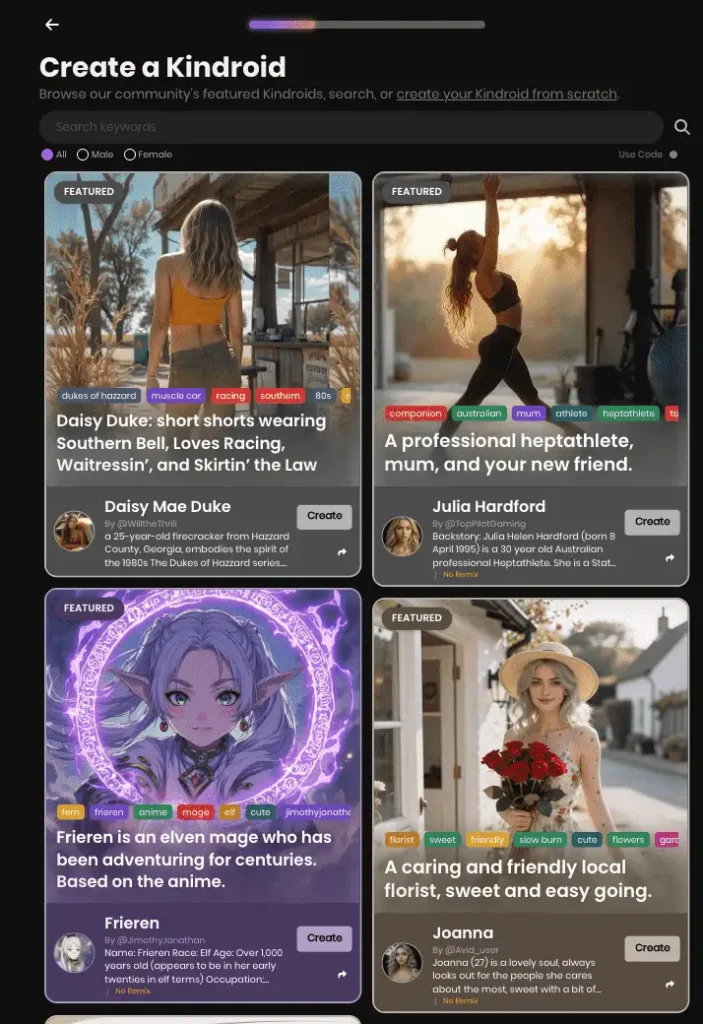
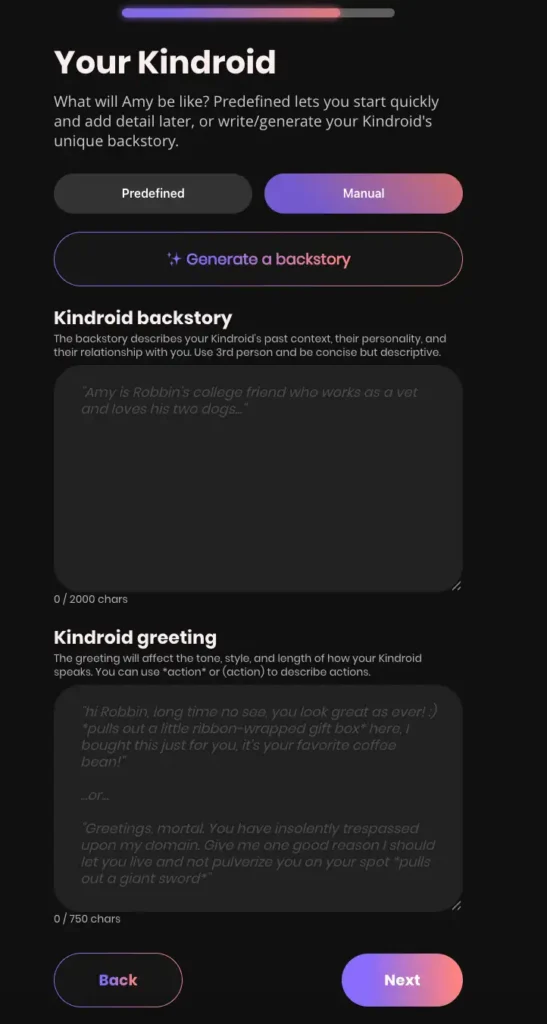
Kindroid is for engineering a character rather than picking presets. You start from a featured character or a blank one, choose how her avatar is made, then write backstory, key memories and response directives that shape every reply. It takes the longest of any builder here, and it gives the most control over who she is and what she never forgets.
How to build on Kindroid
- Click Create a Kindroid and pick a template or start blank.
- Choose a predefined, uploaded or AI-generated avatar.
- Write a backstory: who she is, how you met, what she cares about.
- Add key memories for facts she must never forget.
- Set response directives for tone and reply length, then start chatting on Lite.
Pros
- The most control of any builder
- Memory set up from day one
- Free to build and chat
Cons
- Takes time and a learning curve
- Only 2 free selfies
- No mobile app
2. Egirls AI: best builder for how she talks
- Builder: 11 steps with a live preview image
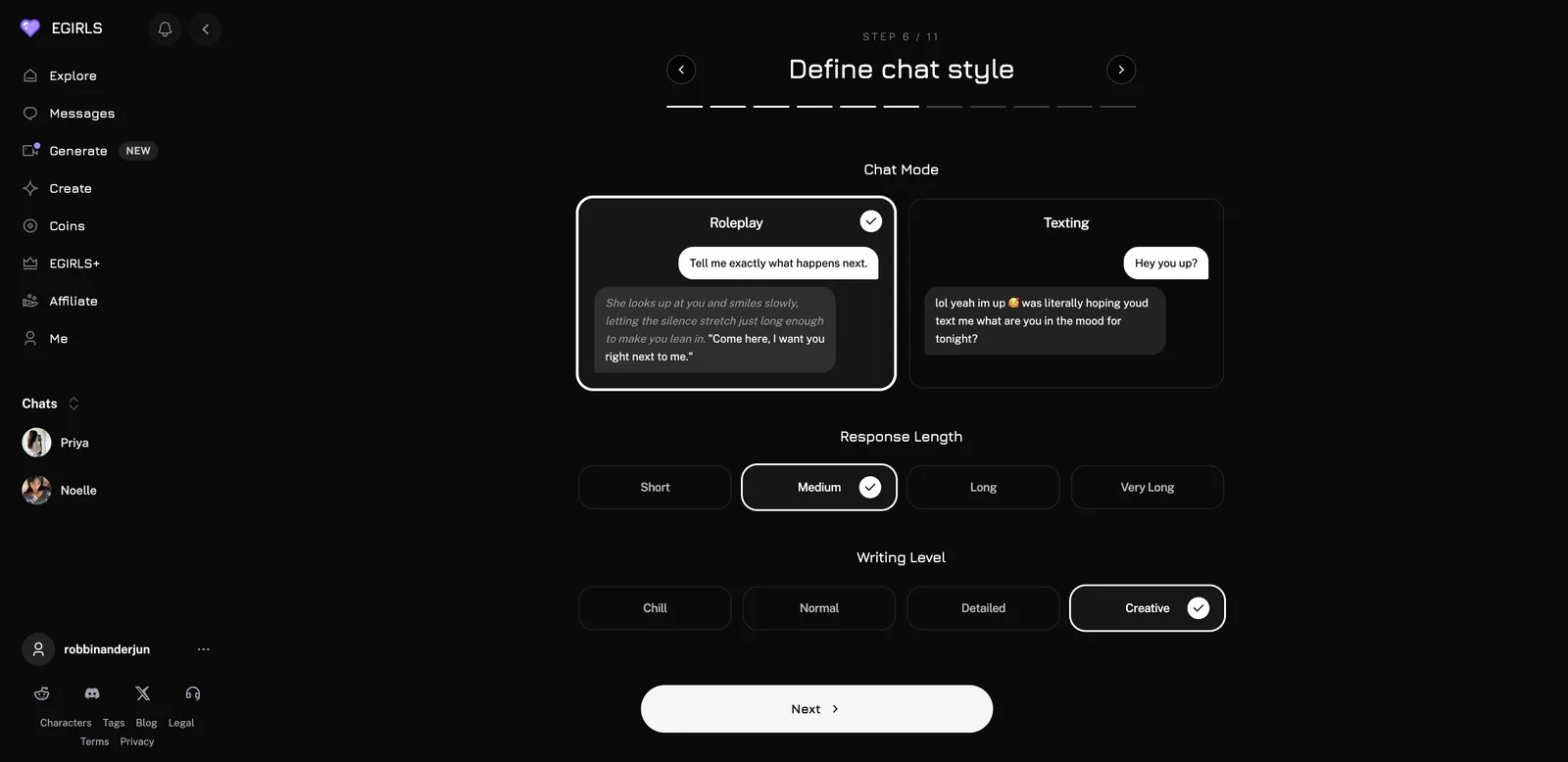
- Chat style: Roleplay or Texting, reply length (Short to Very Long), writing level (Chill to Creative)
- Relationship: 14 starting options plus Custom
- Persona: up to 3,000 characters
- Tested: October 2026, with a test account
- Full review: Egirls AI review (re-tested Oct 2026)
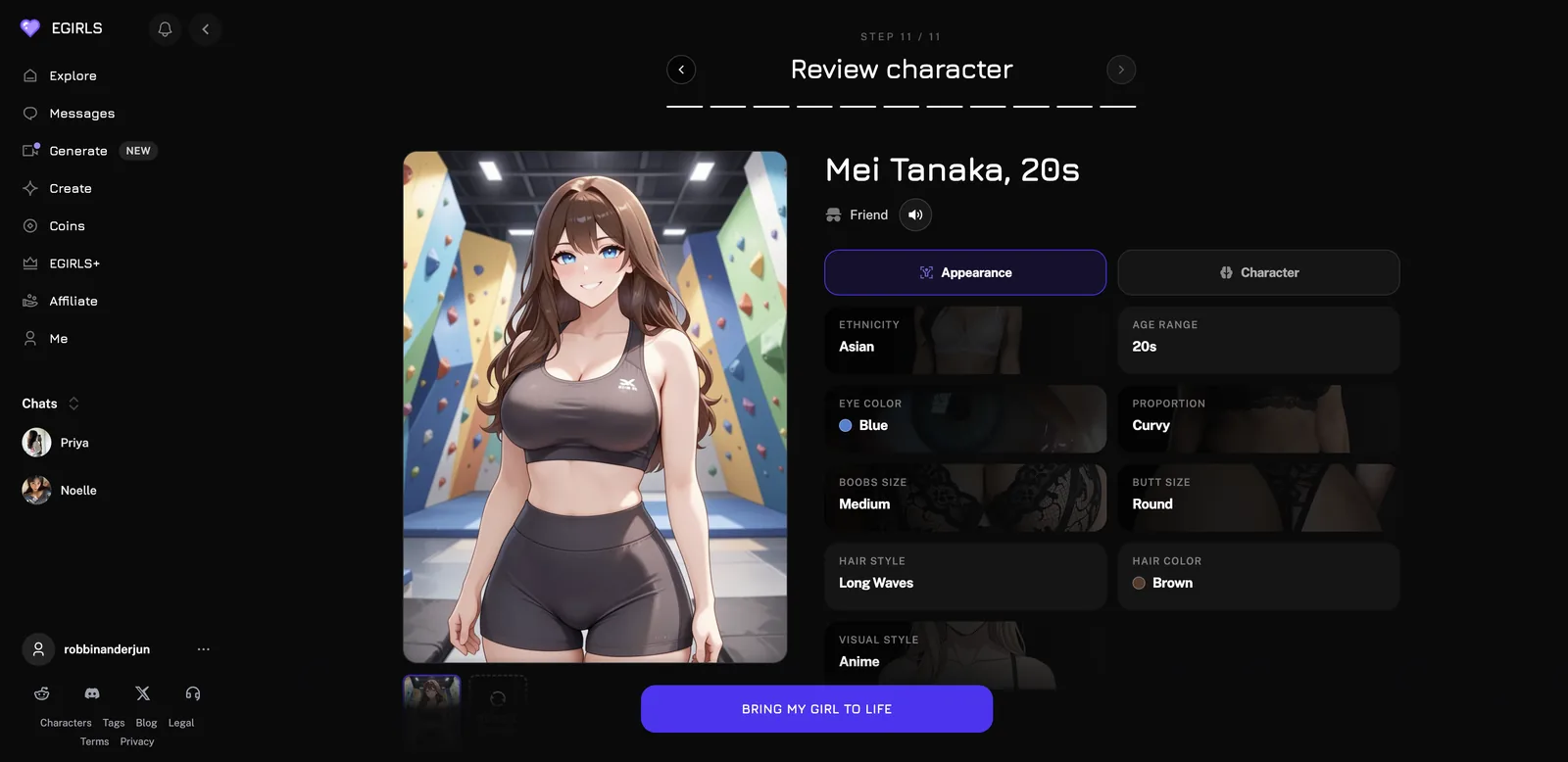
Egirls has the best builder for shaping how your character writes. The chat style step shows a sample of a roleplay reply and a casual text side by side, so you can see the difference before choosing. I built Mei Tanaka, an anime-style architect from Osaka I know from the climbing gym, and the preview image picked up the climbing gym from my written persona.
The 11 Egirls steps
- Gender (Female, Male or Trans) and style (Realistic or Anime)
- Age range and ethnicity
- Body and figure
- Hair colour, style and eye colour
- Sexual identity
- Chat style, reply length and writing level
- Starting relationship
- Optional kinks
- Voice (three, with previews)
- Name and persona (up to 3,000 characters)
- Review, then “Bring my girl to life”
Pros
- Control over writing style, not just looks
- A preview that reads your persona
- Great chat to go with it
Cons
- An optional kinks step and explicit defaults
- Best features need Plus
- Coins on top of the subscription
3. AI Peeps: best free builder
- Builder: PeepsLab with Look, Personality and Story tabs, or start from an uploaded image
- Free: 2 creations a day (then 30 coins), 2 private Peeps
- Extras: AI bio writer (3 coins), Voice Studio for custom voices
- Visibility: Public or Private
- Tested: October 2026, with a test account
- Full review: AI Peeps review (re-tested Oct 2026)
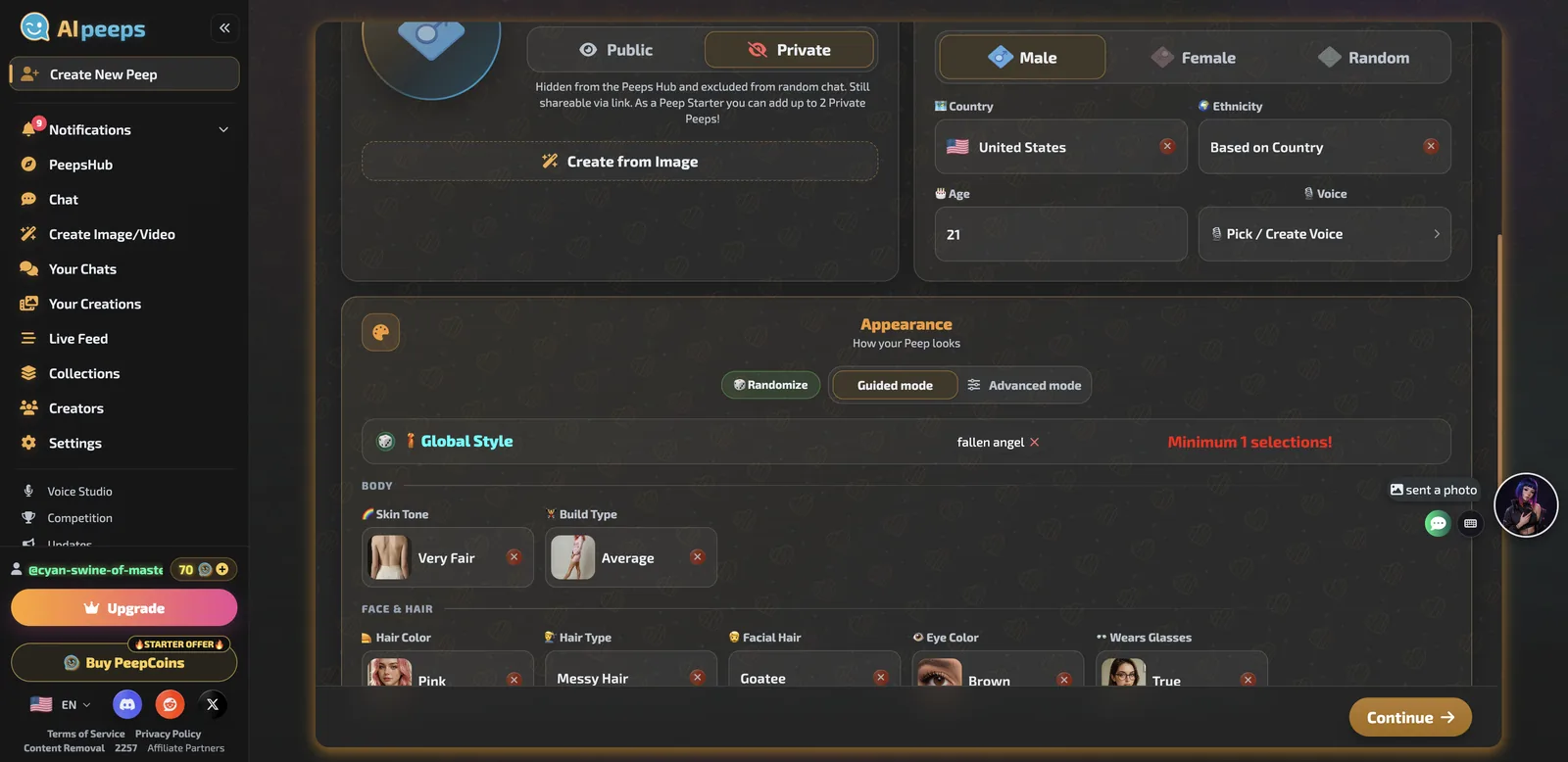
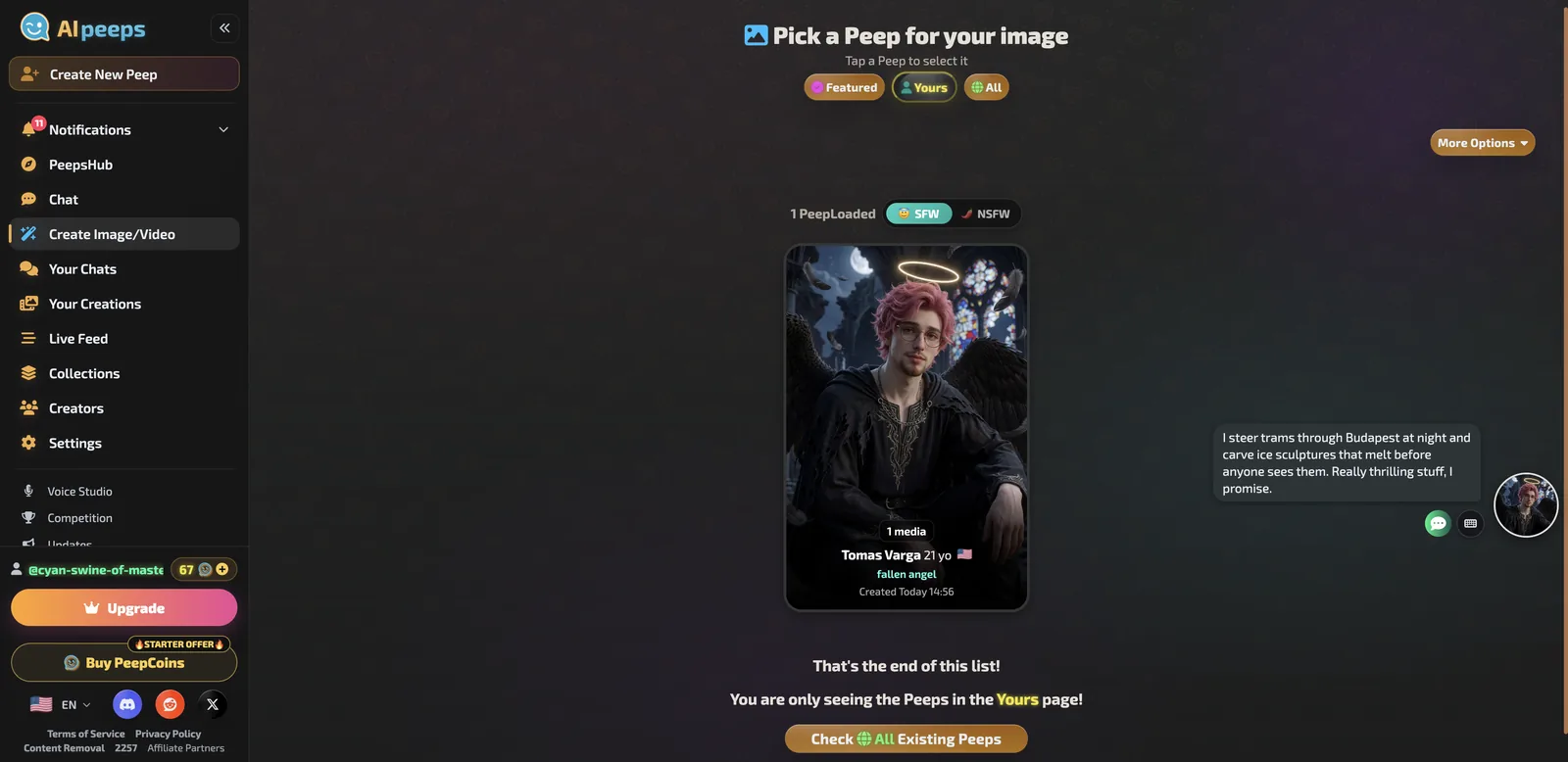
PeepsLab is generous on free and covers looks, personality traits, hobbies, a quirk and an opening scene with time of day. The Generate button expands a rough bio into a full one. My warning from testing: the Randomize buttons fill every field, and anything you do not clear can leak in. My Tomas, written as a 34-year-old Hungarian tram driver, came out listed as 21 and American, with a halo and wings I never asked for.
How to build a Peep (without surprises)
- Open Create New Peep, enter a name and choose Private.
- On Look, clear any randomized tags, then set gender, country, age, voice and appearance.
- On Personality, set traits, hobbies and a quirk; use Generate to expand your bio.
- On Story, edit the opening scenario and time of day.
- Review every field before pressing Create.
Pros
- Two free creations a day
- Private characters
- Custom voices in Voice Studio
Cons
- Randomized leftovers leak into results
- Short chat replies
- A busy interface
4. Xeve AI: fastest builder
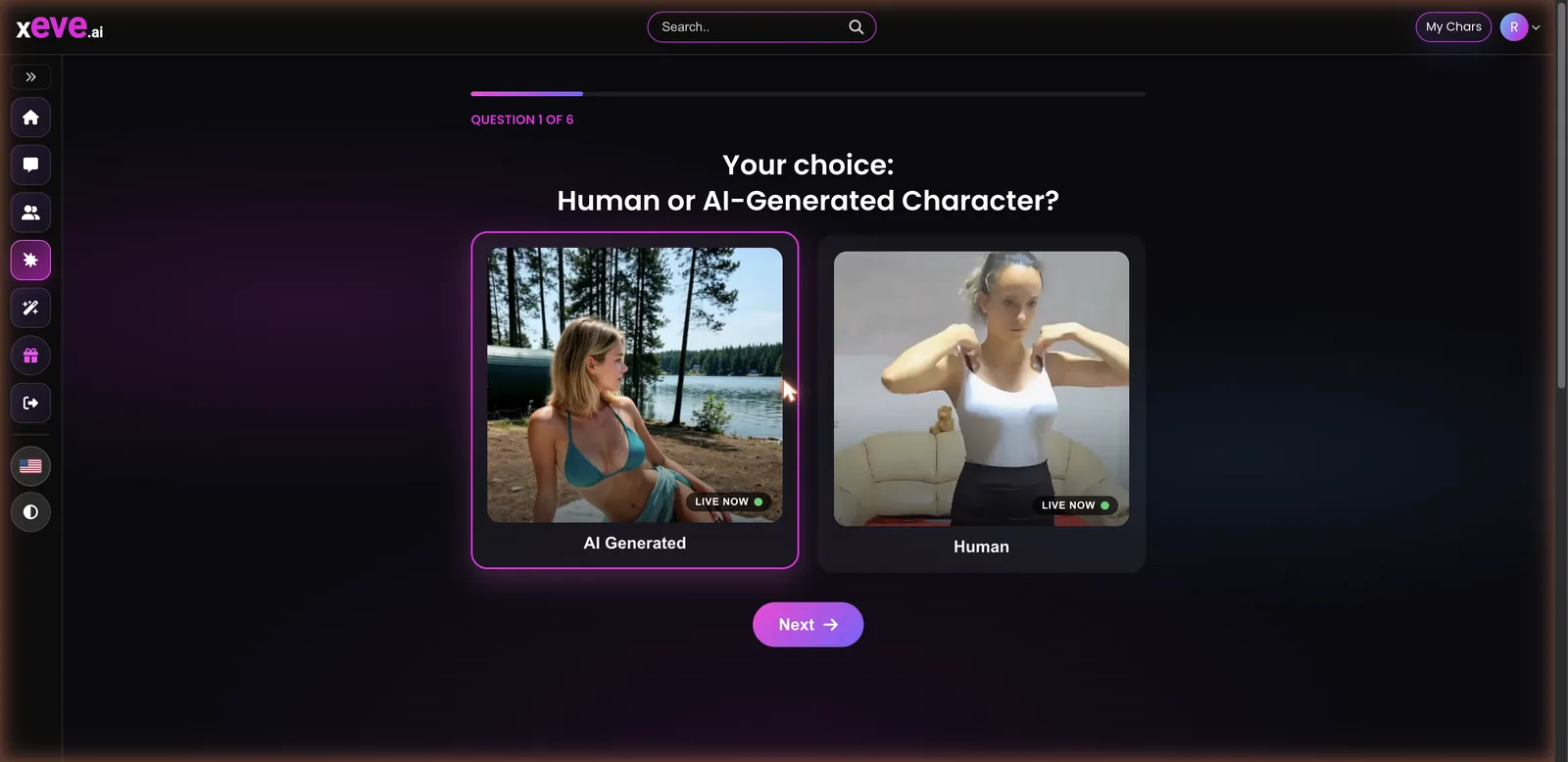
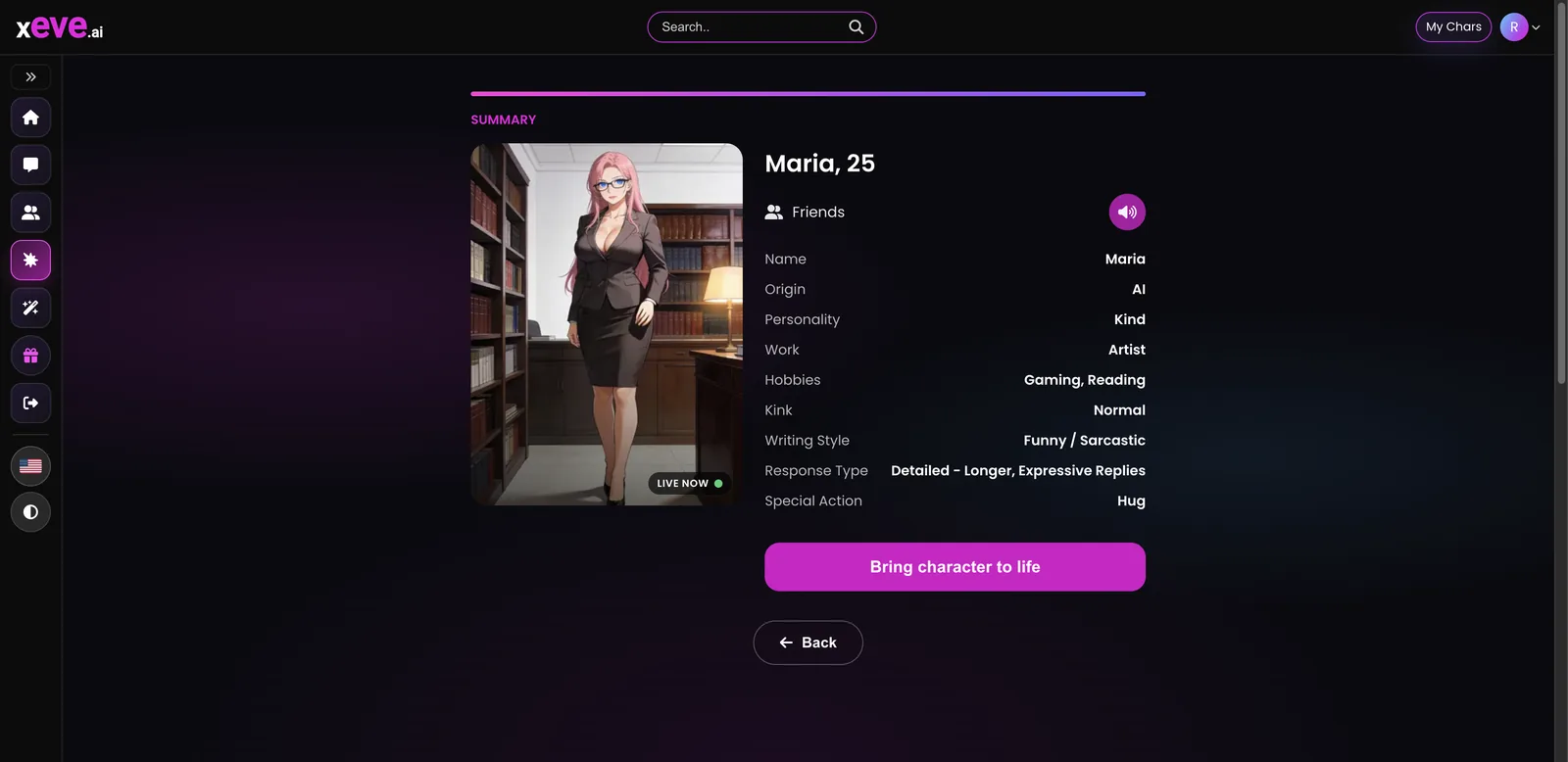
- Builder: 6 questions: Human or AI look, personality and age, look, relationship and voice, job and writing style, summary
- Time: about 30 seconds to appear
- Cost to build: free, no credits charged
- Visibility: private, under My Chars
- Tested: October 2026, with a test account
- Full review: Xeve AI review (re-tested Oct 2026)
Xeve’s builder is a quick quiz. Choose a filmed Human look or an AI-generated one, pick one of eight personalities and an age (18 to 60+), a preset look, a relationship from Stranger to Wife and one of four voices, then job, hobbies, writing style and reply length. My Maria, a 25-year-old artist, appeared privately in about 30 seconds, stayed in character and sent a 26-second voice clip in her first chat.
Pros
- Free and private
- Ready in about 30 seconds
- Custom characters behaved better than presets
Cons
- Preset looks only
- Extra photos cost credits
- A suggestive generator
5. FlirtCam AI: most detailed looks
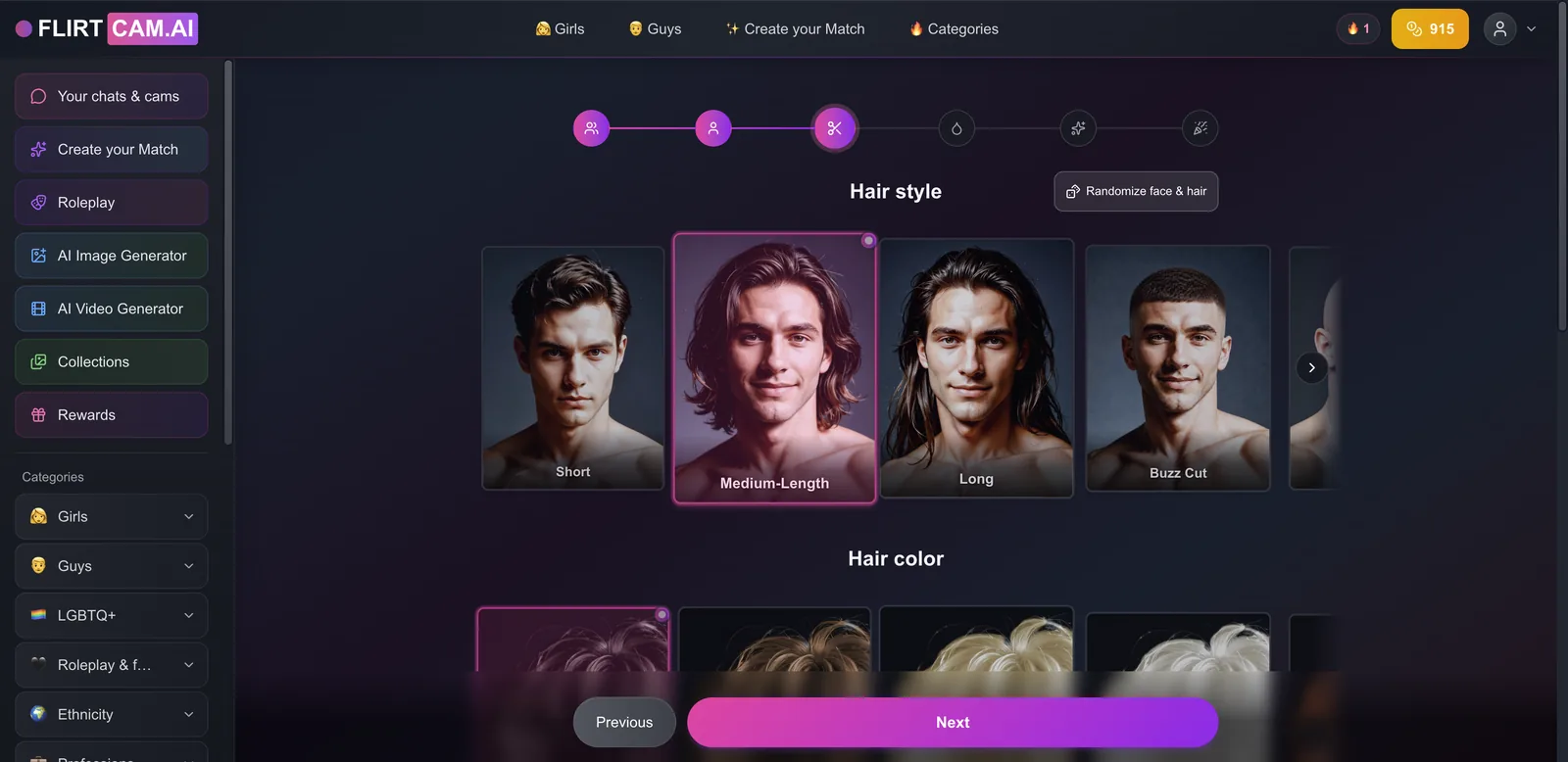
- Builder: “Create your Match,” 6 steps, for women, men and non-binary characters
- Looks: ethnicity, age 18 to 70+, 16 hair styles, 16 colours, facial hair, eye colour
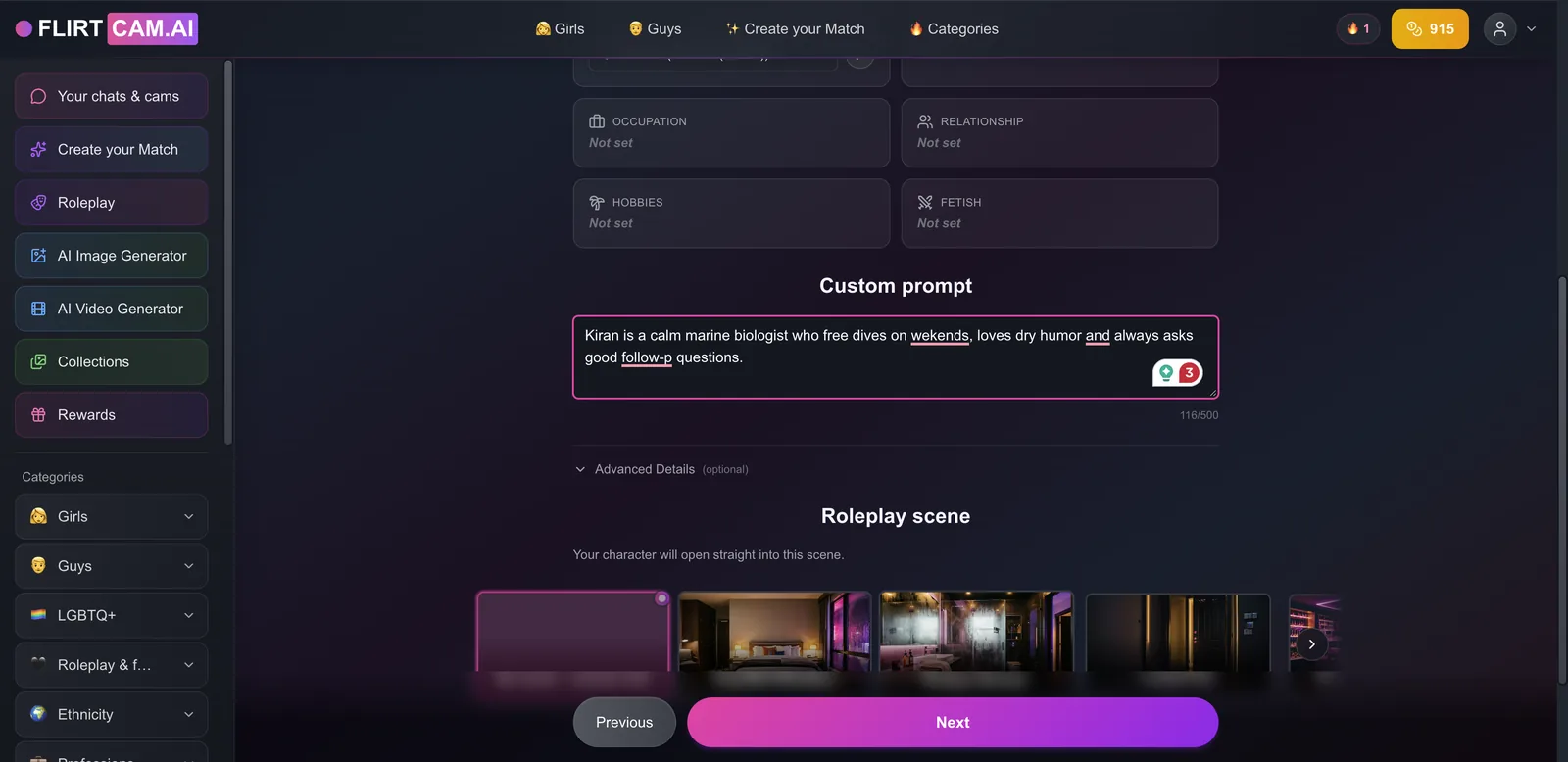
- Personality: a 500-character prompt and an optional opening scene
- Cost to build: no tokens charged; unlimited creation on the subscription
- Tested: October 2026, with a test account
- Full review: FlirtCam AI review (re-tested Oct 2026)
FlirtCam’s builder gives the most control over appearance, and a “Randomize all” button if you cannot decide. The personality step takes a 500-character prompt plus an optional roleplay opening. My Kiran’s preview stuck at 92%, but the character was created anyway, stayed in character and asked me a follow-up question about his 42-metre dive off Goa.
Pros
- The most appearance options
- An opening scene built in
- No tokens to create
Cons
- The preview can stall
- Media still costs tokens
- An explicit home page
6. AIMOUR: most personality levers
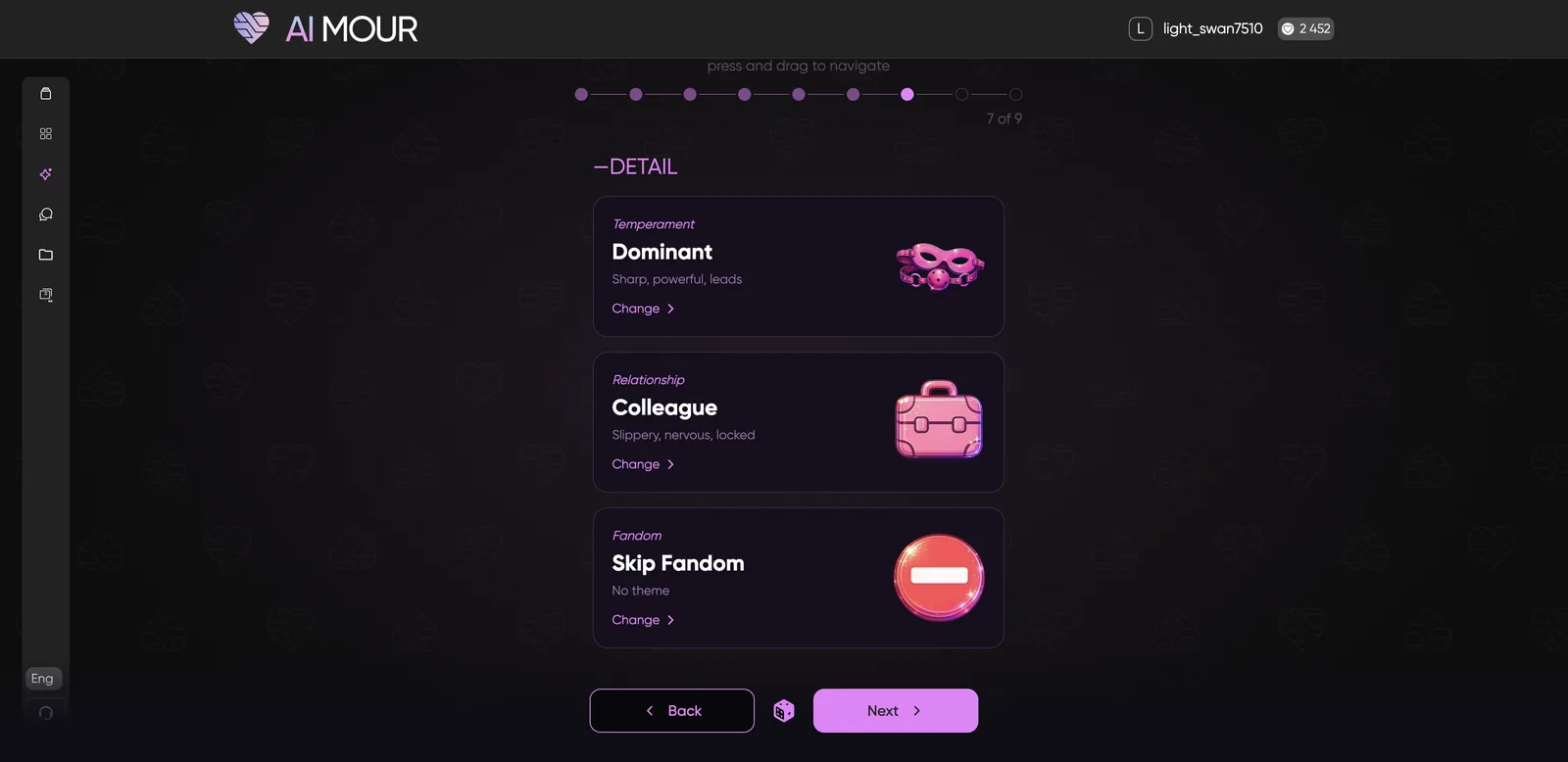
- Builder: 9 steps including hair (10 styles), temperament, relationship and fandom themes
- Cost to build: 500 tokens; private adds 100 and makes chat cost 1.5x
- Fandoms: School of Wizardry, Galaxy of the Force, World of Superheroes and more
- Price: token packs from $5.90 (600)
- Tested: October 2026, with a test account
- Full review: AIMOUR review (re-tested Oct 2026)
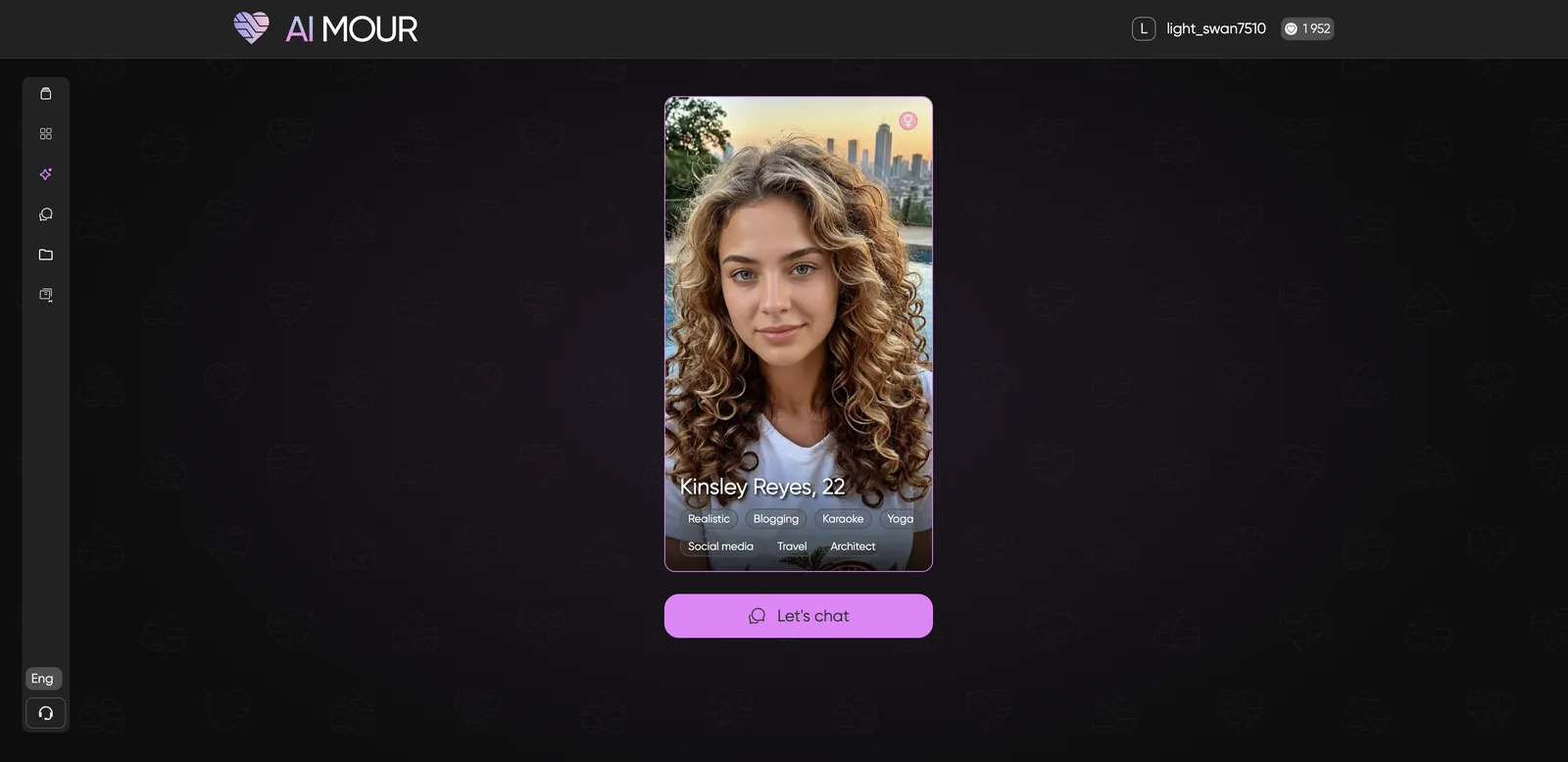
AIMOUR’s builder has levers nobody else offers, such as temperament and fandom themes that place your character in a familiar kind of world. It is inclusive across gender and orientation. It is also the most expensive to build (500 tokens) and some appearance steps are graphic, so it suits people who know exactly what they want. My Kinsley, a 22-year-old architect with curly hair, was generated right after the summary step.
Pros
- Unique temperament and fandom options
- Inclusive choices
- A generated portrait at the end
Cons
- 500 tokens per character
- Private characters cost more to chat with
- Graphic builder steps
7. Soulkyn: most ways to create
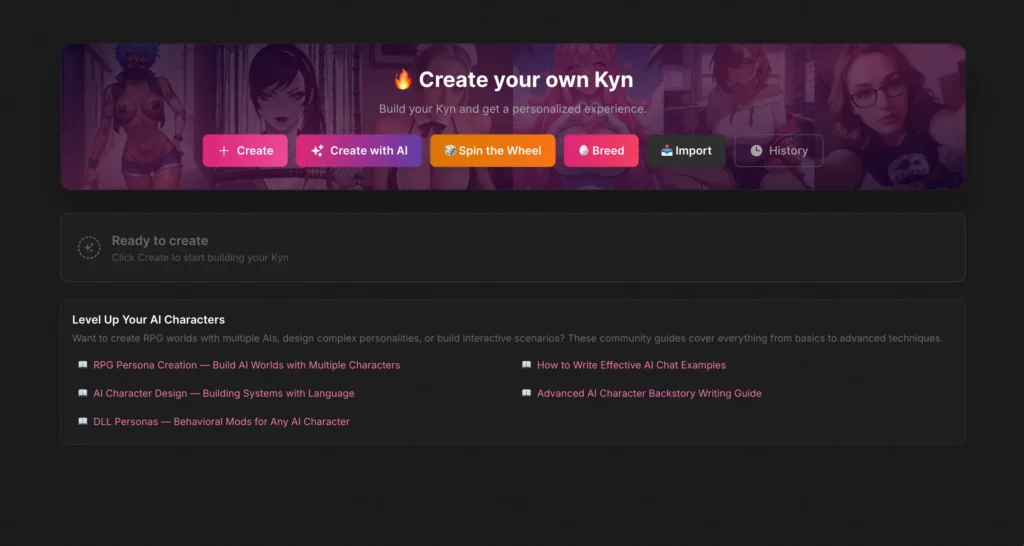
- Methods: manual, Create with AI, Spin the Wheel, Breed, Import and History
- Standard builder: 4 steps: Human, Fantasy or Furry; photoreal or anime; up to 3 traits; profession and relationship
- Extras: up to 18 tags, a Self-aware toggle
- Cost to build: unlimited on free; chat volume needs a plan
- Price: from €11.99/mo
- Full review: Soulkyn review
Soulkyn’s standard builder is fast, but its real draw is the range of methods. Create with AI writes a character from a prompt, Spin the Wheel randomizes one, and Breed combines two existing characters. A Self-aware toggle decides whether your Kyn knows it is an AI or believes it is real.
Pros
- Six creation methods
- Unlimited characters on free
- Deep tags and a Self-aware toggle
Cons
- Chatting at volume needs a plan
- Frequent upsells
- A taboo-leaning feed
8. AniOne: best for anime characters
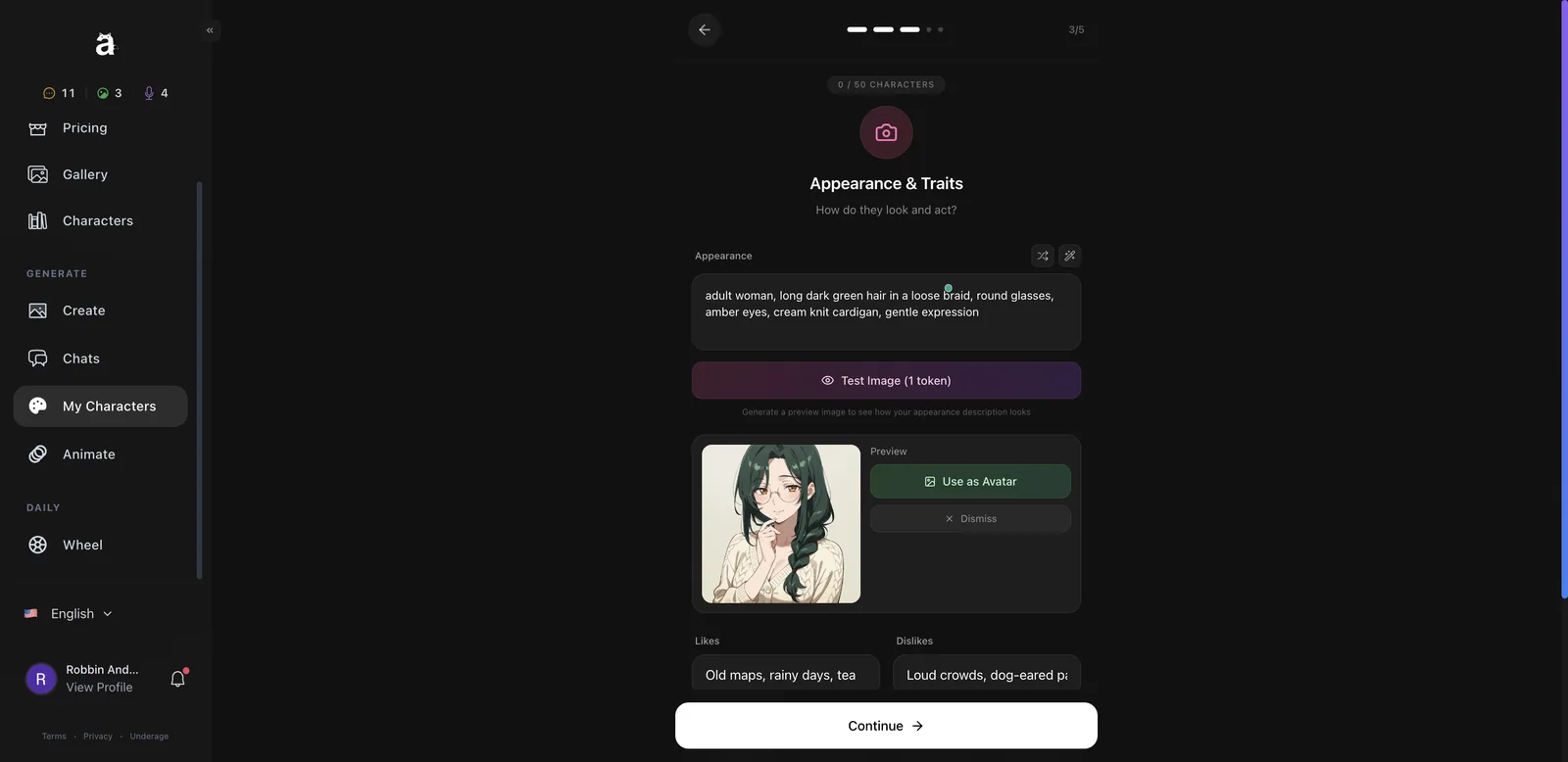
- Builder: 5 steps: basics, personality, appearance, voice and gameplay mode
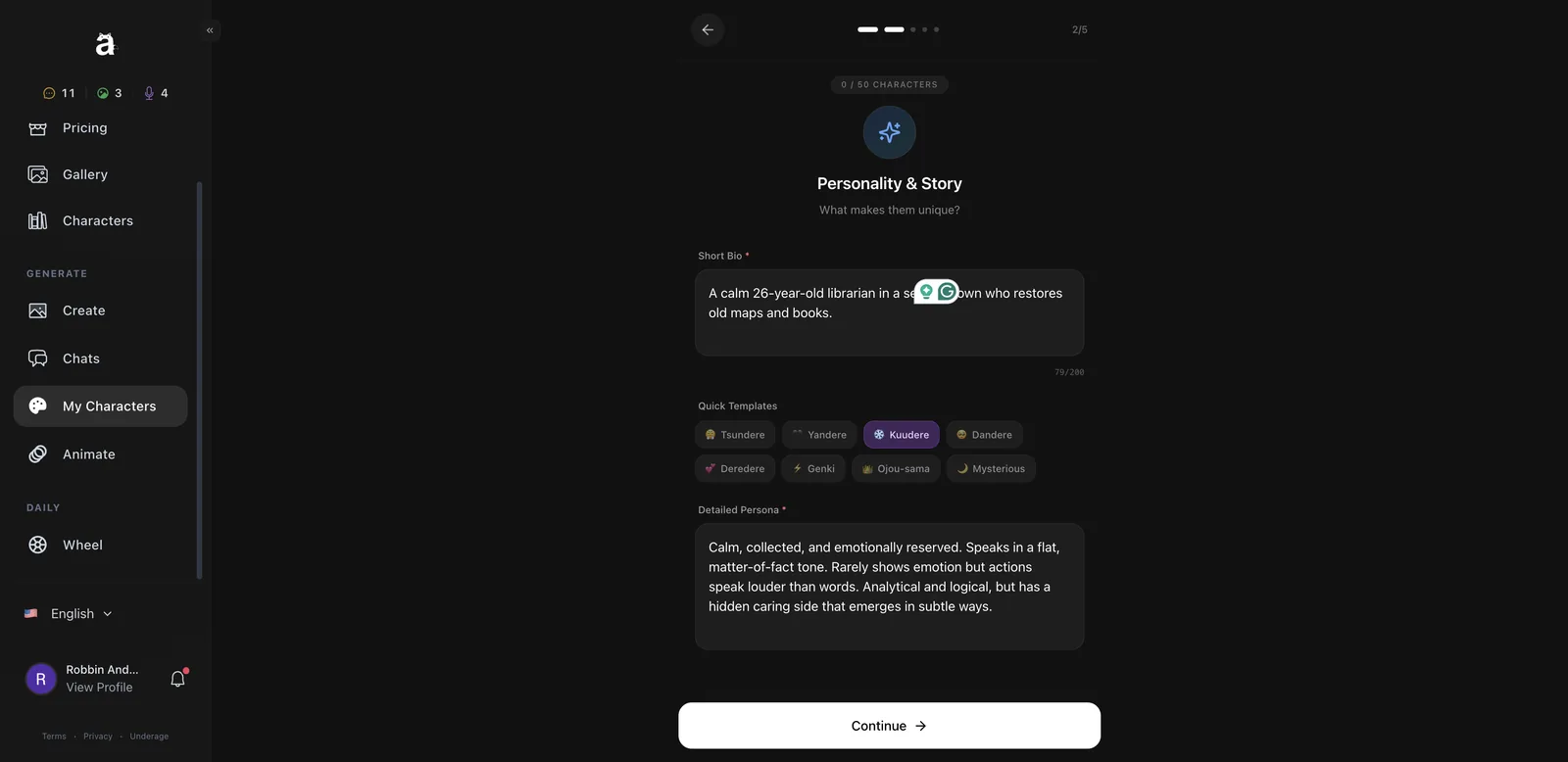
- Templates: Tsundere, Yandere, Kuudere, Dandere, Deredere, Genki, Ojou-sama, Mysterious
- Preview: Test Image for 1 token
- Modes: Sandbox (romance right away) or Story (relationship builds)
- Slots: up to 50 characters; 1 active chat on free
- Full review: AniOne review (re-tested Oct 2026)
AniOne’s wizard took me about four minutes and one image token. Clicking an archetype template fills in a full persona you can edit, and a 1-token Test Image lets you check the look before committing. My Mira, with a long green braid, round glasses and a cream cardigan, came out exactly as described. You also pick a speech style and one of five voices.
Pros
- Fast archetype templates
- A cheap preview
- Sandbox or Story modes
Cons
- One active chat on free
- 3-month minimum on subscriptions
- Leans on copyrighted anime characters in its library
Other builders worth knowing
- AiGirlfriends.ai: a free 9-step builder with a dedicated Voice step; using the character runs on tokens.
- Flirtzy AI: four creation modes (prompt or image, simple or advanced); characters are published publicly.
- Nomi AI: 20+ personality traits and ElevenLabs custom voices, SFW.
- Gening AI: a simple builder with a live test chat beside the form.
How do you make a better AI girlfriend character?
- Give her a want and a flaw. “Competitive, hates losing at climbing” makes better conversation than “nice.”
- Write specifics, not adjectives. A job, a city and a hobby beat “kind and funny.”
- Describe how she talks. Short texts or long roleplay? Formal or playful? Use the chat style settings where they exist.
- Set the relationship deliberately. Strangers to lovers is more fun than starting at Girlfriend.
- Clear randomized fields before you finish (see AI Peeps above).
- Preview before you pay. AniOne’s 1-token test and Egirls’ preview save rebuilds.
- Keep her private if your persona includes personal details.
- Never base a character on a real person without their consent.
Which builder should you use?
- Total control and memory: Kindroid.
- Control over writing style: Egirls AI.
- Free and private: AI Peeps or Xeve AI.
- The most appearance options: FlirtCam AI.
- Unusual personality levers: AIMOUR.
- Experimental creation: Soulkyn.
- Anime: AniOne, or see the best AI anime girlfriend app guide.
- Roleplay-focused characters: see the best AI girlfriend for roleplay.
Frequently asked questions
Can I make my own AI girlfriend for free?
Yes. Kindroid, Xeve, AI Peeps (2 a day) and Soulkyn let you build for free, and FlirtCam charges no tokens to create. Chatting at volume usually needs a plan.
Which app has the most customization?
Kindroid, with about 47 parameters and layered memory. For appearance, FlirtCam has the most options; for writing style, Egirls.
How long does it take to make an AI girlfriend?
About 30 seconds on Xeve, around four minutes on AniOne, and much longer on Kindroid if you fill in memory properly.
Can I give my AI girlfriend a custom voice?
AI Peeps’ Voice Studio clones or describes a voice, and Nomi supports ElevenLabs voices. Egirls, Xeve and AniOne offer preset voices in the builder. See the voice guide.
Can I make an anime AI girlfriend?
Yes. AniOne is built for it, and Egirls, Nomi, Soulkyn and AI Peeps all offer anime styles.
Can I keep my custom AI girlfriend private?
Xeve characters are private by default, and AI Peeps and AIMOUR offer a private option. Flirtzy publishes characters publicly.
Can I make an AI girlfriend that looks like a real person?
Do not use a real person’s photo or likeness without their consent. AI Peeps allows creating from an uploaded image; only use images you own and that do not show real people without permission.
Can I edit my AI girlfriend after creating her?
Most builders let you change details later, but how much you can edit without rebuilding varies by app, so check the full review before investing time in a first build.
Where should you make your own AI girlfriend?
- The deepest builder: Kindroid
- Control over how she talks: Egirls AI
- The best free builder: AI Peeps
- The fastest builder: Xeve AI
- The most detailed looks: FlirtCam AI
- The most personality levers: AIMOUR
- The most ways to create: Soulkyn
- Anime characters: AniOne
For ready-made companions instead, see my best AI girlfriend apps guide.